Laverty pathology results download 2026

Get Form
laverty results Preview on Page 1

Here's how it works

01. Edit your laverty results online
Type text, add images, blackout confidential details, add comments, highlights and more.

02. Sign it in a few clicks
Draw your signature, type it, upload its image, or use your mobile device as a signature pad.

03. Share your form with others
Send laverty pathology results via email, link, or fax. You can also download it, export it or print it out.

How to use or fill out laverty pathology results download with our platform

Form edit decoration
9.5
Ease of Setup
DocHub User Ratings on G2
9.0
Ease of Use
DocHub User Ratings on G2
  1. Click ‘Get Form’ to open the laverty pathology results download in the editor.
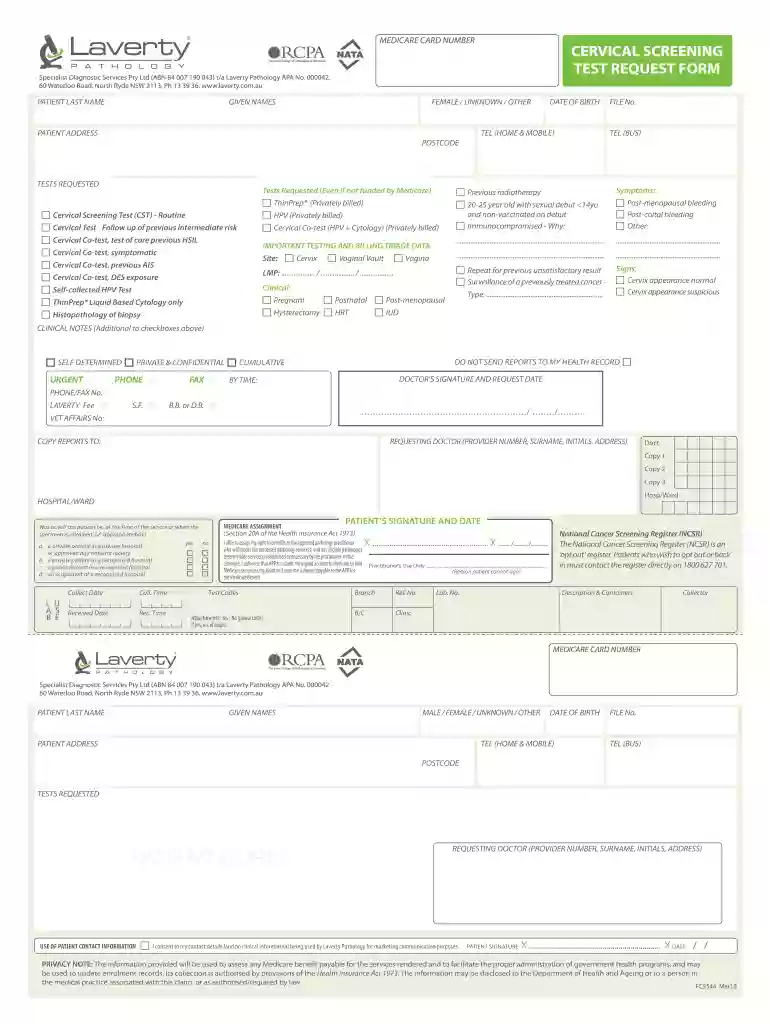
  2. Begin by entering the patient's last name and given names in the designated fields. Ensure accuracy for proper identification.
  3. Select the appropriate gender option (Female, Male, Unknown, Other) and fill in the date of birth along with contact numbers.
  4. Complete the patient address section, including postcode and file number for reference.
  5. In the 'Tests Requested' section, check all relevant tests that apply to the patient’s situation. This includes options like Cervical Screening Test or HPV testing.
  6. Fill out any clinical notes if necessary, providing additional context for the requested tests.
  7. Ensure that both the requesting doctor’s details and patient’s signature are included at the end of the form for validation.

Start using our platform today to easily fill out your laverty pathology results download for free!

See more laverty pathology results download versions

We've got more versions of the laverty pathology results download form. Select the right laverty pathology results download version from the list and start editing it straight away!
Versions Form popularity Fillable & printable
2018 4.2 Satisfied (43 Votes)
be ready to get more

Complete this form in 5 minutes or less

Get form

Got questions?

We have answers to the most popular questions from our customers. If you can't find an answer to your question, please contact us.
Contact us
Average Time Frames for Common Tests Complete Blood Count (CBC) 24 hours. Basic Metabolic Panel (BMP) 24-48 hours. Lipid Panel 24-72 hours. Glucose Test 24 hours.
The results of most common blood tests are available within 1 to 2 days. Some blood tests take longer to process. Ask your doctor when your results are likely to be ready and whether they will contact you about the result. They may recommend making a follow-up appointment to discuss your results.
You may get your blood test results after a few days, and usually within a few weeks.
Pay your account BPoint. Pay online with your Visa or MasterCard. Bpay. Make a payment directly from your bank account. 1800 350 046. Contact our Accounts Department. Post Office. Visit any Australia Post Office with your invoice.
What do we test for? Metals: Lead, mercury, chromium, zinc, arsenic, cadmium, and more. Herbicides and Pesticides: Ensuring safe working conditions for agricultural or industrial environments. Infectious Diseases: Q Fever, Hepatitis, and Tuberculosis testing.

Security and compliance

At DocHub, your data security is our priority. We follow HIPAA, SOC2, GDPR, and other standards, so you can work on your documents with confidence.

Learn more
ccpa2
pci-dss
gdpr-compliance
hipaa
soc-compliance
be ready to get more

Complete this form in 5 minutes or less

Get form

People also ask

To answer that question, your lab report tells you whether your test result is in a normal range called a reference range or normal values. A reference range is a set of numbers that form the high and low ends of the range of results thats considered to be normal.

laverty request form