Type text, add images, blackout confidential details, add comments, highlights and more.
02. Sign it in a few clicks
Draw your signature, type it, upload its image, or use your mobile device as a signature pad.
03. Share your form with others
Send pse residential service application via email, link, or fax. You can also download it, export it or print it out.
How to use or fill out the pse application with our platform
Ease of Setup
DocHub User Ratings on G2
Ease of Use
DocHub User Ratings on G2
Click ‘Get Form’ to open the pse application in the editor.
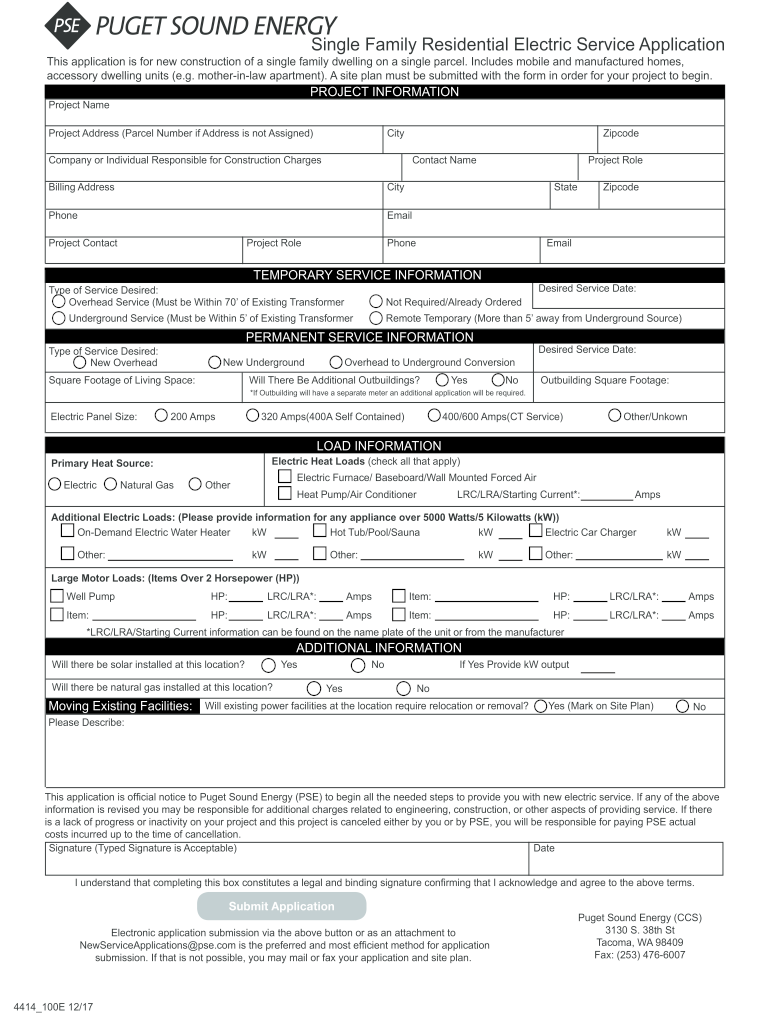
Begin by filling out the 'Project Information' section. Enter the project name, address, city, and zip code. Provide details about the responsible individual or company, including contact name, billing address, phone number, and email.
Next, move to 'Temporary Service Information.' Select the type of service desired (overhead or underground) and specify your desired service date.
In the 'Permanent Service Information' section, indicate whether you want new overhead or underground service. Fill in square footage of living space and any additional outbuildings if applicable.
Complete the 'Load Information' section by checking all applicable electric heat loads and providing details for any large motor loads over 2 HP.
Finally, review the 'Additional Information' section regarding solar installation and existing facilities. Ensure all fields are filled accurately before signing electronically.
Start using our platform today to streamline your application process for free!
Pse application onlinePse application formPSE application portalPse application form pdfPSE application statusPSE new service ApplicationPSE start service phone numberPSE construction services
Security and compliance
At DocHub, your data security is our priority. We follow HIPAA, SOC2, GDPR, and other standards, so you can work on your documents with confidence.
Privacy Stewards of Ethereum - Organizations - IQ.wiki
Sep 12, 2025 Formerly known as the Privacy Scaling Explorations team, PSE develops open-source cryptographic tools, contributes to standards, andRead more
Complete three (3) years of qualifying experience as an educator as defined by the Department; and. 2. Earn thirty (30) professional development points.Read more
To be eligible to join a PSE cohort, the applicant must: Be between the ages 18 and 28 years of age; Have completed a high school or learning resourceRead more
Cookie consent notice
This site uses cookies to enhance site navigation and personalize your experience.
By using this site you agree to our use of cookies as described in our Privacy Notice.
You can modify your selections by visiting our Cookie and Advertising Notice.