




Here's how it works



How to use or fill out California Southern Pipe Administrative Corporation Claim Form

- Click ‘Get Form’ to open it in our platform's editor.
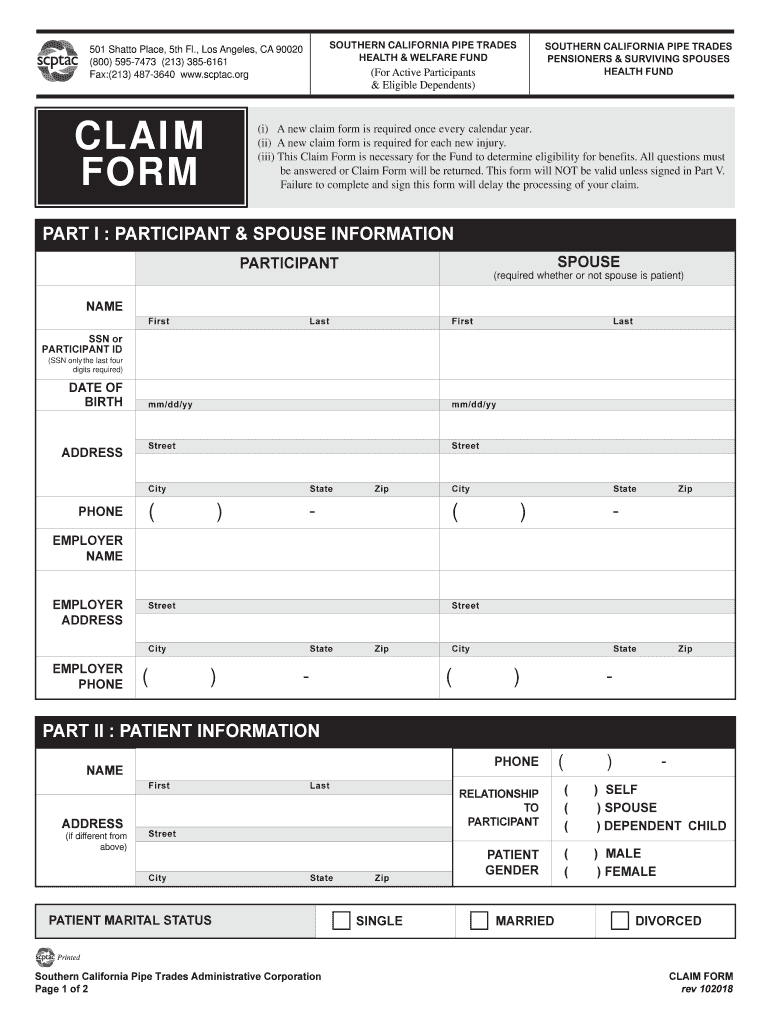
- Begin with Part I: Participant & Spouse Information. Fill in the participant's name, Social Security Number (last four digits), date of birth, and address. Ensure all fields are completed accurately.
- Next, provide the spouse's information if applicable. Include their name and any relevant details as required.
- Move to Part II: Patient Information. Enter the patient's name, address (if different), phone number, marital status, relationship to the participant, and gender.
- In Part III: Other Coverage or Benefits, indicate if the patient has other insurance coverage. If yes, provide details about the policy holder and type of coverage.
- Proceed to Part IV: Claim Information. Specify whether this claim is for a new injury or illness and describe the incident thoroughly, including when and where it occurred.
- Finally, complete Part V: Authorization by signing and dating where indicated. Ensure that all necessary signatures are provided to avoid delays in processing your claim.
Start using our platform today for free to streamline your document editing and submission process!
It's free
See more california southern pipe administrative corporation versions
Got questions?
How do I generate an electronic signature on my scpt health welfare fund from Google Chrome?
Managing your documents with DocHub this way is very straightforward after you have downloaded its extension for Google Chrome. Navigate to the Chrome Web Store and install DocHub - Sign PDF from Gmail to get it. Give our tool access to your Google account, and then open an email with the scpt health welfare fund attached and point to the file with your cursor - the DocHub extension key will automatically appear there. Click on it to open your document in our editor. Make any required modifications, fill out the blanks, and click Sign to create your legally-binding electronic signature.
How do you complete scptac debit card on Android?
It is a no-brainer on a computer or via a mobile phone to complete a scptac debit card with DocHub. All you need to do is open any installed web browser on your smartphone and proceed to the DocHub website. Once authenticated, add your document and open it in editing mode. Use our toolbar to make your edits and save adjustments. Optionally, keep your document in your files or send it to a recipient immediately.
What does scptac stand for?
How is scptac funded?
What is the Southern California drug benefit fund?
Security and compliance
At DocHub, your data security is our priority. We follow HIPAA, SOC2, GDPR, and other standards, so you can work on your documents with confidence.
Learn more


