




Here's how it works

01. Edit your eop essay online
Type text, add images, blackout confidential details, add comments, highlights and more.

02. Sign it in a few clicks
Draw your signature, type it, upload its image, or use your mobile device as a signature pad.

03. Share your form with others
Send eop essay examples via email, link, or fax. You can also download it, export it or print it out.
How to use or fill out eop financial information get with our platform

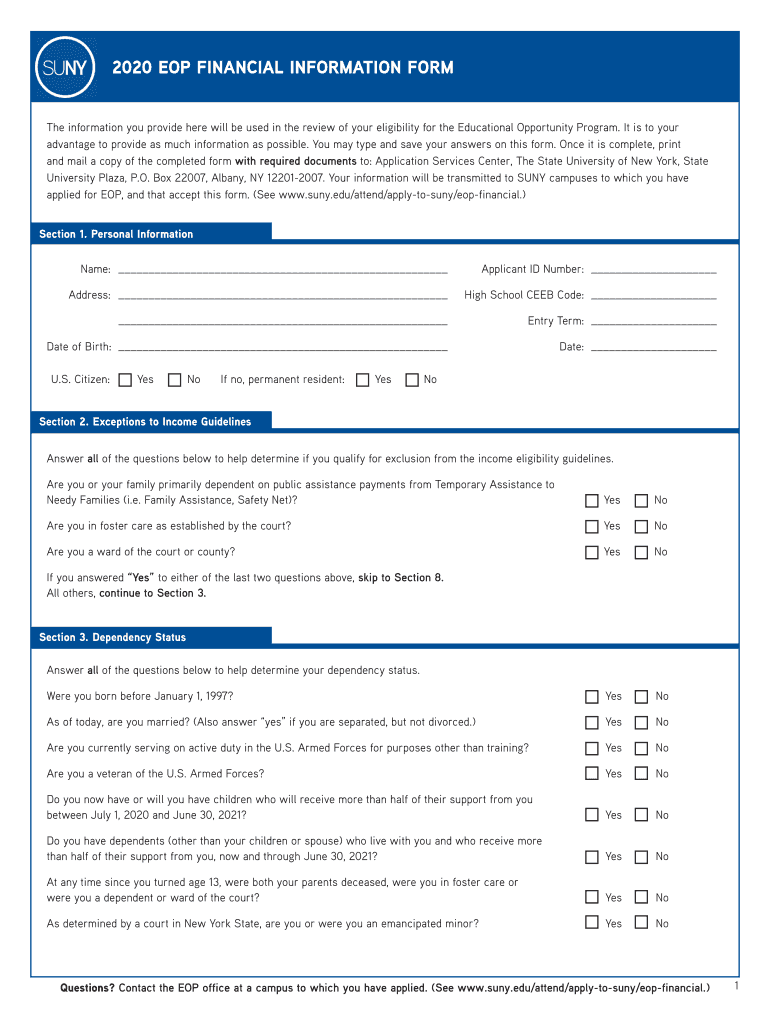
- Click ‘Get Form’ to open the eop financial information get in the editor.
- Begin with Section 1, Personal Information. Fill in your name, applicant ID number, address, high school CEEB code, entry term, date of birth, and citizenship status.
- Proceed to Section 2, Exceptions to Income Guidelines. Answer all questions honestly to determine if you qualify for exceptions.
- In Section 3, Dependency Status, answer the questions regarding guardianship and homelessness to establish your dependency status.
- If you are a dependent student, complete Section 4 with your legal parents' information. If independent, skip this section.
- Fill out Section 5 with household information. Include all members living with you and their financial contributions.
- Continue to Sections 6 and 7 for additional household income and assets. Report all relevant figures accurately.
- Complete Section 8 by indicating participation in any relevant programs and answering FAFSA-related questions.
- If required, attach your personal essay as outlined in Section 9 before signing in Section 10.
Start using our platform today for free to streamline your eop financial information get process!
Fill out eop financial information get online
It's free
It's free
See more eop financial information get versions
We've got more versions of the eop financial information get form. Select the right eop financial information get version from the list and start editing it straight away!
Security and compliance
At DocHub, your data security is our priority. We follow HIPAA, SOC2, GDPR, and other standards, so you can work on your documents with confidence.
Learn more


