Type text, add images, blackout confidential details, add comments, highlights and more.

02. Sign it in a few clicks
Draw your signature, type it, upload its image, or use your mobile device as a signature pad.

03. Share your form with others
Send copy tax via email, link, or fax. You can also download it, export it or print it out.

How to use or fill out form 7001 report form with our platform
Ease of Setup
DocHub User Ratings on G2
Ease of Use
DocHub User Ratings on G2
Click ‘Get Form’ to open the form 7001 report in the editor.
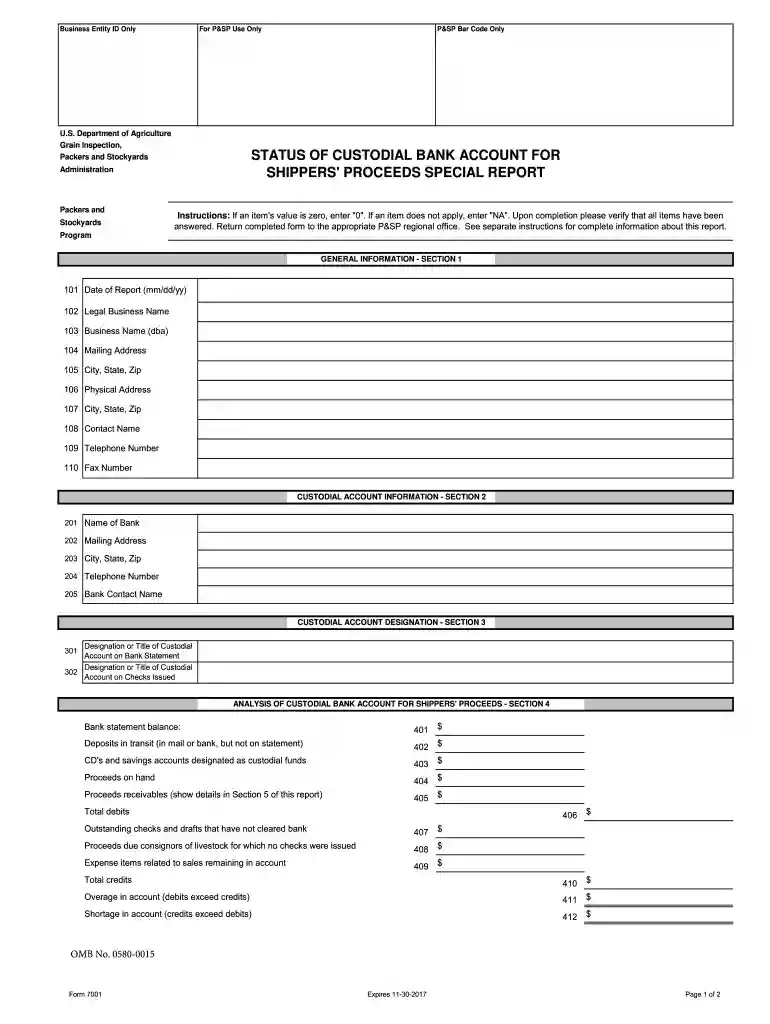
Begin with Section 1: General Information. Fill in the date of the report, legal business name, and any applicable mailing addresses. Ensure all fields are completed accurately.
Proceed to Section 2: Custodial Account Information. Enter the bank's name, address, and contact details. This section is crucial for identifying where funds are held.
In Section 3: Custodial Account Designation, specify how the account is labeled on bank statements and checks issued. This helps maintain clarity in financial records.
Move to Section 4: Analysis of Custodial Bank Account. Input balances, deposits in transit, and any outstanding checks. Be thorough to ensure accurate reporting.
Complete Section 5: Proceeds Receivable by listing sales details and amounts owed from buyers. This section may require additional pages if there are many entries.
Finally, certify your report in Section 6 by providing your name, signature, phone number, and title. Review all entries before submission.
Start using our platform today for free to streamline your form completion process!
We've got more versions of the form 7001 report form form. Select the right form 7001 report form version from the list and start editing it straight away!
How to Obtain and Complete the APHIS 7001 for Pet Shipping Find a USDA-Accredited veterinarian in your area. Download the APHIS Vet Health Certificate (Form 7001). Go to your veterinarian to get the health certificate issued. Check your (vets) work! Send your paperwork to the USDA (or take it in by hand).
How long does it take to get DHS 7001?
If you submit DHS Form 7001 online, you will typically receive the email within 24 hours. If you email or mail DHS Form 7001, you will receive your CIS Ombudsman Request Number by email or mail after we enter the information into our system. This can take two to three weeks or more.
Can my dog fly without a health certificate?
Yes, you always need a health certificate that is current (30 days or less) to get your pet on a flight.
What is form 7001?
DHS Form 7001, Request for Case Assistance, is used to request case assistance from the Office of the Citizenship and Immigration Services Ombudsman (CIS Ombudsman). Before you submit this form: Please contact U.S. Citizenship and Immigration Services (USCIS) first before submitting a request with our office, and.
fee tax form
Form 7001 report form pdfDHS Form 7001 PDF downloadDHS Form 7001 onlineForm 7001 report form onlineSection 9 of DHS Form 7001USCIS case statusi-700 formUSCIS login
Security and compliance
At DocHub, your data security is our priority. We follow HIPAA, SOC2, GDPR, and other standards, so you can work on your documents with confidence.
Oct 23, 2023 Please include the CIS Ombudsman request number received via email after submitting DHS Form 7001 online. Email: If you are outside the United
Cited by 12 Examination for Small Animals (APHIS Form 7001) and Record of Disposition of Dogs and Cats (APHIS Form 7006) are forms which may be used by research
Please consult your Medicaid Provider Manual for the seven acceptable reasons for late submission of a paper claim. (see FOD 7001) and the ten acceptable
Cookie consent notice
This site uses cookies to enhance site navigation and personalize your experience.
By using this site you agree to our use of cookies as described in our Privacy Notice.
You can modify your selections by visiting our Cookie and Advertising Notice.