Mclean hospital medical records fax form 2026

Get Form
mclean hospital medical records Preview on Page 1

Here's how it works

01. Edit your mclean hospital medical records online
Type text, add images, blackout confidential details, add comments, highlights and more.
02. Sign it in a few clicks
Draw your signature, type it, upload its image, or use your mobile device as a signature pad.
03. Share your form with others
Send mclean medical records via email, link, or fax. You can also download it, export it or print it out.

How to use or fill out McLean Hospital Medical Records Fax Form with our platform

Form edit decoration
9.5
Ease of Setup
DocHub User Ratings on G2
9.0
Ease of Use
DocHub User Ratings on G2
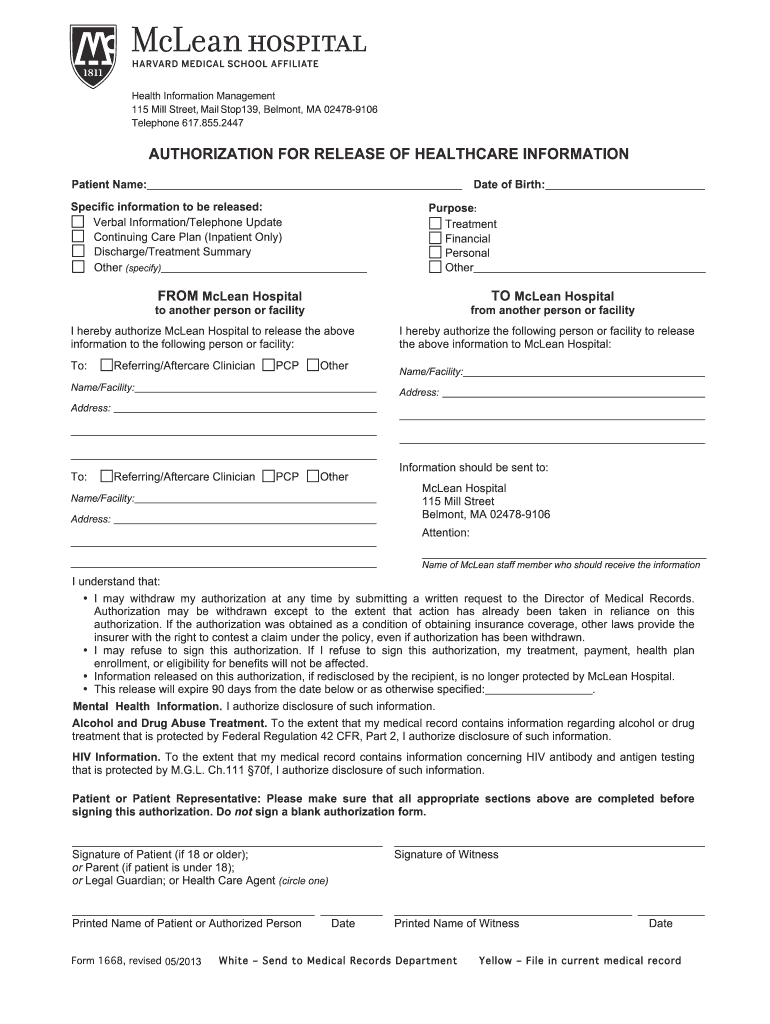
  1. Click ‘Get Form’ to open the McLean Hospital Medical Records Fax Form in the editor.
  2. Begin by entering the Patient Name and Date of Birth in the designated fields. This information is crucial for identifying the correct medical records.
  3. Specify the information you wish to release by selecting from options such as 'Verbal Information/Telephone Update', 'Discharge/Treatment Summary', or 'Other'. If you choose 'Other', please provide details in the space provided.
  4. Indicate the purpose of the request by selecting from options like 'Treatment', 'Financial', or 'Personal'. This helps clarify why the information is needed.
  5. Fill in the details of where the information should be sent, including name/facility and address. Ensure accuracy to avoid delays.
  6. Review all sections carefully before signing. Make sure that all required fields are completed, then sign and date at the bottom of the form.

Start using our platform today to easily fill out your McLean Hospital Medical Records Fax Form for free!

See more mclean hospital medical records fax form versions

We've got more versions of the mclean hospital medical records fax form form. Select the right mclean hospital medical records fax form version from the list and start editing it straight away!
Versions Form popularity Fillable & printable
2016 4.8 Satisfied (258 Votes)
2013 4.2 Satisfied (62 Votes)
be ready to get more

Complete this form in 5 minutes or less

Get form

Got questions?

We have answers to the most popular questions from our customers. If you can't find an answer to your question, please contact us.
Contact us
Fax completed form to 844.870.8875 If you are interested in receiving this periodic update, please complete the below requested information, sign, and fax the completed form to 1-844-870-8875.
Can You Fax Medical Records Under HIPAA? Yes. HIPAA does not prohibit faxing, but it requires that certain safeguards are in place when transmitting Protected Health Information (PHI).
To request a copy of your VA medical records by mail or fax, send a signed and completed VA Form 10-5345a to our Release of Information office. Per VHA Directives, we have 20 business days to process all requests. Requests are accepted in-person, through My HealtheVet, mail, and fax.
FAX your completed Request for Airman Medical Records Form to (405) 954-9326.
Fax the completed form and a copy of your ID to the Medical Records Department at (855) 874-5286 or email the medical records department.

Security and compliance

At DocHub, your data security is our priority. We follow HIPAA, SOC2, GDPR, and other standards, so you can work on your documents with confidence.

Learn more
ccpa2
pci-dss
gdpr-compliance
hipaa
soc-compliance
be ready to get more

Complete this form in 5 minutes or less

Get form

People also ask

Phone Directory Department namePhone number Main Phone 469.764.8000 Business Office/Billing Questions 214.820.2278 Medical Records 469.764.9110 | Fax: 469.764.9118 Physician Referral 1.844.BSW.DOCS (1.844.279.3627) (1.844.279.3627)2 more rows
Temple University Hospital Patients Phone: 215-707-3755. Fax: 215-707-6123.
How to Fax Medical Records? Log into your eFax account online. Click Create Cover Page in the File menu and customize it with a confidentiality statement. Add your recipients and upload the medical records as documents or PDF files. Hit Send and make sure you receive a delivery confirmation notification.

Related links