Composition form construction 2026

Get Form
composition form Preview on Page 1

Here's how it works

01. Edit your composition form online
Type text, add images, blackout confidential details, add comments, highlights and more.

02. Sign it in a few clicks
Draw your signature, type it, upload its image, or use your mobile device as a signature pad.

03. Share your form with others
Send it via email, link, or fax. You can also download it, export it or print it out.

How to use or fill out composition form construction with our platform

Form edit decoration
9.5
Ease of Setup
DocHub User Ratings on G2
9.0
Ease of Use
DocHub User Ratings on G2
  1. Click ‘Get Form’ to open the composition form construction in the editor.
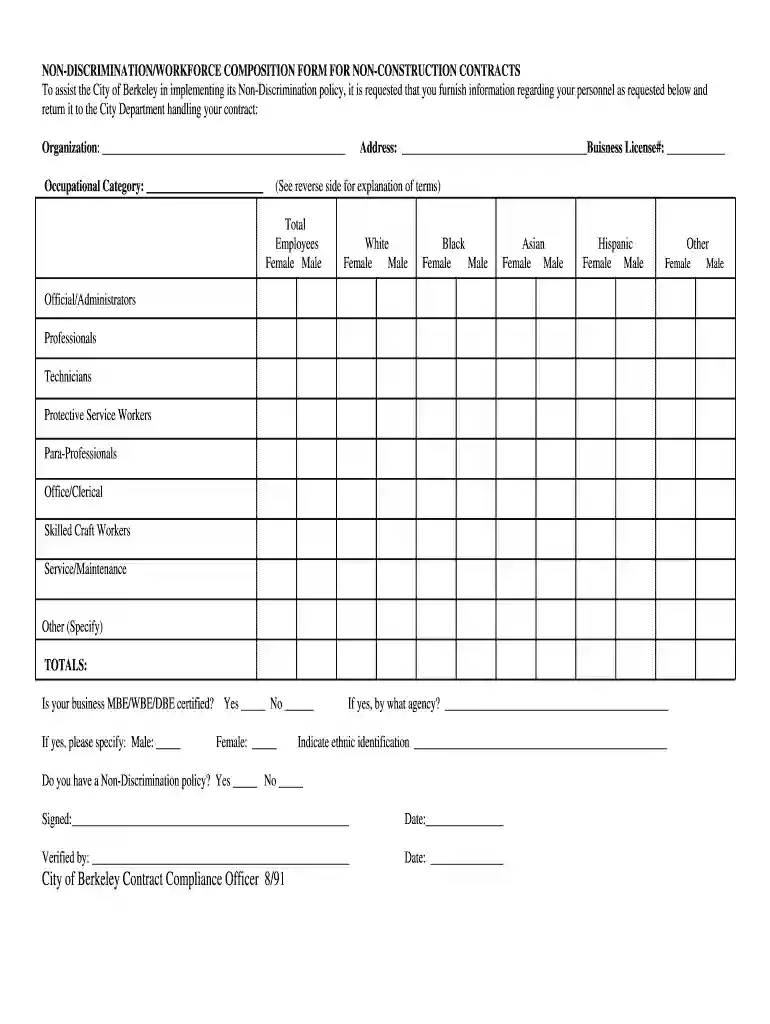
  2. Begin by entering your organization name and address in the designated fields. Ensure that you also include your Business License number for proper identification.
  3. In the total employees section, input the number of employees categorized by gender and ethnicity. Fill in each category accurately, including White, Black, Asian, Hispanic, and Other.
  4. Indicate the occupational categories of your employees by selecting from options such as Officials/Administrators, Professionals, Technicians, etc. Be sure to specify any other roles if necessary.
  5. Answer whether your business is MBE/WBE/DBE certified and provide details if applicable. Additionally, confirm if you have a Non-Discrimination policy in place.
  6. Finally, sign and date the form at the bottom before submitting it back through our platform for processing.

Start filling out your composition form construction today for free using our editor!

See more composition form construction versions

We've got more versions of the composition form construction form. Select the right composition form construction version from the list and start editing it straight away!
Versions Form popularity Fillable & printable
1991 4.9 Satisfied (60 Votes)
be ready to get more

Complete this form in 5 minutes or less

Get form

Got questions?

We have answers to the most popular questions from our customers. If you can't find an answer to your question, please contact us.
Contact us
A construction form is a digital or paper document used to collect, record, and manage information related to construction projects, such as work orders, safety inspections, daily reports, and equipment checklists.
What are the Stages of Construction? Stage 1: Site preparation foundation pour. Stage 2: Rough framing. Stage 3: Rough plumbing, electrical, HVAC. Stage 4: Insulation. Stage 5: Drywall, interior primer finishes begin finishes. Stage 6: Finish interior trim; exterior driveways walkways.
Components of Construction Documents Detailed plans showing the layout, dimensions and construction of each part of the building. Documents that outline the structural framework and support systems of the building. Plans that detail the HVAC systems, electrical wiring and plumbing systems.
The construction industry uses forms to collect and share information at every stage of a project. Traditionally on paper, these forms are now being converted into digital forms that enable workers to share information via mobile devices and tablets on the job.
Basic Building and Construction Skills, 7e is designed for the Certificate III in Carpentry qualification (CPC30220). It provides the knowledge and skills apprentices need to work safely, efficiently and prolifically in the building and construction industry.

Security and compliance

At DocHub, your data security is our priority. We follow HIPAA, SOC2, GDPR, and other standards, so you can work on your documents with confidence.

Learn more
ccpa2
pci-dss
gdpr-compliance
hipaa
soc-compliance
be ready to get more

Complete this form in 5 minutes or less

Get form