Eta form 9142 10312012-2026

Get Form
eta 9142 Preview on Page 1

Here's how it works

01. Edit your eta 9142 online
Type text, add images, blackout confidential details, add comments, highlights and more.

02. Sign it in a few clicks
Draw your signature, type it, upload its image, or use your mobile device as a signature pad.

03. Share your form with others
Send eta form 9142 via email, link, or fax. You can also download it, export it or print it out.

How to use or fill out eta form 9142 10312012 with our platform

Form edit decoration
9.5
Ease of Setup
DocHub User Ratings on G2
9.0
Ease of Use
DocHub User Ratings on G2
  1. Click ‘Get Form’ to open the ETA Form 9142 in the editor.
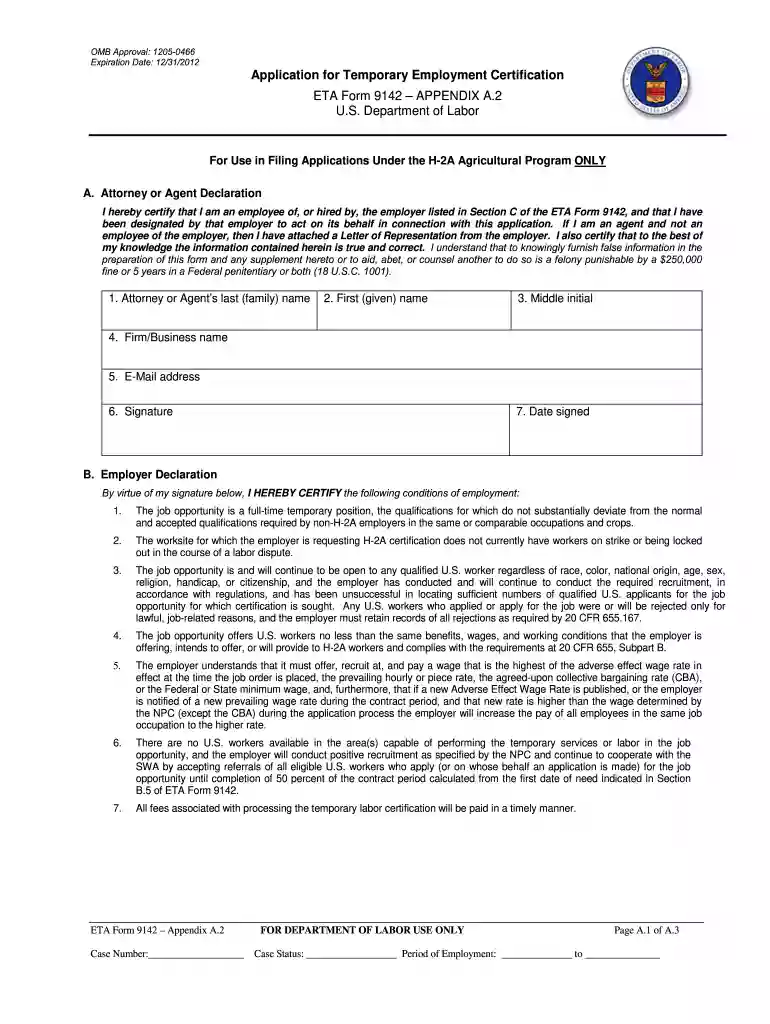
  2. Begin with Section A, where the Attorney or Agent Declaration is located. Fill in your last name, first name, middle initial, firm/business name, email address, and signature. Ensure you date your signature accurately.
  3. Proceed to Section B for the Employer Declaration. Carefully read each statement and confirm compliance by checking the appropriate boxes. Provide detailed information about job qualifications and recruitment efforts.
  4. Complete any additional attestations required for H-2A Labor Contractors if applicable. This includes providing proof of financial obligations and compliance with housing standards.
  5. Review all entered information for accuracy before submitting. Utilize our platform’s features to save your progress or make edits as needed.

Start filling out your ETA Form 9142 today for free using our platform!

See more eta form 9142 10312012 versions

We've got more versions of the eta form 9142 10312012 form. Select the right eta form 9142 10312012 version from the list and start editing it straight away!
Versions Form popularity Fillable & printable
2013 4.8 Satisfied (64 Votes)
2012 4.2 Satisfied (85 Votes)
2011 4.4 Satisfied (395 Votes)
be ready to get more

Complete this form in 5 minutes or less

Get form

Got questions?

We have answers to the most popular questions from our customers. If you can't find an answer to your question, please contact us.
Contact us
In most instances, before the U.S. employer can submit an immigration petition to the Department of Homeland Securitys U.S. Citizenship and Immigration Services (USCIS) , the employer must obtain a certified labor certification application from the DOLs Employment and Training Administration (ETA).
In order to electronically file the ETA-9141, you will need to follow the steps below: Open the ETA-9141 Form that you would like to e-file. Click the eFile this form on flag.dol.gov button. Enter the password associated with your login.gov credentials. In Docketwise: Click the Sync button.
Documents that Establish Both Identity and Employment Authorization U.S. Passport or U.S. Passport Card. Permanent Resident Card or Alien Registration Receipt Card (Form I-551) Foreign passport that contains a temporary I-551 stamp or temporary I-551 printed notation on a machine-readable immigrant visa.
What is an Electronic Travel Authorization? An Electronic Travel Authorization (eTA) is an entry requirement for visa-exempt foreign nationals travelling to Canada by air. An eTA is electronically linked to a travellers passport. It is valid for up to five years or until the passport expires, whichever comes first.
ETA Form 9142. U.S. Department of Labor. I. Declaration of Employer and Attorney/Agent. In accordance with Federal regulations, the employer must attest that it will abide by certain terms, assurances and obligations as a condition for receiving a temporary labor certification from the U.S. Department of Labor.
be ready to get more

Complete this form in 5 minutes or less

Get form