Type text, add images, blackout confidential details, add comments, highlights and more.
02. Sign it in a few clicks
Draw your signature, type it, upload its image, or use your mobile device as a signature pad.
03. Share your form with others
Send it via email, link, or fax. You can also download it, export it or print it out.
How to use or fill out uscis i 924a 2010 form with DocHub
Ease of Setup
DocHub User Ratings on G2
Ease of Use
DocHub User Ratings on G2
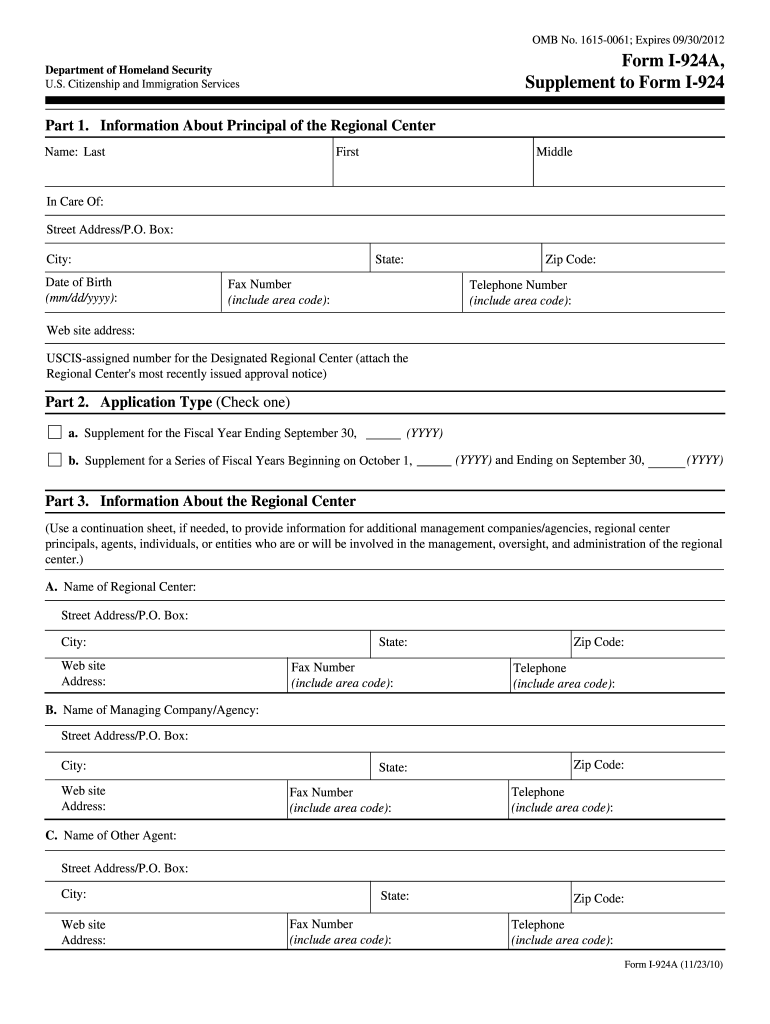
Click ‘Get Form’ to open the uscis I-924A 2010 form in our editor.
Begin with Part 1, where you will enter the principal's information. Fill in the last name, first name, middle name, and contact details including address, date of birth, and phone numbers.
In Part 2, select the application type by checking the appropriate box for either a fiscal year supplement or a series of fiscal years.
Proceed to Part 3. Here, provide detailed information about the regional center and any managing companies or agents involved. Use continuation sheets if necessary for additional entries.
Answer questions regarding EB-5 capital investments and job creation. Ensure you provide accurate figures for aggregate investments and job maintenance.
Complete Parts 4 and 5 by signing and dating the form. If someone else prepared it, they must also sign in Part 5.
Start using our platform today to fill out your uscis I-924A form online for free!
We've got more versions of the uscis i 924a 2010 form form. Select the right uscis i 924a 2010 form version from the list and start editing it straight away!
Sep 24, 2010 Pilot Program, Form I924, and Form I. 924A (OMB No. 1615NEW), Docket. No. USCIS2009003300030006, show 40 hours to adjudicate an initial.Read more
Sep 8, 2017 Form I-924A, Annual Certification of Regional Center (I-924A) is used to demonstrate a regional centers continued eligibility for theRead more
Cookie consent notice
This site uses cookies to enhance site navigation and personalize your experience.
By using this site you agree to our use of cookies as described in our Privacy Notice.
You can modify your selections by visiting our Cookie and Advertising Notice.