




01. Edit your child care registration form online
Type text, add images, blackout confidential details, add comments, highlights and more.

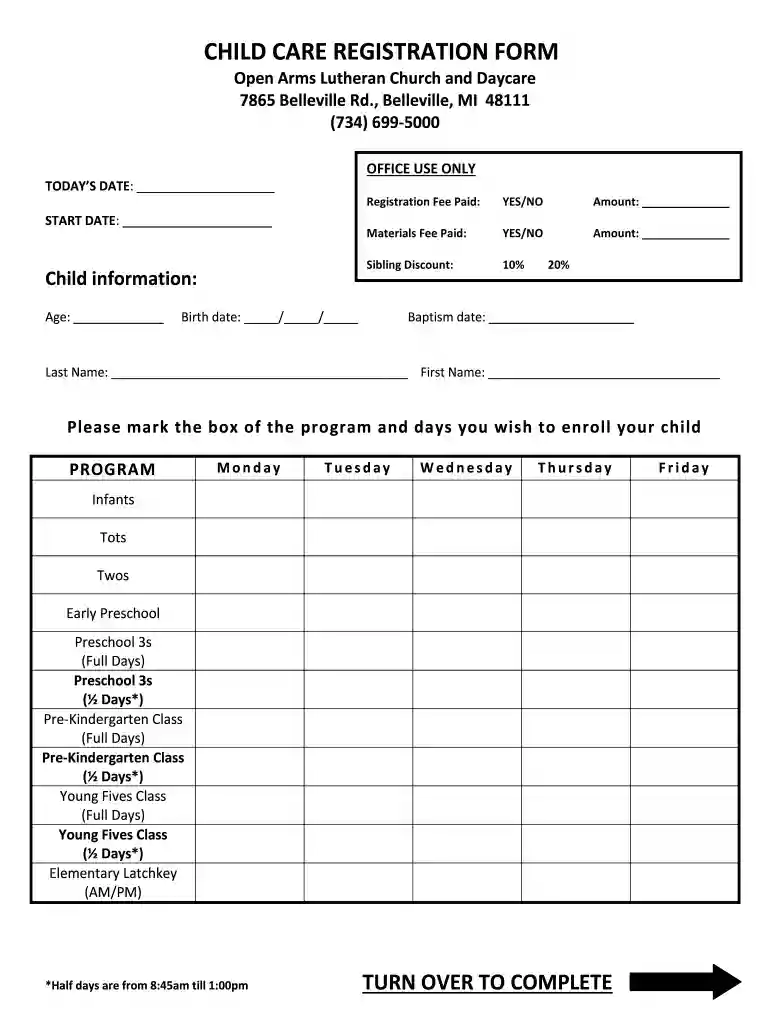
Type text, add images, blackout confidential details, add comments, highlights and more.

Draw your signature, type it, upload its image, or use your mobile device as a signature pad.

Send daycare application form via email, link, or fax. You can also download it, export it or print it out.

Start filling out your child care registration form today using our platform for free!
We've got more versions of the child care registration form form. Select the right child care registration form version from the list and start editing it straight away!
Most eSignature services require users to have a paid subscription. With DocHub, there are two ways for you to add an electronic signature to your daycare registration form without being charged:
The second option, however, has limitations on the number of signatures, sign requests, emails, and forms for adjusting available per month. You can check for full details here.
Document editing with DocHub is equally convenient on desktop and mobile devices. You only need an internet browser to edit your open arms adoption agency reviews on Android. Open our site and sign in to access the tools you need. Add your document and introduce your intended changes. After that, you can keep your form in your document storage or send it out immediately.
At DocHub, your data security is our priority. We follow HIPAA, SOC2, GDPR, and other standards, so you can work on your documents with confidence.
Dec 20, 2023 MS ARNOLD: We have visitors from all over, all over the world. And of course we welcome them with open arms here in Santa Claus, Indiana.Read more
Most parents will not hesitate to move their child if a new center offers some clear advantages. The Open Arms Center at Our Saviors. Way Lutheran Church inRead more
Apr 1, 2019 (Whole Dollars Only). Check the box for the return for which you are using this Form 8879-EO and enter the applicable amount, if any,Read more


