Dhs 901 2026

Get Form
dhs 901 Preview on Page 1

Here's how it works

01. Edit your dhs 901 online
Type text, add images, blackout confidential details, add comments, highlights and more.
02. Sign it in a few clicks
Draw your signature, type it, upload its image, or use your mobile device as a signature pad.
03. Share your form with others
Send it via email, link, or fax. You can also download it, export it or print it out.

How to use or fill out dhs 901 with our platform

Form edit decoration
9.5
Ease of Setup
DocHub User Ratings on G2
9.0
Ease of Use
DocHub User Ratings on G2
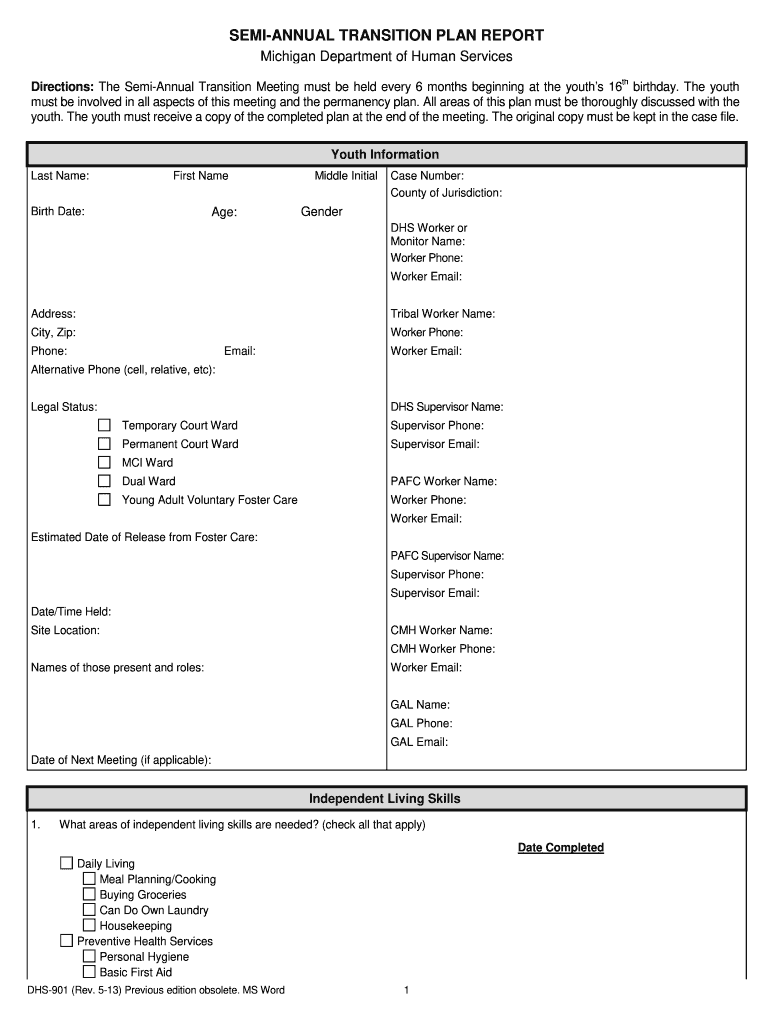
  1. Click ‘Get Form’ to open the DHS 901 in the editor.
  2. Begin by filling in the 'Youth Information' section. Enter the last name, first name, birth date, age, and case number. Ensure all fields are completed accurately.
  3. Proceed to the 'Independent Living Skills' section. Check all applicable skills needed and provide dates for completion where required.
  4. In the 'Education' section, indicate current education status and any referrals made for housing resources. Attach necessary documents like a sample rental application if applicable.
  5. Complete the 'Employment' section by detailing current employment status and any community resource referrals made for job assistance.
  6. Fill out the 'Health / Medication' section, ensuring to include Medicaid coverage details and any ongoing medical needs.
  7. Finally, review all sections for accuracy before signing. Use our platform's features to save your progress or share it with relevant parties for collaboration.

Start using our platform today to easily fill out your DHS 901 form online for free!

See more dhs 901 versions

We've got more versions of the dhs 901 form. Select the right dhs 901 version from the list and start editing it straight away!
Versions Form popularity Fillable & printable
2013 4.8 Satisfied (100 Votes)
be ready to get more

Complete this form in 5 minutes or less

Get form

Got questions?

We have answers to the most popular questions from our customers. If you can't find an answer to your question, please contact us.
Contact us

Yes, and it’s really straightforward! DocHub is an online PDF editor with advanced document management functions that allow you rapidly modify your documents, fill out empty fields and insert new ones for other people to fill out, and create electronic signatures in several ways. Import your dhs 901, give information as required, and decide how you want to eSign your document - by typing your name, drawing your signature, uploading its picture, or utilizing a QR code.

If you use Chrome, there are two straightforward methods to edit your dhs 901 online. First, go to the DocHub site, add your file, and edit it using our toolbar. You can also install our Chrome extension and edit any document by dragging and dropping it in your browser window.

You can make an online payment using Visa, MasterCard, American Express credit cards or debit cards that have the Visa or MasterCard logo. Step 1: Fill out the Form I-901 online at .fmjfee.com. Step 2: Choose the credit card or debit card option, enter your card information. Step 3: Submit the payment.
The I-901 SEVIS Fee is mandated by Congress to support the program office and the automated system that keeps track of students and exchange visitors and ensures that they maintain their status while in the United States.
Fee Amounts DescriptionAmount I-901 SEVIS Fee F or M visa applicants (full payment) $350 I-901 SEVIS Fee J visa applicants (full payment) $220 I-901 SEVIS Fee special J-visa categories (subsidized payment) $35 I-901 SEVIS Fee government visitor (no payment) $0 Dec 10, 2024

Security and compliance

At DocHub, your data security is our priority. We follow HIPAA, SOC2, GDPR, and other standards, so you can work on your documents with confidence.

Learn more
ccpa2
pci-dss
gdpr-compliance
hipaa
soc-compliance
be ready to get more

Complete this form in 5 minutes or less

Get form

People also ask

The Student and Exchange Visitor Information System (SEVIS) is the web-based system that the U.S. Department of Homeland Security (DHS) uses to maintain information on Student and Exchange Visitor Program (SEVP)-certified schools, F-1 and M-1 students who come to the United States to attend those schools, U.S.

Related links