




Here's how it works



How to use or fill out Car Show Sponsor Form 2011 - namknightsorg with our platform

- Click ‘Get Form’ to open it in the editor.
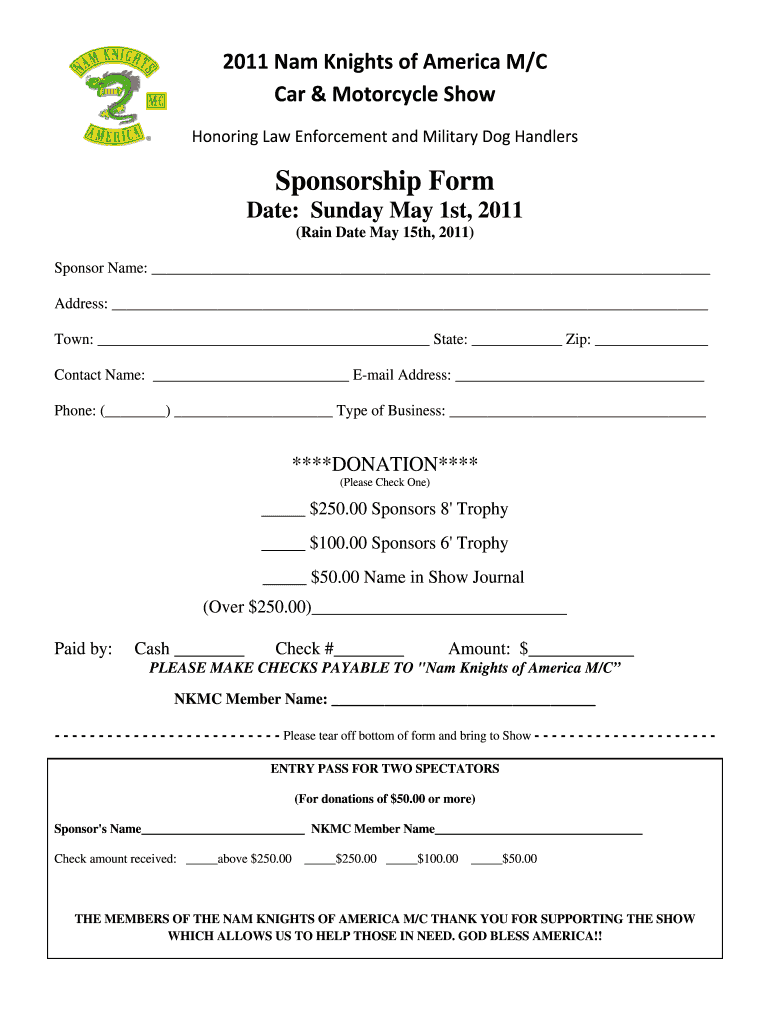
- Begin by entering your Sponsor Name in the designated field, followed by your Address, Town, State, and Zip Code.
- Fill in the Contact Name, E-mail Address, and Phone Number to ensure you can be reached for any follow-up.
- Select the Type of Business from the provided options to clarify your sponsorship role.
- Choose your donation amount by checking one of the boxes: $250.00 for an 8' Trophy, $100.00 for a 6' Trophy, or $50.00 for a name in the Show Journal. If donating over $250.00, specify the amount in the space provided.
- Indicate your payment method by checking either Cash or Check and provide the check number if applicable.
- Complete the NKMC Member Name section if you are associated with a member.
- Tear off the bottom portion of the form as an entry pass for two spectators and bring it to the show.
Start filling out your Car Show Sponsor Form today using our platform for free!
It's free
See more Car Show Sponsor Form 2011 - namknightsorg versions
Got questions?
How do I sign my Car Show Sponsor Form 2011 - namknightsorg free of charge?
Most eSignature solutions require users to have a paid subscription. With DocHub, there are two options for you to add an electronic signature to your Car Show Sponsor Form 2011 - namknightsorg free of charge:
- You can do it during a 7-day trial period;
- You can subscribe to a free plan.
The second option, though, has restrictions on the number of signatures, sign requests, emails, and documents for adjusting available per month. You can check for full details here.
How do you edit Car Show Sponsor Form 2011 - namknightsorg on iOS?
You can easily edit and complete your Car Show Sponsor Form 2011 - namknightsorg on any iOS device. Open an internet browser of your liking, visit the DocHub website, authorize or create a new account, upload your file for editing, and make your desired adjustments. Our service is mobile-friendly, so using its features on your smartphone will be a no-brainer, even on the first try.
Security and compliance
At DocHub, your data security is our priority. We follow HIPAA, SOC2, GDPR, and other standards, so you can work on your documents with confidence.
Learn more


