




Here's how it works

01. Edit your heartland dermatology wichita ks online
Type text, add images, blackout confidential details, add comments, highlights and more.

02. Sign it in a few clicks
Draw your signature, type it, upload its image, or use your mobile device as a signature pad.

03. Share your form with others
Send it via email, link, or fax. You can also download it, export it or print it out.
How to use or fill out Ultherapy Consult Record - Heartland Dermatology & Skin

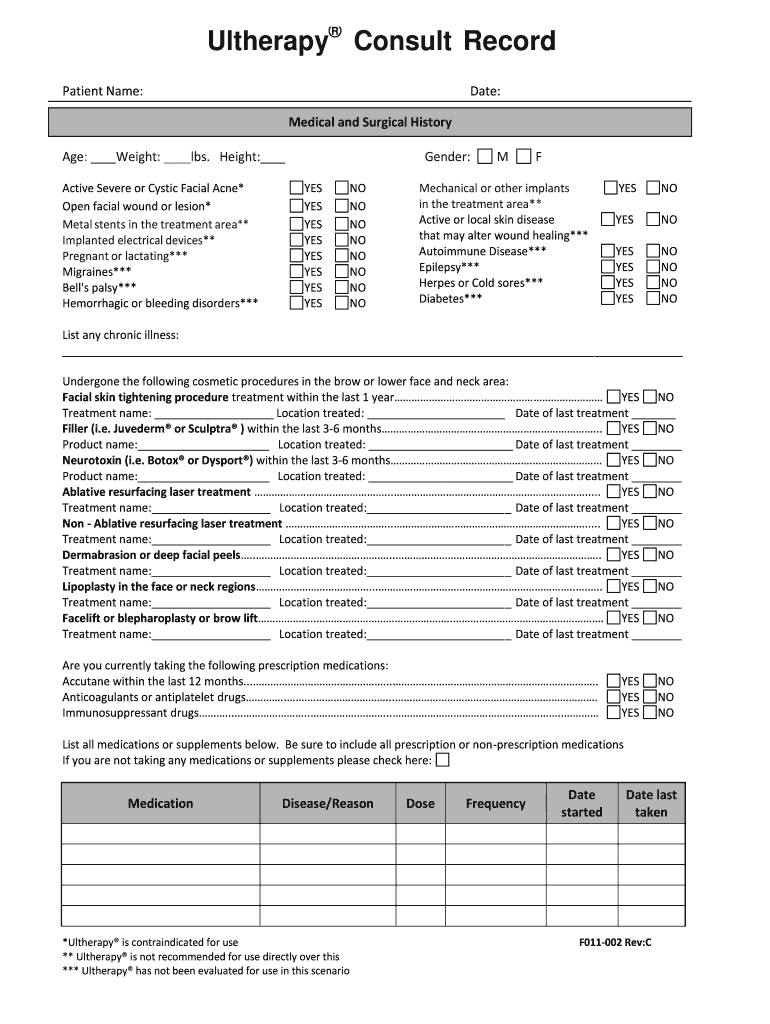
- Click ‘Get Form’ to open the Ultherapy Consult Record in our editor.
- Begin by entering your personal information, including your name, date, age, weight, and height. This foundational data is crucial for your consultation.
- Carefully review the medical and surgical history section. Indicate any relevant conditions by selecting 'YES' or 'NO' for each item listed. This helps your clinician assess your suitability for Ultherapy.
- In the self-exam section, score each clinical factor based on your current health status and treatment goals. This will guide your physician in tailoring the best approach for you.
- Complete the medication list by detailing any prescriptions or supplements you are currently taking. If none, check the designated box.
- Finally, ensure all signatures are collected at the bottom of the form from both you and your healthcare provider before submission.
Start using our platform today to easily fill out your Ultherapy Consult Record for free!
Fill out Ultherapy Consult Record - Heartland Dermatology & Skin online
It's free
It's free
See more Ultherapy Consult Record - Heartland Dermatology & Skin versions
We've got more versions of the Ultherapy Consult Record - Heartland Dermatology & Skin form. Select the right Ultherapy Consult Record - Heartland Dermatology & Skin version from the list and start editing it straight away!
| Versions | Form popularity | Fillable & printable |
|---|---|---|
| 2013 | 3.9 Satisfied (30 Votes) |
Security and compliance
At DocHub, your data security is our priority. We follow HIPAA, SOC2, GDPR, and other standards, so you can work on your documents with confidence.
Learn more


