Type text, add images, blackout confidential details, add comments, highlights and more.

02. Sign it in a few clicks
Draw your signature, type it, upload its image, or use your mobile device as a signature pad.

03. Share your form with others
Send it via email, link, or fax. You can also download it, export it or print it out.

How to use or fill out vista oath with our platform
Ease of Setup
DocHub User Ratings on G2
Ease of Use
DocHub User Ratings on G2
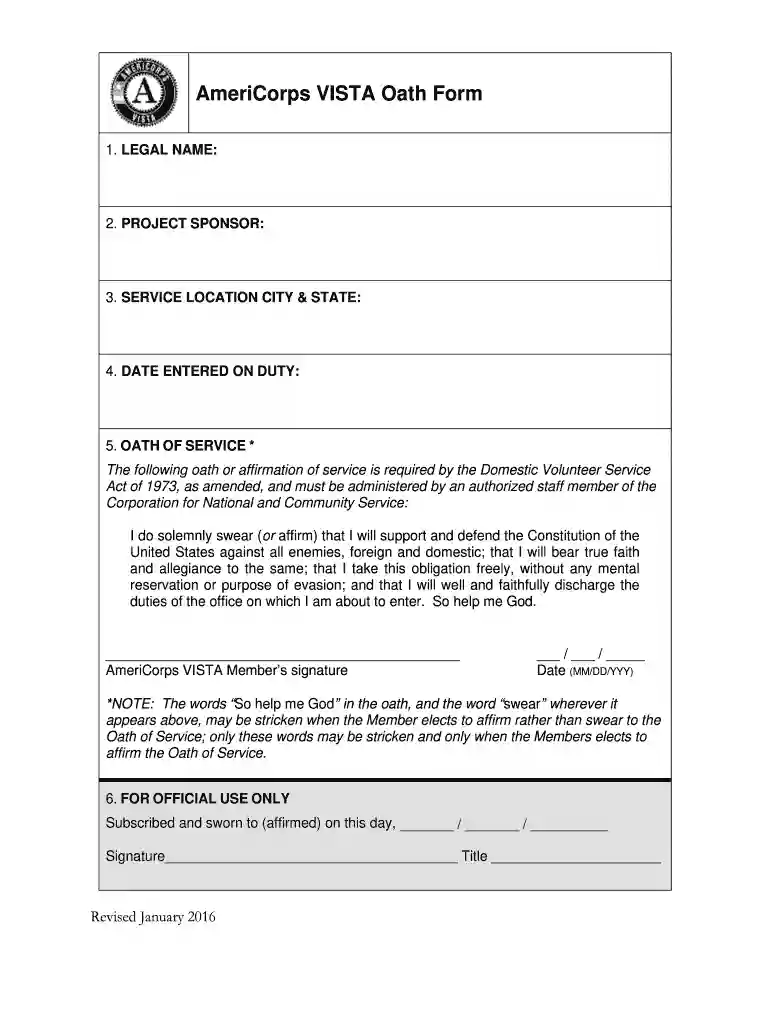
Click ‘Get Form’ to open the vista oath in the editor.
Begin by entering your LEGAL NAME in the designated field. This ensures that your identity is accurately represented.
Next, fill in the PROJECT SPONSOR information. This identifies the organization you are serving under.
Provide your SERVICE LOCATION CITY & STATE. This specifies where you will be fulfilling your service commitment.
Enter the DATE ENTERED ON DUTY. This date marks the beginning of your service period.
Carefully read through the OATH OF SERVICE section. You may choose to either swear or affirm this oath. If you opt for affirmation, remember that you can strike specific words as indicated.
Sign and date the form at the bottom where indicated, ensuring all details are correct before submission.
Start filling out your vista oath today for free using our platform!
Vista oath meaningVista oath pdfVista oath templateVISTA sponsor HandbookAmeriCorps PledgeAmericorp VISTAAmeriCorps VISTA living allowance 2026Are AmeriCorps members employees
Security and compliance
At DocHub, your data security is our priority. We follow HIPAA, SOC2, GDPR, and other standards, so you can work on your documents with confidence.
An individual may serve as a VISTA if all the following requirements are met as of the date the individual takes the oath or affirmation, as appropriate,Read more
Cookie consent notice
This site uses cookies to enhance site navigation and personalize your experience.
By using this site you agree to our use of cookies as described in our Privacy Notice.
You can modify your selections by visiting our Cookie and Advertising Notice.