




Here's how it works



How to use or fill out Animal Hospital of Pasco Client Information Sheet with our platform

- Click ‘Get Form’ to open the Animal Hospital of Pasco Client Information Sheet in the editor.
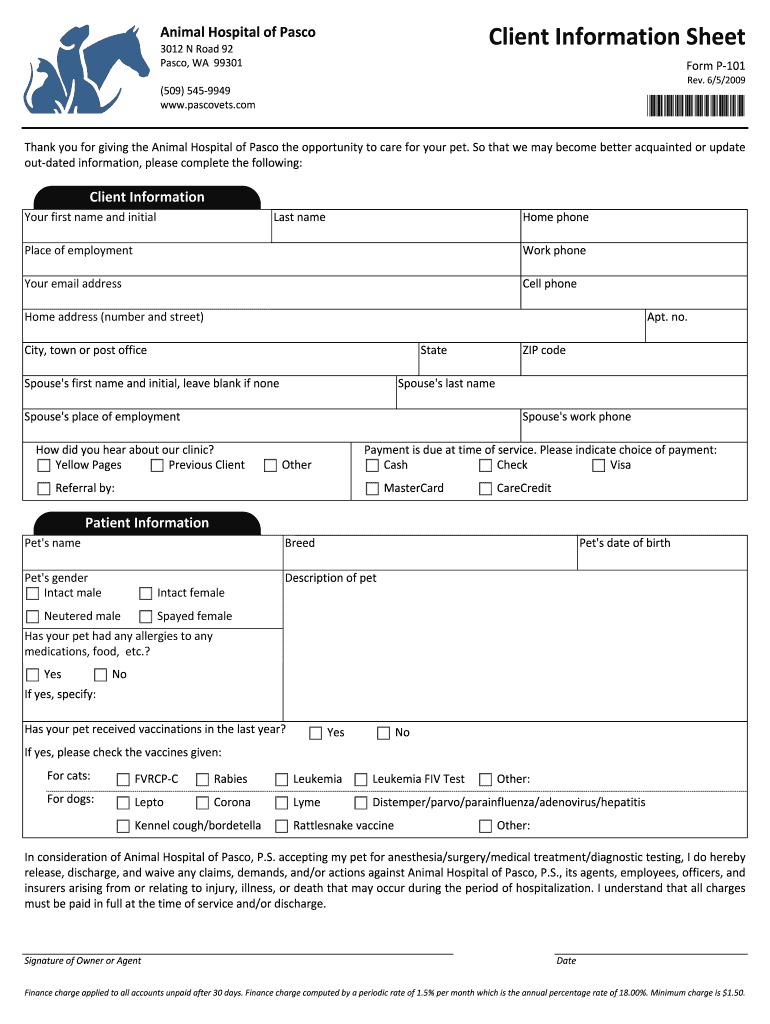
- Begin by filling out the 'Client Information' section. Enter your first name, last name, and contact details including home phone, work phone, and email address.
- Provide your home address, including street number, city, state, and ZIP code. If applicable, include your spouse's information as well.
- Indicate how you heard about the clinic and select your preferred payment method from options like cash, check, or credit card.
- In the 'Patient Information' section, enter your pet's name, breed, gender, and date of birth. Specify any allergies or recent vaccinations if applicable.
- Finally, review the release statement regarding treatment and sign with the date to complete the form.
Start using our platform today for free to easily fill out your Animal Hospital of Pasco Client Information Sheet!
It's free
See more Animal Hospital of Pasco Client Information Sheet versions
| Versions | Form popularity | Fillable & printable |
|---|---|---|
| 2009 | 4.8 Satisfied (277 Votes) |
Got questions?
What do I need to sign my Animal Hospital of Pasco Client Information Sheet electronically?
Electronic document approval requires a software solution that complies with data security and eSignature regulations. DocHub is a great tool for that, as it fulfills all the previously mentioned requirements. Whatever method you prefer to sign your Animal Hospital of Pasco Client Information Sheet in DocHub, your eSignature will be legally binding and court-admissible.
Can I sign my Animal Hospital of Pasco Client Information Sheet while I edit it?
If you edit your Animal Hospital of Pasco Client Information Sheet with DocHub, you will not need to look for other applications or solutions to sign it. An electronic signature is a component of DocHub’s substantial editing toolset, which enables you to apply changes in your form without switching between platforms. Simply complete your form, double-check the correctness of the information and place your electronic signature at the end to make it submission-ready quickly.
Security and compliance
At DocHub, your data security is our priority. We follow HIPAA, SOC2, GDPR, and other standards, so you can work on your documents with confidence.
Learn more


