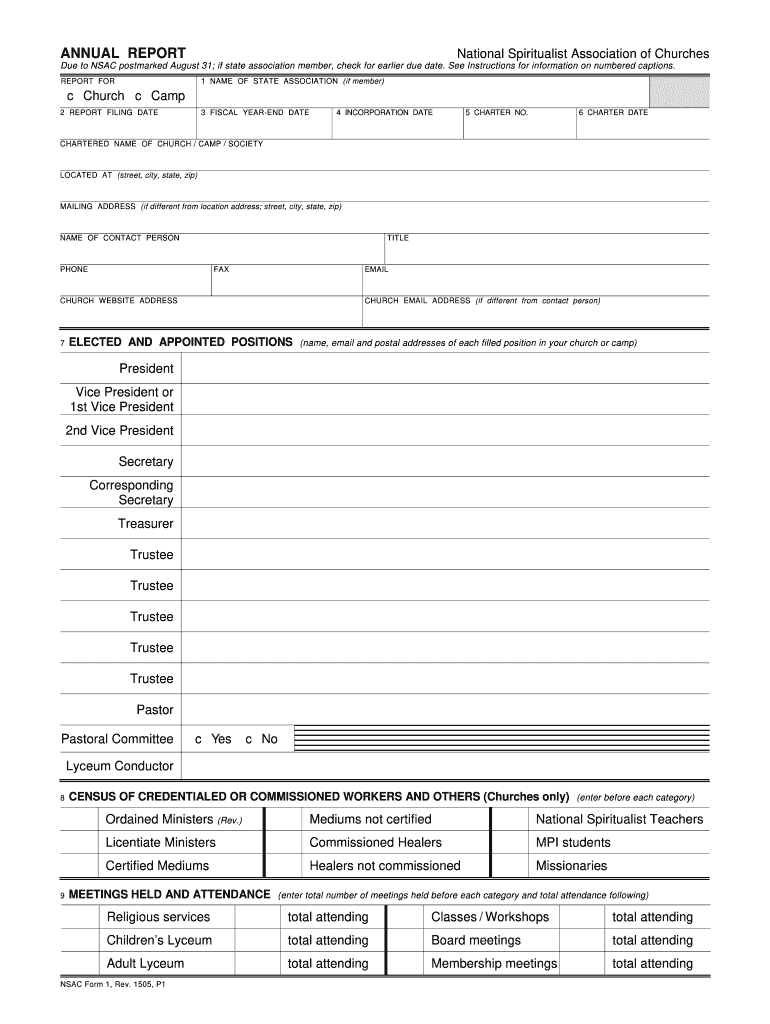
ANNUAL REPORT - National Spiritualist Association of Churches - nsac 2026

Get Form
universal spiritualist association Preview on Page 1

Here's how it works

01. Edit your universal spiritualist association online
Type text, add images, blackout confidential details, add comments, highlights and more.
02. Sign it in a few clicks
Draw your signature, type it, upload its image, or use your mobile device as a signature pad.
03. Share your form with others
Send celestial spiritualist church via email, link, or fax. You can also download it, export it or print it out.

How to use or fill out ANNUAL REPORT - National Spiritualist Association of Churches - nsac with our platform

Form edit decoration
9.5
Ease of Setup
DocHub User Ratings on G2
9.0
Ease of Use
DocHub User Ratings on G2
  1. Click ‘Get Form’ to open the ANNUAL REPORT in the editor.
  2. Begin by entering the NAME OF STATE ASSOCIATION if applicable, followed by the REPORT FOR section where you specify whether it is for a Church or Camp.
  3. Fill in the REPORT FILING DATE and FISCAL YEAR-END DATE to ensure accurate reporting periods.
  4. Complete the incorporation details including INCORPORATION DATE, CHARTER NO., and CHARTER DATE as required.
  5. Provide the CHARTERED NAME OF CHURCH/CAMP/SOCIETY along with its LOCATION and MAILING ADDRESS if different.
  6. List the NAME OF CONTACT PERSON along with their TITLE, PHONE, FAX, EMAIL, and any other relevant contact information.
  7. In the ELECTED AND APPOINTED POSITIONS section, enter names and contact details for each filled position within your organization.
  8. For CENSUS OF CREDENTIALED WORKERS, input totals for each category as specified. This section is crucial for churches only.
  9. Document MEETINGS HELD AND ATTENDANCE by entering total meetings and attendance figures for each type of meeting held.
  10. Complete the MEMBER CENSUS by calculating total members reported from previous reports and any changes since then.
  11. Finally, fill out the FINANCIAL STATEMENT section accurately reflecting all receipts and disbursements as per guidelines provided in the instructions.

Start using our platform today to streamline your form completion process effortlessly!

See more ANNUAL REPORT - National Spiritualist Association of Churches - nsac versions

We've got more versions of the ANNUAL REPORT - National Spiritualist Association of Churches - nsac form. Select the right ANNUAL REPORT - National Spiritualist Association of Churches - nsac version from the list and start editing it straight away!
Versions Form popularity Fillable & printable
2015 4.8 Satisfied (157 Votes)
be ready to get more

Complete this form in 5 minutes or less

Get form

Got questions?

We have answers to the most popular questions from our customers. If you can't find an answer to your question, please contact us.
Contact us

Managing your forms with DocHub this way is extremely simple after you have downloaded its extension for Google Chrome. Go to the Chrome Web Store and set up DocHub - Sign PDF from Gmail to get it. Give our tool access to your Google account, and then open an email containing spiritual churches near me as an attachment and point to the file with your cursor - the DocHub extension button will automatically show up there. Click on it to open your form in our editor. Make any essential adjustments, fill out the blanks, and click Sign to create your legally-binding eSignature.

You can find the latest and most relevant version of the national spiritualist association of churches in our DocHub forms collection. Search it by categories or use the search field to locate the exact template that suits your situation. You may open this form for editing after you find it.

Security and compliance

At DocHub, your data security is our priority. We follow HIPAA, SOC2, GDPR, and other standards, so you can work on your documents with confidence.

Learn more
ccpa2
pci-dss
gdpr-compliance
hipaa
soc-compliance
be ready to get more

Complete this form in 5 minutes or less

Get form