Type text, add images, blackout confidential details, add comments, highlights and more.

02. Sign it in a few clicks
Draw your signature, type it, upload its image, or use your mobile device as a signature pad.

03. Share your form with others
Send it via email, link, or fax. You can also download it, export it or print it out.

How to use or fill out jftx form 182 military make with our platform
Ease of Setup
DocHub User Ratings on G2
Ease of Use
DocHub User Ratings on G2
Click ‘Get Form’ to open the jftx form 182 military make in the editor.
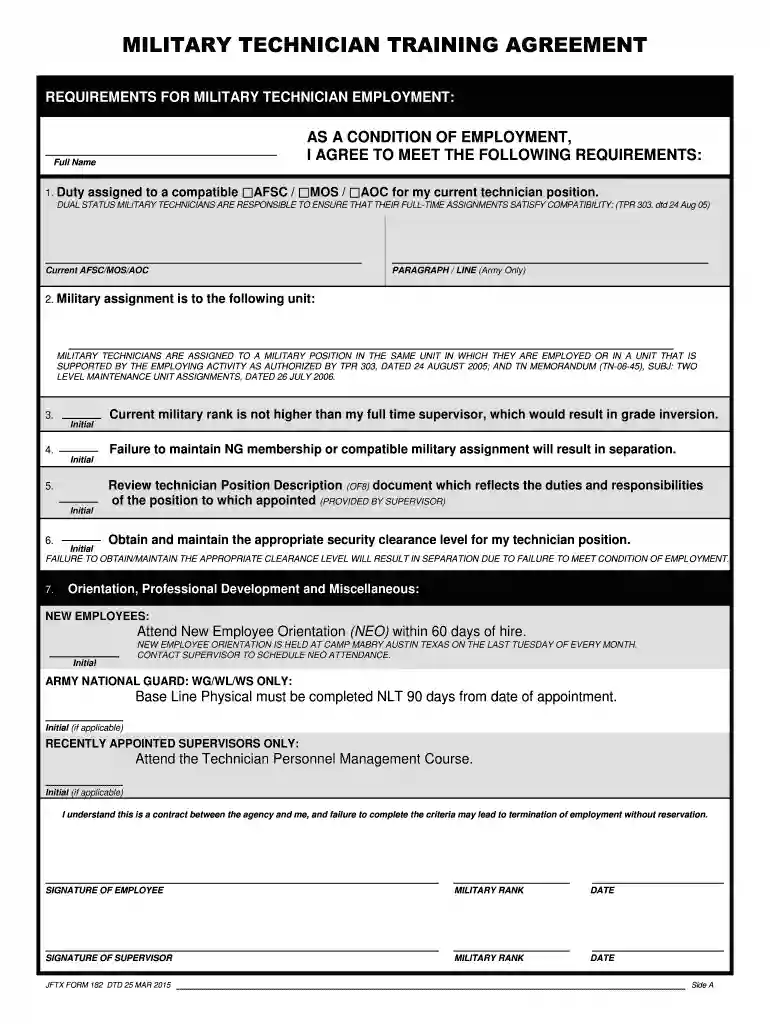
Begin by entering your full name in the designated field at the top of the form. This is essential for identification purposes.
In section 1, specify your assigned AFSC/MOS/AOC. Ensure that this aligns with your current technician position as it is a condition of employment.
For section 2, indicate your military assignment unit clearly. This helps maintain compatibility with your employment.
Review and initial each requirement listed in sections 3 through 6, confirming your understanding and agreement to maintain NG membership and security clearance.
Complete the orientation requirements in section 7 by marking attendance at New Employee Orientation and any other applicable training.
Finally, sign and date the form at the bottom, ensuring both you and your supervisor have completed their signatures.
Start using our platform today to fill out your jftx form 182 military make easily and for free!
Fill out jftx form 182 military make online It's free
We've got more versions of the jftx form 182 military make form. Select the right jftx form 182 military make version from the list and start editing it straight away!
Since DD Form 214 is issued to those leaving the active military as well as to members of the National Guard and Reserves completing their initial active duty for training, possession of this document does not necessarily mean the Service Member is a veteran.
How to request W2 from the military?
Call the Military Pay customer care center (1-888-332-7411) to request a corrected W-2. Use AskDFAS; clickable icons are located on the myPay and DFAS homepages. FAQs are available for information and the application allows members to submit a secure message to the appropriate DFAS military pay office.
Is a DD214 proof of veteran status?
The DD 256 and 257 are issued when the person has not met the active duty requirements to be considered a veteran by the DoD. But having a DD214 form doesnt automatically mean you are a veteran! What is truly bothersome is that people who have served but dont qualify as a veteran can request a DD214.
What document proves military service?
A DD-214 can authenticate if an individual has indeed served in the military.
What form is used to prove military service?
A DD Form 214 proves military service.
Related Searches
When is an SF 182 requiredSF 182 formSF 182 fillableSF 182 form armySF 182 requirementsSF 182 fillable PDFSF 182 instructionsSf 182 PDF
Cookie consent notice
This site uses cookies to enhance site navigation and personalize your experience.
By using this site you agree to our use of cookies as described in our Privacy Notice.
You can modify your selections by visiting our Cookie and Advertising Notice.