




Here's how it works



How to use or fill out 4-H Project Form - Refugio County Extension Office - refugio agrilife with DocHub

- Click ‘Get Form’ to open it in the editor.
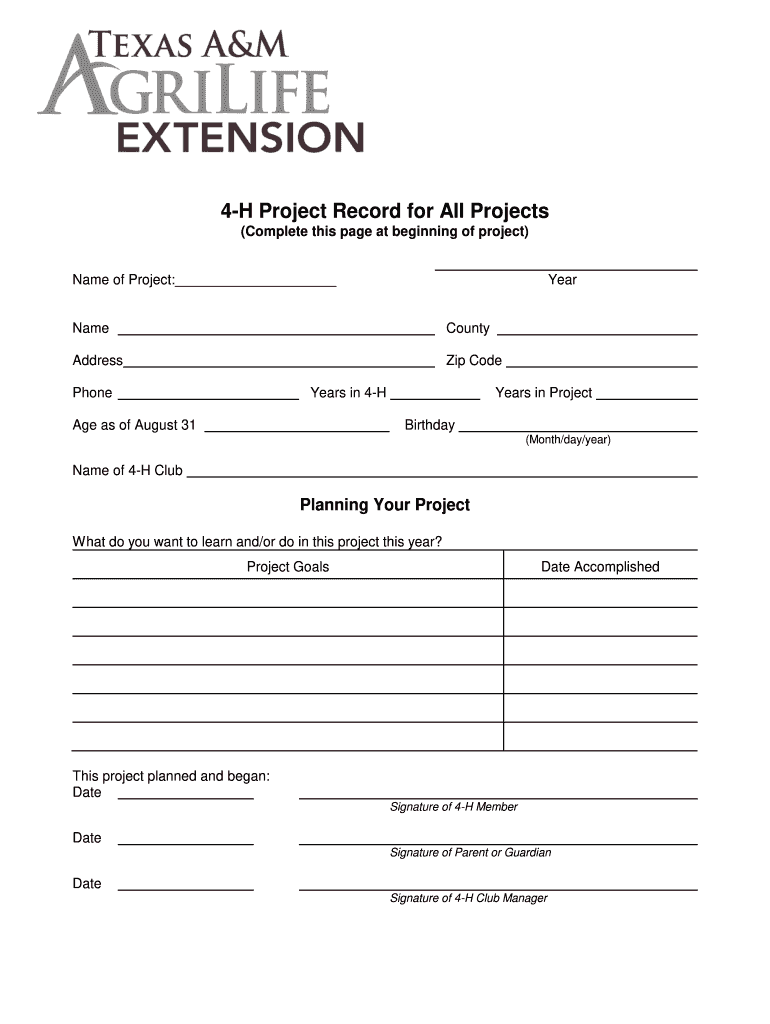
- Begin by filling in your project details, including the 'Name of Project', 'Year', and personal information such as your name, county, address, and phone number.
- Next, indicate your experience by completing fields like 'Years in 4-H', 'Age as of August 31', and 'Years in Project'. Don't forget to include your birthday.
- In the 'Planning Your Project' section, articulate what you aim to learn this year. Set clear project goals and record the date accomplished.
- As you progress through the year, document activities and learning experiences in the 'Activities Record' section. List all relevant activities and any awards received.
- At the end of your project, complete the 'Project Summary' section with reflections on your experiences and future plans. Ensure all signatures are collected before submission.
Start using our platform today to easily fill out your 4-H Project Form for free!
It's free
See more 4-H Project Form - Refugio County Extension Office - refugio agrilife versions
| Versions | Form popularity | Fillable & printable |
|---|---|---|
| 2012 | 4.6 Satisfied (50 Votes) |
Got questions?
Can I sign my 4-H Project Form - Refugio County Extension Office - refugio agrilife on a mobile?
Of course, you’ll find numerous apps for this on the web. However, if you need to eSign your 4-H Project Form - Refugio County Extension Office - refugio agrilife without installing extra software, DocHub is the optimum choice you can make. This powerful editor works on mobile devices just as on desktops. Open our editor in any internet browser, register or sign in to your account, and start managing your forms.
How do you get 4-H Project Form - Refugio County Extension Office - refugio agrilife?
You can find the latest and most relevant version of the 4-H Project Form - Refugio County Extension Office - refugio agrilife in our DocHub forms collection. Search it by categories or utilize the search field to get the exact template that fits your situation. You can open this form for editing once you find it.
Security and compliance
At DocHub, your data security is our priority. We follow HIPAA, SOC2, GDPR, and other standards, so you can work on your documents with confidence.
Learn more


