MMR1015 - Colorado.gov - colorado 2026

Get Form
ciis login Preview on Page 1

Here's how it works

01. Edit your ciis login online
Type text, add images, blackout confidential details, add comments, highlights and more.
02. Sign it in a few clicks
Draw your signature, type it, upload its image, or use your mobile device as a signature pad.
03. Share your form with others
Send ciis login colorado via email, link, or fax. You can also download it, export it or print it out.

How to use or fill out MMR1015 - Colorado.gov - colorado with our platform

Form edit decoration
9.5
Ease of Setup
DocHub User Ratings on G2
9.0
Ease of Use
DocHub User Ratings on G2
  1. Click ‘Get Form’ to open the MMR1015 document in the editor.
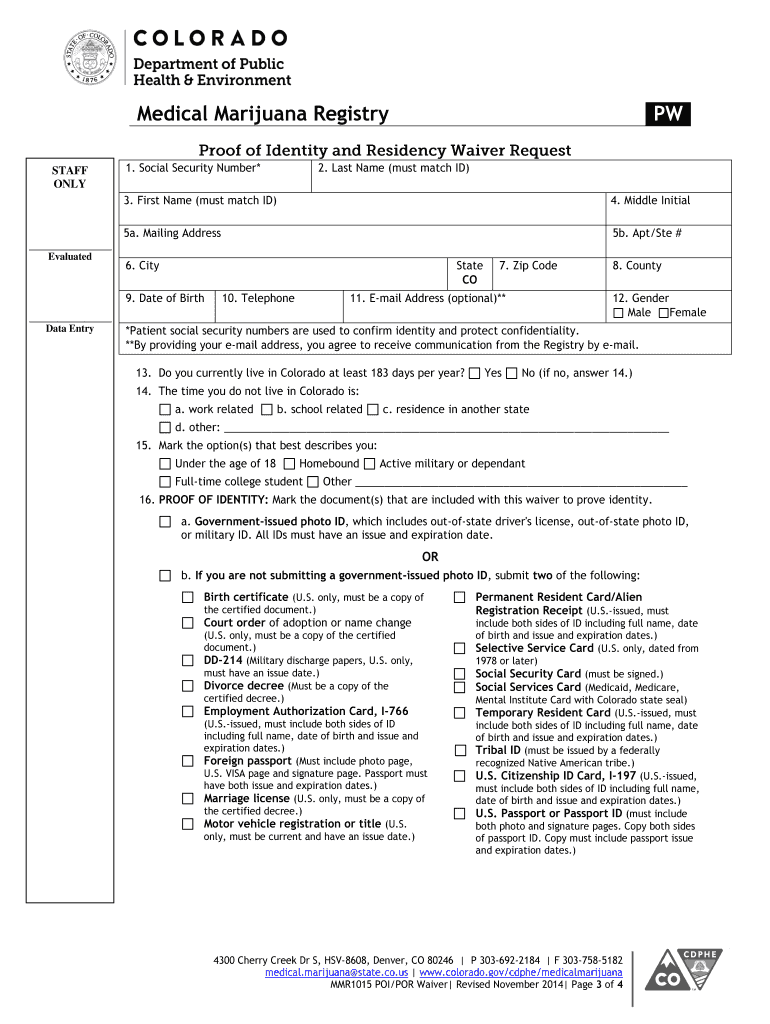
  2. Begin by entering your personal information in the designated fields, including your first and last name, date of birth, and mailing address. Ensure that all details match your proof of identity documents.
  3. Indicate whether you currently reside in Colorado for at least 183 days per year by selecting 'Yes' or 'No'. If 'No', provide details regarding your absence from the state.
  4. Select the appropriate proof of identity documents you are submitting. You can choose from a government-issued photo ID or two alternative forms of identification as specified in the form.
  5. Next, mark the proof of residency documents you are providing. This may include utility bills, tax returns, or other acceptable documentation that verifies your Colorado residency.
  6. Finally, ensure to sign and date the form at the bottom. If applicable, have a notary public witness your signature and affix their seal.

Start using our platform today to easily complete and submit your MMR1015 form online for free!

See more MMR1015 - Colorado.gov - colorado versions

We've got more versions of the MMR1015 - Colorado.gov - colorado form. Select the right MMR1015 - Colorado.gov - colorado version from the list and start editing it straight away!
Versions Form popularity Fillable & printable
2014 4.8 Satisfied (64 Votes)
be ready to get more

Complete this form in 5 minutes or less

Get form

Got questions?

We have answers to the most popular questions from our customers. If you can't find an answer to your question, please contact us.
Contact us
Any Colorado resident who meets the eligibility requirements should submit a rebate application. Once you complete the application, you can bring it to a Colorado Department of Revenue Taxpayer Service Center or send it in by mail to: Colorado Department of Revenue, Denver, CO 80261-0005.
How to check for unclaimed property. Its easy to check if you have unclaimed property waiting for you. Visit the official Great Colorado Payback website and search for your name, business, or organization. Dont forget to check former zip codes or names!
There is no separate application for the Colorado Promise. Students will automatically be notified by their institutions if they were eligible in the prior academic year.
In order to qualify for a drivers license, permit, or ID in Colorado you will need all or a combination of the following: Identification from your country of origin. Tax Identification Number (ITIN) or Social Security number. Proof that you have been a Colorado resident.
be ready to get more

Complete this form in 5 minutes or less

Get form