




Here's how it works



How to use or fill out sp 7 0015 with our platform

- Click ‘Get Form’ to open the sp 7 0015 in the editor.
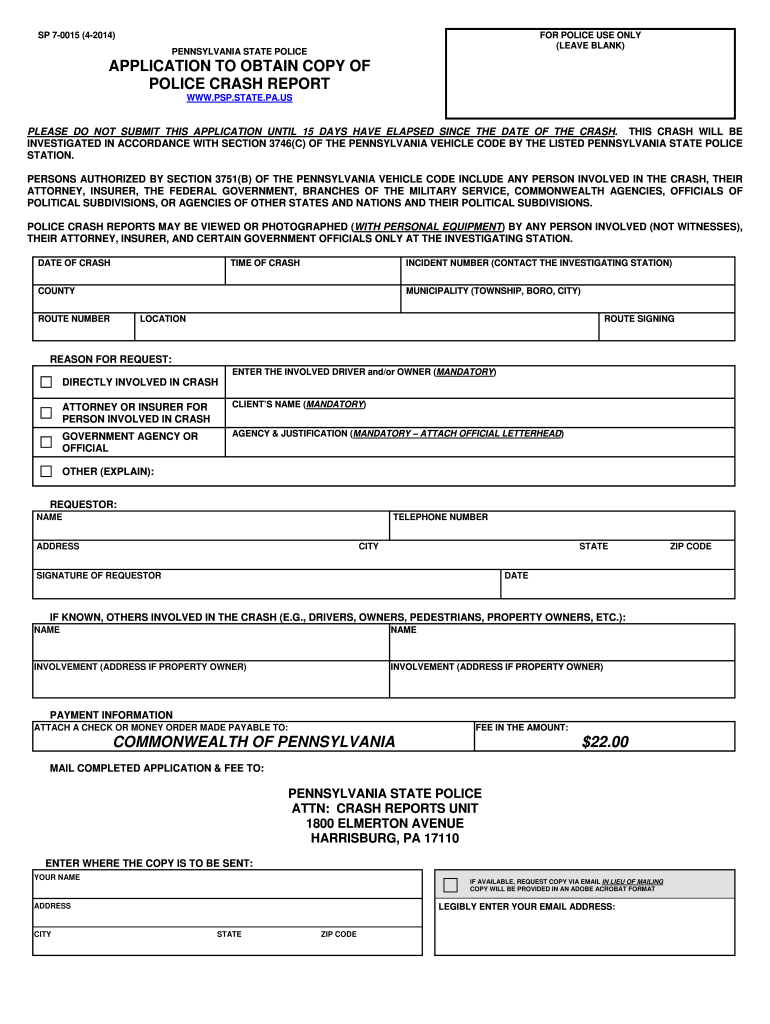
- Begin by entering the 'Date of Crash' and 'Time of Crash' in the designated fields. Ensure accuracy as this information is crucial for processing your request.
- Fill in the 'Incident Number' by contacting the investigating station, followed by specifying the 'County' and 'Municipality' where the crash occurred.
- In the 'Reason for Request' section, select whether you are directly involved in the crash, an attorney, or an insurer. Provide your name and contact details as a requestor.
- If applicable, list any others involved in the crash along with their addresses. This helps ensure all relevant parties are accounted for.
- Complete the payment information section by attaching a check or money order made payable to Commonwealth of Pennsylvania for $22.00.
- Finally, enter where you would like the copy sent, including your email address if you prefer receiving it electronically.
Start using our platform today to easily fill out and submit your sp 7 0015 form for free!
It's free
See more sp 7 0015 versions
| Versions | Form popularity | Fillable & printable |
|---|---|---|
| 2014 | 4.8 Satisfied (164 Votes) |
Got questions?
Can I fill out and sign my sp 7 0015 online?
Yes, and it’s really straightforward! DocHub is a web-based PDF editor with advanced document processing capabilities that allow you promptly adjust your forms, fill out empty fields and insert new ones for others to fill out, and create electronic signatures in several ways. Upload your sp 7 0015, provide information as required, and decide how you want to eSign your template - by typing your name, drawing your signature, uploading its image, or using a QR code.
How do you create an e-signature for the sp 7 0015 on iOS?
Apart from an extensive toolset for editing PDFs on mobile devices, DocHub allows you to sign your sp 7 0015 along the way. Open our editor in your browser, make changes using DocHub’s toolset, and finish your editing by eSigning the finished form.
Security and compliance
At DocHub, your data security is our priority. We follow HIPAA, SOC2, GDPR, and other standards, so you can work on your documents with confidence.
Learn more


