




Here's how it works



How to use or fill out ky need deposition with our platform

- Click ‘Get Form’ to open the ky need deposition in the editor.
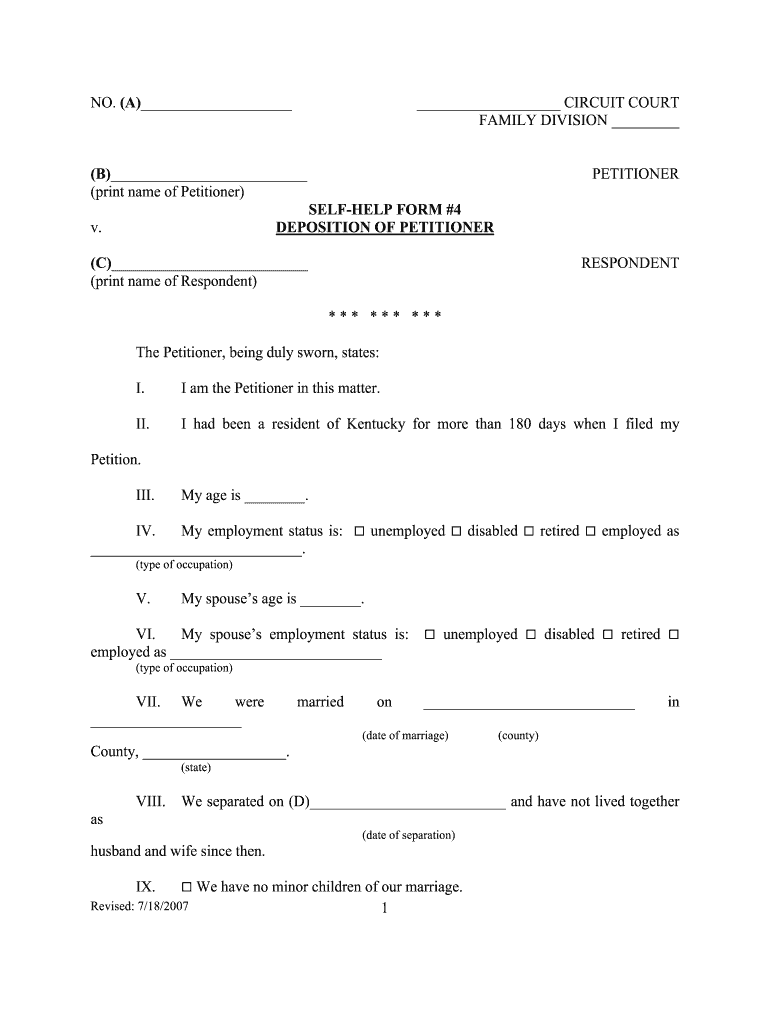
- Begin by filling in your name as the Petitioner in section (B). Ensure accuracy for legal purposes.
- Indicate your age in section III and select your employment status in section IV. Choose from the options provided and specify your occupation if employed.
- Complete section V with your spouse’s age and their employment status in section VI, following the same format as yours.
- In section VII, provide the date of marriage and county where it took place. Fill out section VIII with the date of separation.
- If applicable, indicate whether you have minor children in sections IX and E. Provide their initials and ages as required.
- Confirm pregnancy status in section X and state if the marriage is irretrievably broken in section XI.
- Finalize by signing in sections F, G, H, and I. Ensure all information is complete before submission.
Start using our platform today to easily fill out your ky need deposition for free!
It's free
See more ky need deposition versions
| Versions | Form popularity | Fillable & printable |
|---|---|---|
| 2007 | 4.8 Satisfied (140 Votes) |
Got questions?
How do I sign my ky need deposition on iOS?
With DocHub, you can rapidly approve your ky need deposition or any other paperwork on iOS, even without setting up extra programs. You can access your DocHub account from any internet-connected browser and complete and sign your document in any way you like with just a few clicks.
How do you edit ky need deposition on iOS?
You can easily edit and complete your ky need deposition on any iOS device. Open an internet browser of your liking, visit the DocHub website, authorize or create a new account, upload your file for editing, and make your required changes. Our service is mobile-friendly, so using its features on your phone will be a no-brainer, even on the first try.
Security and compliance
At DocHub, your data security is our priority. We follow HIPAA, SOC2, GDPR, and other standards, so you can work on your documents with confidence.
Learn more


