




Here's how it works



How to use or fill out Nursery Registration Form - Bible Fellowship Evangelical Free Church with our platform

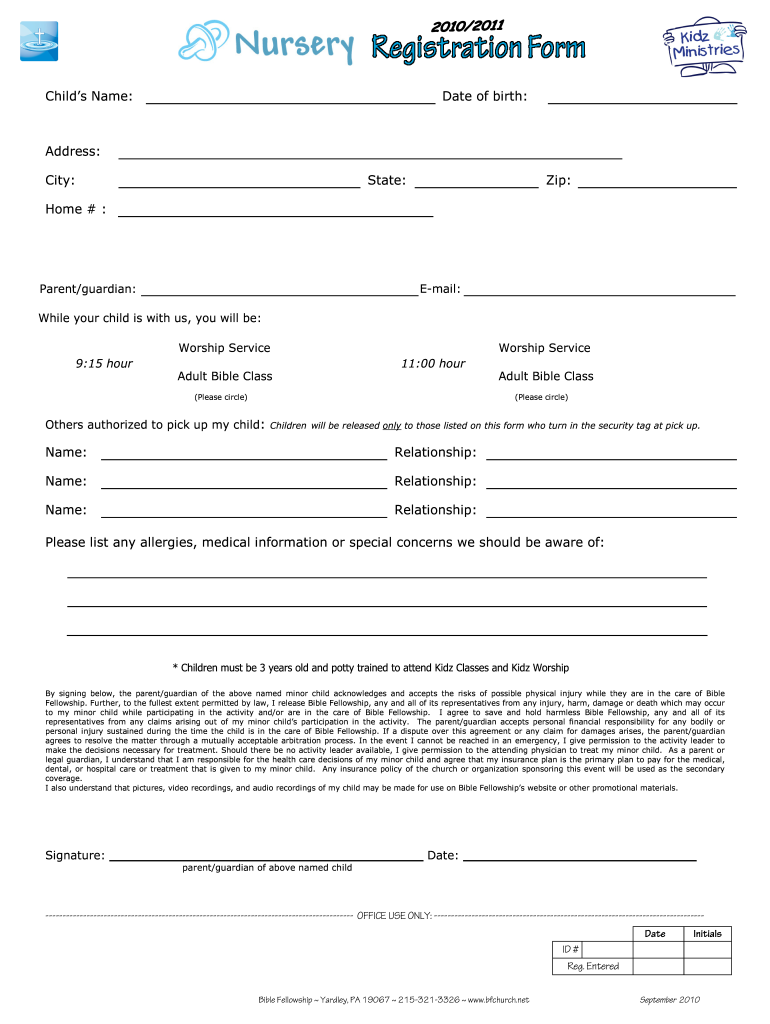
- Click ‘Get Form’ to open the Nursery Registration Form in the editor.
- Begin by entering your child's name and date of birth in the designated fields. This information is crucial for proper identification.
- Fill in your address, city, state, and zip code to ensure accurate communication regarding your child’s registration.
- Provide a home phone number and email address for any necessary correspondence.
- Indicate the parent or guardian's name and select which worship service or adult Bible class you will be attending by circling the appropriate option.
- List any individuals authorized to pick up your child, along with their relationship to your child. Remember, children will only be released to those listed on this form.
- Detail any allergies, medical information, or special concerns that staff should be aware of while caring for your child.
- Finally, read through the acknowledgment section carefully before signing and dating it at the bottom of the form.
Start filling out the Nursery Registration Form today using our platform for a seamless experience!
It's free
See more Nursery Registration Form - Bible Fellowship Evangelical Free Church versions
| Versions | Form popularity | Fillable & printable |
|---|---|---|
| 2010 | 4.3 Satisfied (49 Votes) |
Got questions?
Can I sign my free church nursery registration form in electronic format?
As outlined by eSignature regulations, forms signed digitally have the same validity as traditionally approved ones. You can electronically sign almost any business and private documentation. Four types of paperwork still require handwritten signatures only - wills and testamentary trusts, court orders and other court papers, state statutes regulating divorce, adoption, or other family law, and notice of cancellation of utility services. If you follow the rules and utilize a reliable and compliant software solution, like DocHub, you can eSign your free church nursery registration form without printing it.
How do you edit church nursery forms on Android?
Document editing with DocHub is equally convenient on desktop and mobile devices. You only need an internet browser to modify your church nursery forms on Android. Open our site and sign in to access the tools you need. Add your document and introduce your intended modifications. Next, you can keep your form in your document storage or send it out instantly.
Security and compliance
At DocHub, your data security is our priority. We follow HIPAA, SOC2, GDPR, and other standards, so you can work on your documents with confidence.
Learn more


