




Here's how it works



How to use or fill out sunrise powerlink grant with our platform

- Click ‘Get Form’ to open the sunrise powerlink grant in the editor.
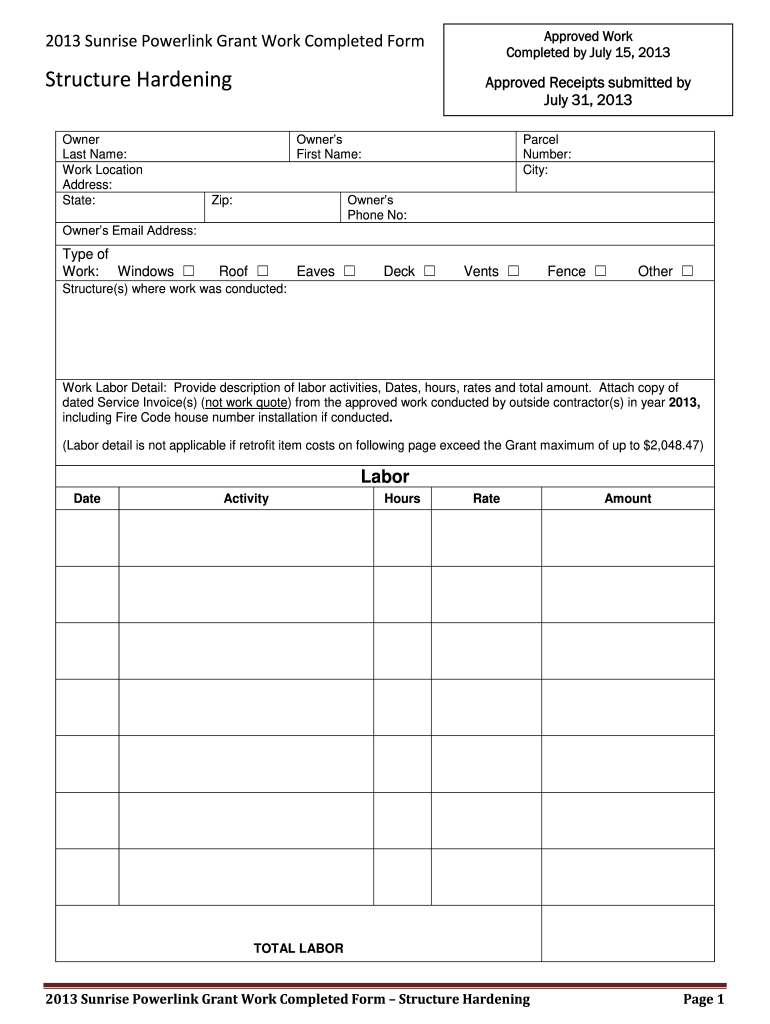
- Begin by filling in your last name and first name in the Owner section, along with your work location address, city, state, zip code, phone number, and email address.
- Select the type of work completed by checking the appropriate box for options such as Windows, Roof, Eaves, Deck, Vents, Fence, or Other.
- In the Work Labor Detail section, provide a detailed description of labor activities including dates worked, hours spent, rates charged, and total amounts. Ensure to attach dated service invoices from approved contractors.
- For Approved Retrofit Items, list each item purchased along with its description and brand. Include quantity and amount for each item and attach corresponding invoices or receipts.
- Finally, sign at the bottom of the form to confirm that all information is accurate before submitting.
Start using our platform today to easily complete your sunrise powerlink grant form online for free!
It's free
See more sunrise powerlink grant versions
| Versions | Form popularity | Fillable & printable |
|---|---|---|
| 2013 | 4.8 Satisfied (197 Votes) |
Got questions?
How can I create an electronic signature on my powerlink grant from Google Chrome?
Managing your documents with DocHub this way is extremely straightforward once you have downloaded its extension for Google Chrome. Go to the Chrome Web Store and install DocHub - Sign PDF from Gmail to get it. Give our tool access to your Google account, and then open an email with the powerlink grant attached and point to the file with your cursor - the DocHub extension key will automatically appear there. Click on it to open your form in our editor. Make any essential modifications, complete the blanks, and click Sign to create your legally-binding eSignature.
How do you get powerlink grant 2023?
You can find the latest and most relevant version of the powerlink grant 2023 in our DocHub forms collection. Browse it by categories or use the search field to locate the exact template that fits your case. You can open this form for editing after you find it.
Security and compliance
At DocHub, your data security is our priority. We follow HIPAA, SOC2, GDPR, and other standards, so you can work on your documents with confidence.
Learn more


