



Here's how it works



How to use or fill out 330 60 with our platform

- Click ‘Get Form’ to open the 330 60 document in the editor.
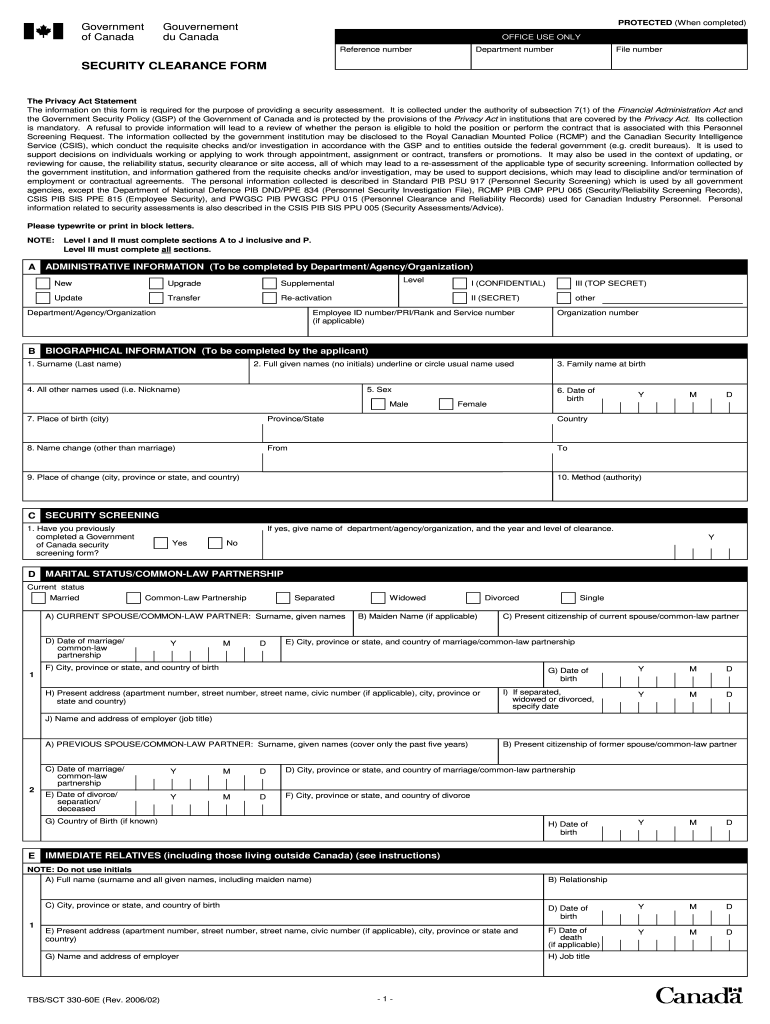
- Begin with Section A, where your department will indicate whether this is a new application, upgrade, or other status. Ensure all fields are filled accurately.
- Move to Section B and provide your biographical information. Fill in your surname, full given names, date of birth, and place of birth. Remember to underline or circle your usual name.
- In Section C, answer whether you have previously completed a Government of Canada security screening form. If yes, provide details as requested.
- Continue through Sections D to J by providing information about your marital status, immediate relatives, and any criminal convictions if applicable. Be thorough and accurate.
- Complete Sections K to O for additional details on travel history, foreign assets, character references, education, and military service if relevant.
- Finally, review all sections for completeness before signing in the certification area at the end of the form.
Start filling out your 330 60 form online for free today!
It's free
Got questions?
How can I eSign my government of canada security clearance form fillable in Word?
Microsoft Word doesn’t have signing tools to generate legitimate electronic signatures and enforceable paperwork. Fortunately, DocHub is an online eSignature-compliant editor that works with different file formats, including .doc files. Sign in to your account and add the Word version of your government of canada security clearance form fillable from your device and cloud, or URL - our editor will automatically convert it into an editable PDF. Make all necessary changes in your document and click Sign to generate your own legally-binding eSignature. There are four signing options from which to choose.
How do you fill out government of canada security screening form online?
You may get and edit your government of canada security screening form online with the help of DocHub. Its straightforward yet feature-rich design enables you to start effective work right after you register your account. Create your profile and add your file, and then our interface will guide you through our stress-free form completion experience.
Security and compliance
At DocHub, your data security is our priority. We follow HIPAA, SOC2, GDPR, and other standards, so you can work on your documents with confidence.
Learn more