Type text, add images, blackout confidential details, add comments, highlights and more.
02. Sign it in a few clicks
Draw your signature, type it, upload its image, or use your mobile device as a signature pad.
03. Share your form with others
Send california type via email, link, or fax. You can also download it, export it or print it out.
How to use or fill out firearms live scan form with our platform
Ease of Setup
DocHub User Ratings on G2
Ease of Use
DocHub User Ratings on G2
Click ‘Get Form’ to open the firearms live scan form in the editor.
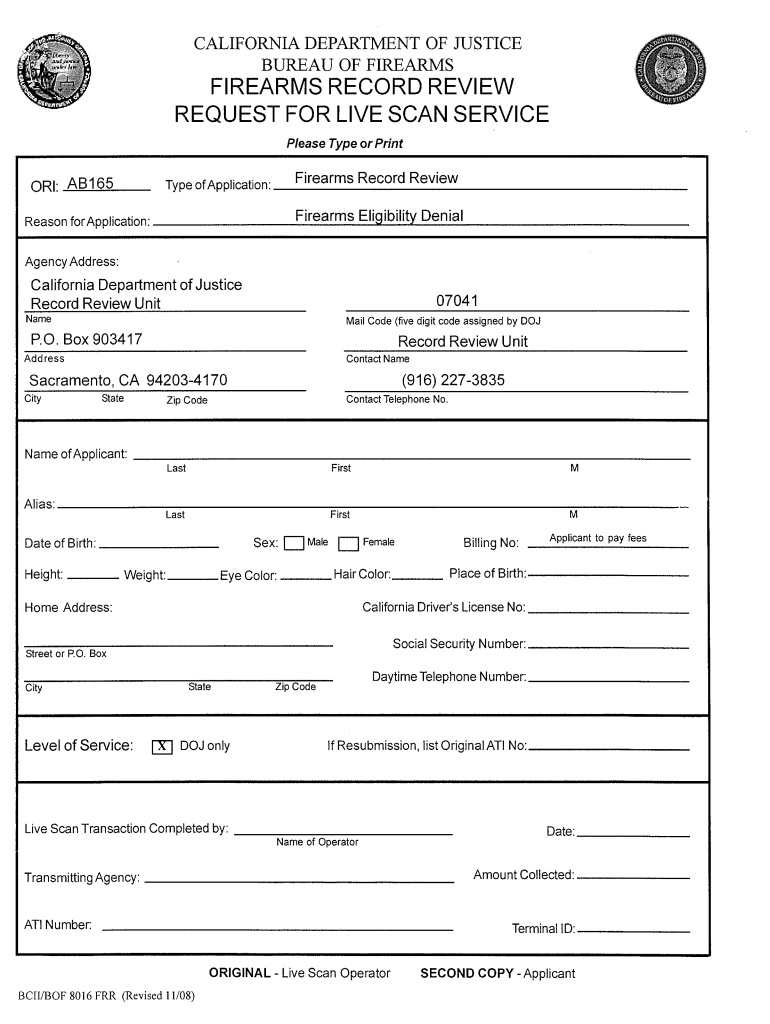
In the 'Type of Application' section, ensure 'Firearms Record Review' is selected. This field is mandatory.
Provide a brief explanation in the 'Reason for Application' field, such as 'Firearms Eligibility Denial'.
Fill in your full name and any known aliases in the 'Name of Applicant' section. Include your date of birth, sex, height, weight, eye color, hair color, place of birth, social security number, and California driver's license number. Note that name, date of birth, and sex are mandatory fields.
Enter your home address in the 'Applicant Address' section. This is also a mandatory field.
Provide a daytime telephone number where you can be reached between 8 am and 5 pm to facilitate communication regarding your request.
Start filling out your firearms live scan form today for free using our platform!
We've got more versions of the firearms live scan form form. Select the right firearms live scan form version from the list and start editing it straight away!
Firearms live scan form pdfFirearms live scan form onlineFirearms live scan form californiaLive Scan Form for CCWLive Scan form pdfDOJ Live Scan Firearms in progressSecurity Guard Live Scan formDOJ Firearms Qualification Applicant form
Security and compliance
At DocHub, your data security is our priority. We follow HIPAA, SOC2, GDPR, and other standards, so you can work on your documents with confidence.
All the personal information requested in the form must be provided. Failure to provide all the necessary information will result in delays and/or the rejectionRead more
This article is about the original incarnation of Viacom. For the current (2005-present) incarnation formerly known as Viacom, see Paramount Global.Read more
Request For Live Scan Service - Security Guard W/Firearm
The California Justice Information Services (CJIS). Division in the Department of Justice (DOJ) collects the information requested on this form as authorized.Read more
Cookie consent notice
This site uses cookies to enhance site navigation and personalize your experience.
By using this site you agree to our use of cookies as described in our Privacy Notice.
You can modify your selections by visiting our Cookie and Advertising Notice.