Type text, add images, blackout confidential details, add comments, highlights and more.
02. Sign it in a few clicks
Draw your signature, type it, upload its image, or use your mobile device as a signature pad.
03. Share your form with others
Send mod pc form via email, link, or fax. You can also download it, export it or print it out.
How to use or fill out mod p with our platform
Ease of Setup
DocHub User Ratings on G2
Ease of Use
DocHub User Ratings on G2
Click ‘Get Form’ to open the mod p document in the editor.
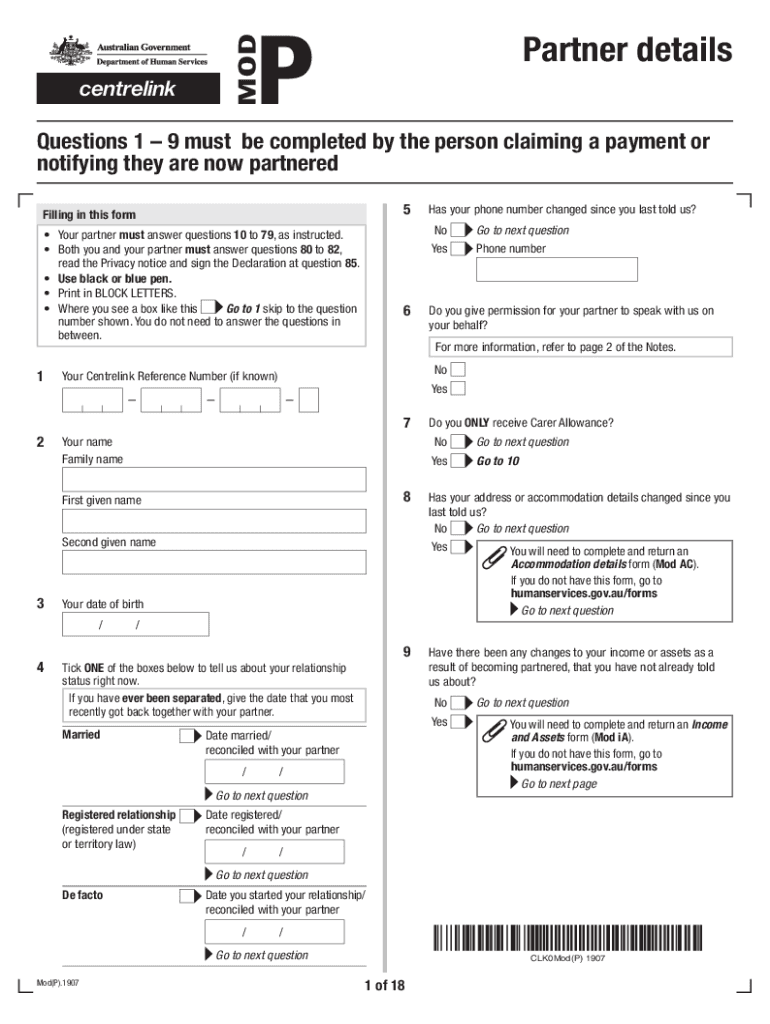
Begin by filling out your personal details in the Partner Details section. Ensure you provide your name, date of birth, and Centrelink Reference Number if known.
Your partner should complete questions 10 to 79 as instructed. Make sure they provide their personal information accurately.
Both you and your partner must answer questions 80 to 82 together. Read the Privacy notice carefully before signing the Declaration at question 85.
Use black or blue pen and print in BLOCK LETTERS for clarity. If any fields are not applicable, follow the instructions provided within the form.
Once completed, save your changes and upload the form through your Centrelink online account via our platform for submission.
Start using our platform today to streamline your mod p form completion!
Today Ill be discussing several problems connected with multiplicative orders of integers modulo p, where p is a prime number. Much of what I will say concernsRead more
The Missouri Professional Development (MOPD) system includes a workforce registry, a place to find trainings, and a learning management system.Read more
Cookie consent notice
This site uses cookies to enhance site navigation and personalize your experience.
By using this site you agree to our use of cookies as described in our Privacy Notice.
You can modify your selections by visiting our Cookie and Advertising Notice.