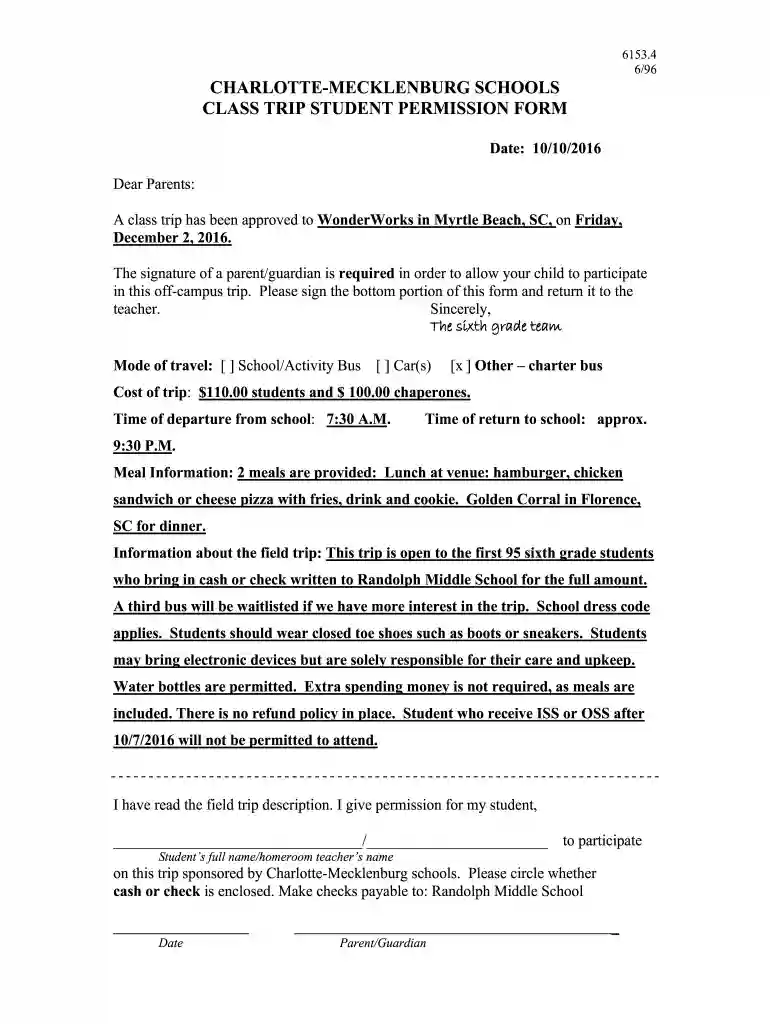
Cms field trip permission slip 2026

Get Form
cms field trip form Preview on Page 1

Here's how it works

01. Edit your cms field trip form online
Type text, add images, blackout confidential details, add comments, highlights and more.

02. Sign it in a few clicks
Draw your signature, type it, upload its image, or use your mobile device as a signature pad.

03. Share your form with others
Send cms 10106 via email, link, or fax. You can also download it, export it or print it out.

How to use or fill out cms field trip permission slip with our platform

Form edit decoration
9.5
Ease of Setup
DocHub User Ratings on G2
9.0
Ease of Use
DocHub User Ratings on G2
  1. Click ‘Get Form’ to open the cms field trip permission slip in the editor.
  2. Begin by entering the date at the top of the form. This helps keep track of when the permission slip was filled out.
  3. In the section for student information, clearly write your child's full name and their homeroom teacher's name in the designated fields.
  4. Select the mode of travel by checking the appropriate box. Options include School/Activity Bus, Car(s), or Other – charter bus.
  5. Indicate whether you are enclosing cash or a check for payment by circling your choice in the provided area.
  6. Finally, sign and date at the bottom of the form to give your consent for your child to participate in this exciting trip.

Start using our platform today to easily complete and submit your cms field trip permission slip for free!

See more cms field trip permission slip versions

We've got more versions of the cms field trip permission slip form. Select the right cms field trip permission slip version from the list and start editing it straight away!
Versions Form popularity Fillable & printable
1996 4.8 Satisfied (142 Votes)
be ready to get more

Complete this form in 5 minutes or less

Get form

Got questions?

We have answers to the most popular questions from our customers. If you can't find an answer to your question, please contact us.
Contact us
Schools will often ask you to sign permission forms for school trips. Permission slips are not liability waivers but they do seek the consent from parents for the students to participate in the trip or activity. Permission forms will often provide a description of the trip and activity and the risks associated with it.
A consent form or permission slip template usually includes: The student name. What activity the child will be participating in. The start time, end time, and date of the activity. An emergency contact number. Release of legal liability, if applicable. Space for a parent signature.
Parents need to understand why it is beneficial for their childs learning. 3. Provide all necessary information Include all relevant details about the field trip, such as date, time, location, means of transportation, cost, what the students should bring, and who the accompanying teachers or chaperones will be.
Here is an example of this line: I, (parent or guardians name), give permission for my child, (childs name), to attend the field trip to (location of field trip) with (organization or adults name who is leading the trip). 4. Include space for medical details. 5. Add an emergency contact option.

Security and compliance

At DocHub, your data security is our priority. We follow HIPAA, SOC2, GDPR, and other standards, so you can work on your documents with confidence.

Learn more
ccpa2
pci-dss
gdpr-compliance
hipaa
soc-compliance