






Definition & Meaning
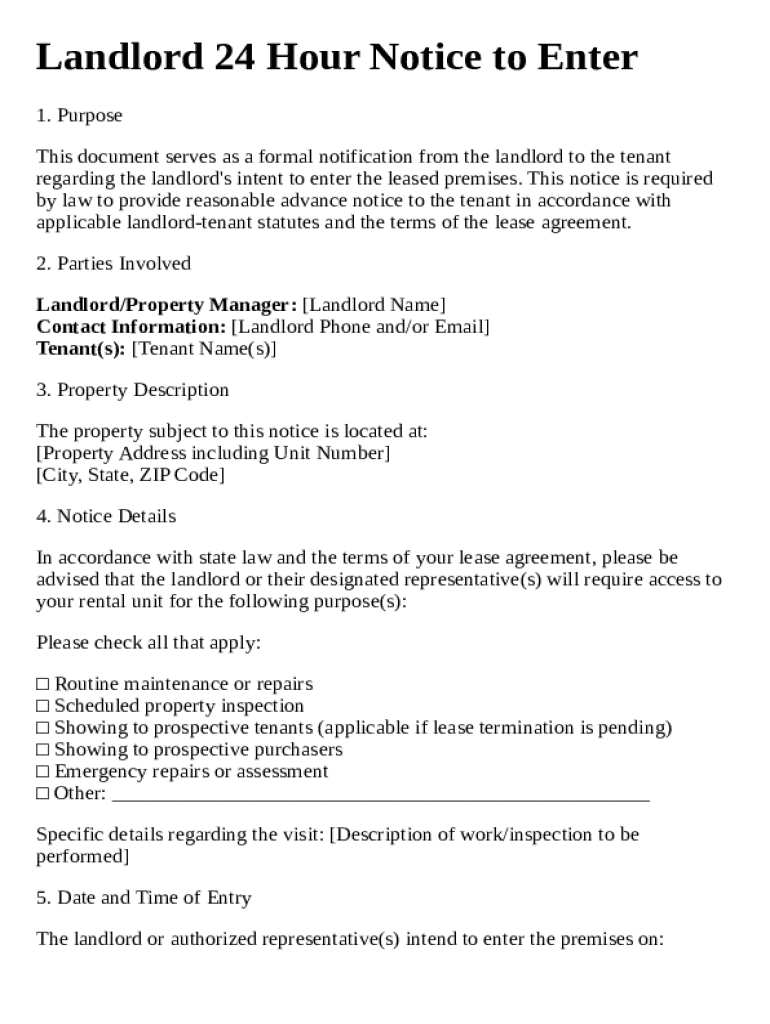
A "Landlord 24 Hour Notice to Enter Template" refers to a standardized document landlords use to inform tenants of their intent to enter the rental property. This notice serves as a formal communication tool adhering to tenant-landlord agreements and local regulations that typically require landlords to provide prior notice before entry. Such a notice ensures transparency, protecting both the tenant's right to privacy and the landlord's need to access the property for inspections, repairs, or emergency conditions.
Key Elements of the Landlord 24 Hour Notice to Enter Template
The template generally includes several critical components to be legally effective and comprehensive:
- Landlord's Information: Full name, contact details, and the address of the landlord or property manager.
- Tenant's Information: Tenant's name and the address of the rental property.
- Date and Time of Entry: Specifics on when the landlord intends to enter, complying with the 24-hour notice requirement.
- Purpose of Entry: Clear details on why entry is needed, such as repairs, inspections, or showings.
- Authorization Statement: A statement indicating that the entry is within the legal rights of the landlord, adhering to the lease agreement and relevant laws.
- Signatures: Both the landlord’s and optionally, the tenant’s signatures, to acknowledge the receipt of the notification.
Examples of Use
- Inspection Purposes: To check the condition of the property.
- Maintenance and Repairs: For routine or emergency repairs.
- Showings: If the property is on the market for sale or rent.
How to Use the Landlord 24 Hour Notice to Enter Template
Using the notice template requires following these steps to ensure clarity and legal compliance:
- Customize the Template: Fill in the landlord’s and tenant’s details along with the date and time of the proposed entry.
- State the Purpose: Clearly outline the reason for the entry, whether it’s a repair, inspection, or other justified purpose.
- Delivery to Tenant: Deliver the notice personally, through mail, or via an agreed-upon electronic method, ensuring it reaches the tenant at least 24 hours before the intended entry.
- Keep a Record: Maintain a copy of the notice for your records, including how and when it was delivered, to address any disputes or misunderstandings later.
Legal Use of the Landlord 24 Hour Notice to Enter Template
The notice is a critical tool for maintaining legal compliance:
- Aligning with State Laws: It is essential to adapt the template to meet specific state regulations that define how and when such notices should be issued.
- Privacy and Entry Rights: Balances tenant privacy rights with the landlord's necessity to access the property in specified circumstances.
- Documentation: Serving as legal proof of notification to tenants, which can be essential if legal disputes arise regarding unauthorized entry.
State-Specific Rules for the Landlord 24 Hour Notice to Enter Template
Different states may impose varying requirements for these notices:
- California: Requires strict 24-hour notice for most non-emergency entries.
- New York: Similar notice requirements, though they emphasize reasonable times for entry.
- Texas: Typically requires more flexible notification periods, depending on lease agreements rather than strict statutory guidance.
Handling State Variances
- Research and Adapt: It is crucial for landlords to research state and local regulations to tailor their notices accordingly.
- Consult Legal Experts: Seeking legal advice or using software solutions that account for state differences can be beneficial.
Steps to Complete the Landlord 24 Hour Notice to Enter Template
Compile a complete and accurate notice by following these detailed steps:
- Gather Necessary Information: Include all required contact details, property address, and relevant dates.
- Draft the Notice: Begin by using the template to outline the entry purpose and period.
- Verify Accuracy: Double-check all information for accuracy and completeness.
- Review Legal Requirements: Ensure the notice complies with relevant local legal requirements.
- Deliver and Document: Send the notice to the tenant, preferring methods that offer a delivery receipt.
Why Use a Landlord 24 Hour Notice to Enter Template
Using such a template provides several benefits:
- Legal Compliance: Helps in adhering to tenant laws and reducing risks of legal issues.
- Standardization and Consistency: Offers a consistent format for notifying tenants, avoiding potential miscommunication.
- Conflict Reduction: Sets clear expectations and prevents misunderstandings, fostering a positive landlord-tenant relationship.
Important Terms Related to the Landlord 24 Hour Notice to Enter Template
Familiarity with certain terms enhances understanding:
- Tenant: The individual renting and occupying the property.
- Landlord: The property owner or manager responsible for the rental unit.
- Right of Entry: Legal provisions allowing landlords to access rental properties under specified conditions.
- Notice: A formal warning or announcement delivered to inform relevant parties of impending actions.
Exploring Variants and Alternatives
- Digital Notices: Increasingly adopted for ease of delivery and confirmation.
- Lease Agreements: When well-crafted, they can define notice specifications more stringent than state laws.
By understanding these aspects, landlords can effectively utilize the "Landlord 24 Hour Notice to Enter Template" to maintain a compliant and harmonious relationship with their tenants.