Ej 110 2026

Get Form
ej 110 Preview on Page 1

Here's how it works

01. Edit your ej 110 online
Type text, add images, blackout confidential details, add comments, highlights and more.
02. Sign it in a few clicks
Draw your signature, type it, upload its image, or use your mobile device as a signature pad.
03. Share your form with others
Send judgment law via email, link, or fax. You can also download it, export it or print it out.

How to use or fill out ej 110 with our platform

Form edit decoration
9.5
Ease of Setup
DocHub User Ratings on G2
9.0
Ease of Use
DocHub User Ratings on G2
  1. Click ‘Get Form’ to open the ej 110 in the editor.
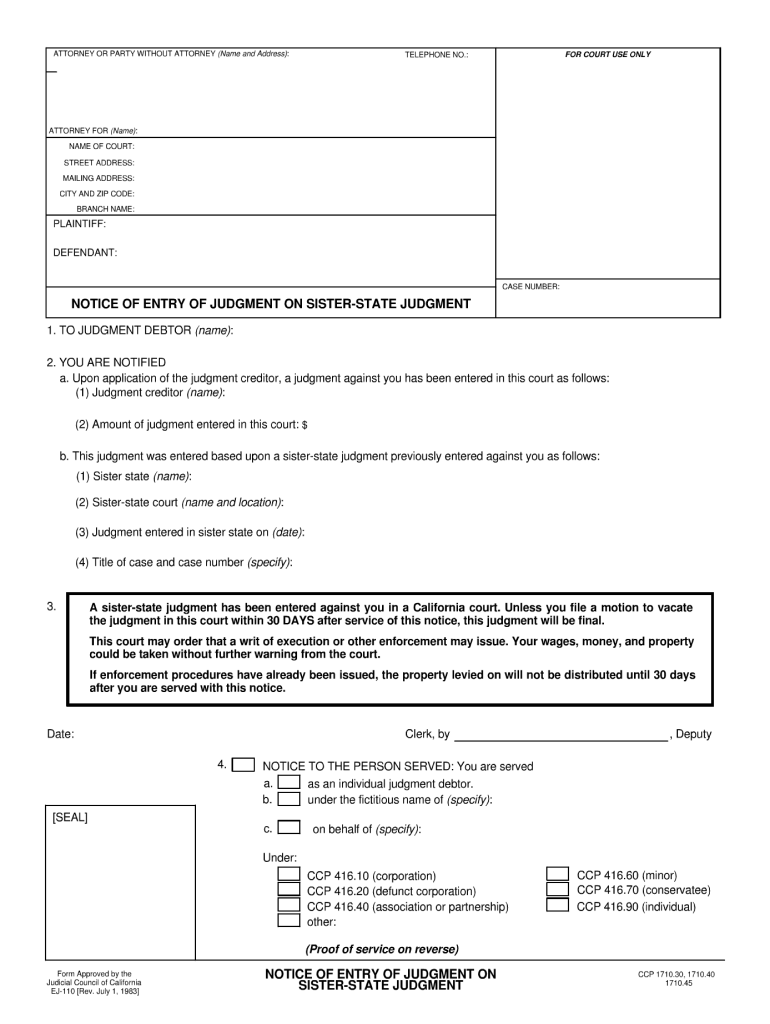
  2. Begin by filling in the 'Attorney or Party Without Attorney' section. Enter your name and address, along with your telephone number for contact purposes.
  3. In the 'For Court Use Only' section, provide details such as the name of the court, street address, mailing address, city and zip code, and branch name.
  4. Next, complete the 'Plaintiff' and 'Defendant' fields with the respective names involved in the case. Don't forget to include the case number for reference.
  5. Proceed to fill out the 'Notice of Entry of Judgment' section. Here you will need to specify details about the judgment debtor and judgment creditor, including amounts and relevant dates.
  6. Finally, ensure that all information is accurate before saving or printing your completed form. Use our platform's features to easily modify any sections if needed.

Start using our platform today for free to streamline your document editing experience!

See more ej 110 versions

We've got more versions of the ej 110 form. Select the right ej 110 version from the list and start editing it straight away!
Versions Form popularity Fillable & printable
1983 4.8 Satisfied (144 Votes)
be ready to get more

Complete this form in 5 minutes or less

Get form

Got questions?

We have answers to the most popular questions from our customers. If you can't find an answer to your question, please contact us.
Contact us

If you often work with documents kept in your Google Drive, DocHub is a perfect option for you to easily and quickly complete, modify, and approve them. This editor integrates well with Google services, so you can export your damages actual from your Google Drive to the editor without downloading and re-uploading it. Right-click on your file, select Open With → DocHub PDF Sign and Edit. In our editor, add and assign Signature Fields for all parties involved, then click on the Menu option above → Send → choose how you want to share your paperwork.

If your go-to electronic mail service is Gmail, you can easily integrate your DocHub editor in your work. Modify your judgment debtor with DocHub instruments and connect it to your drafts in Gmail. See how straightforward it is to exchange documents and work together with a swift PDF editing solution at hand.

To notify the court of a change of address for any other case-type, the Notice of Change of Address or Other Contact Information form (JC Form #MC-040) which may be found on the Judicial Council website at .courts.ca.gov, should be used. The mailing address of the defendant in the above-entitled case has changed.
Here are three other ways you can put pressure on the Debtor to pay your judgment. Place a lien on property. If the Judgment Debtor owns real estate, you can place a lien on their property. Suspend the debtors driver license. Place a lien on a business.
First, the creditor must file an Application for Entry of Judgment on Sister-State Judgment (Form EJ-105). The application must be filed in the debtors county of residence, pursuant to CCP 1710.20(b). Second, the creditor must submit a Notice of Entry of Sister-State Judgment (Form EJ-110).

Security and compliance

At DocHub, your data security is our priority. We follow HIPAA, SOC2, GDPR, and other standards, so you can work on your documents with confidence.

Learn more
ccpa2
pci-dss
gdpr-compliance
hipaa
soc-compliance
be ready to get more

Complete this form in 5 minutes or less

Get form

People also ask

A sister state judgment is not enforceable in California until it has been registered or authenticated as a California judgment in accordance with the Sister State Money-Judgments Act, California Code of Civil Procedure 1710.10 et seq., or by filing a lawsuit to establish the judgment in California.
An authenticated copy of the judgment is a certified document that confirms the validity of a courts decision, typically bearing the courts seal and signature of the clerk.
Request for Dismissal (CIV-110) Tell the court and the parties that you do not want to go forward with the case. You also need to use Notice of Entry of Dismissal and Proof of Service (form CIV-120).
If you do not pay the judgment within 30 days or file a Motion to Vacate the Judgment or Notice of Appeal the judgment creditor can sell your real property. The judgment creditor can get an order to sell your land, buildings, or home.
A judgment or order may be void if the issuing court lacked subject matter jurisdiction over the action, if the court lacked personal jurisdiction over the defendant, if the judgment or order granted relief that the court had no power to grant, or if the judgment was procured by fraud on the court.

Related links