01. Edit your reedy creek building department online
Type text, add images, blackout confidential details, add comments, highlights and more.
02. Sign it in a few clicks
Draw your signature, type it, upload its image, or use your mobile device as a signature pad.
03. Share your form with others
Send reedy creek permit via email, link, or fax. You can also download it, export it or print it out.
How to use or fill out permit tp building form with our platform
Ease of Setup
DocHub User Ratings on G2
Ease of Use
DocHub User Ratings on G2
Click ‘Get Form’ to open the permit tp building form in the editor.
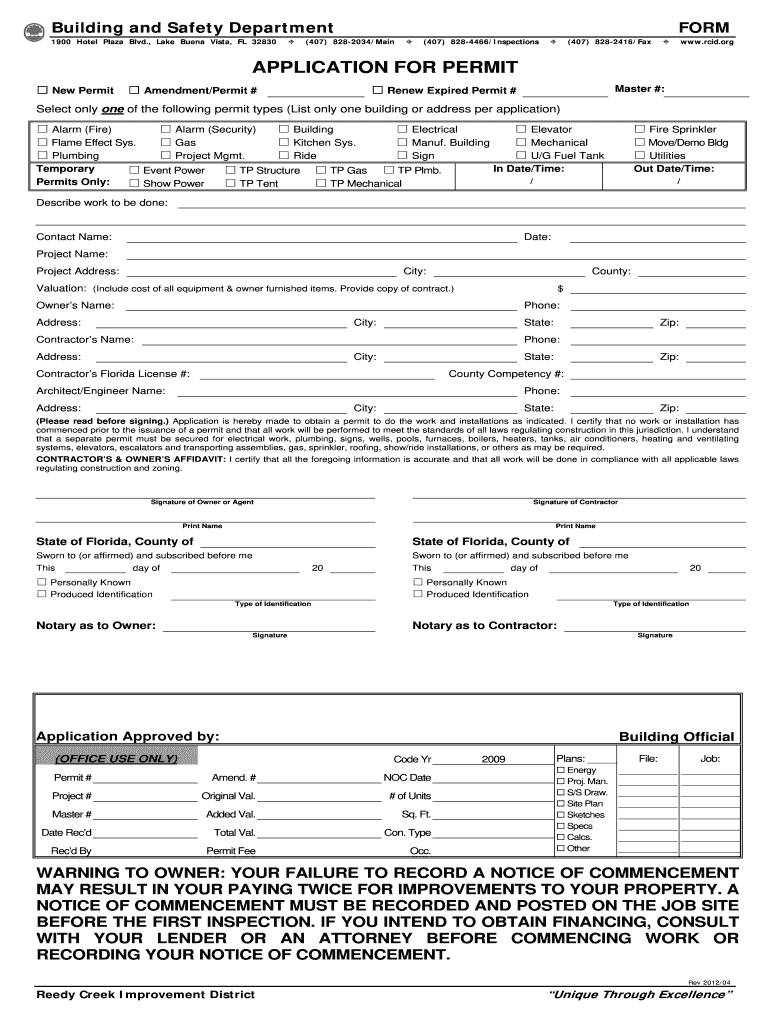
Select the type of application you are submitting by checking either 'New Permit', 'Amendment', or 'Renew Expired Permit'. Ensure you only select one option.
Choose the specific permit type from the list provided, such as 'Building', 'Electrical', or 'Plumbing'. Remember, only one building or address should be listed per application.
Fill in the project details including 'Project Name', 'Project Address', and contact information for both the owner and contractor. Accurate information is crucial for processing your application.
In the valuation section, include the total cost of all equipment and any owner-furnished items. Attach a copy of your contract if available.
Review the affidavit section carefully. By signing, you certify that all information is accurate and that work will comply with local laws. Ensure both owner and contractor signatures are included.
Start filling out your permit tp building form online for free today!
We've got more versions of the permit tp building form form. Select the right permit tp building form version from the list and start editing it straight away!
Okc building permitsOkc building permit searchOklahoma City permit Portal72 hour trip permit OklahomaOklahoma permits onlineOkc Building inspectionsOkc permits and inspectionsOkc permit Office
Security and compliance
At DocHub, your data security is our priority. We follow HIPAA, SOC2, GDPR, and other standards, so you can work on your documents with confidence.
Design and Construction Standards - Campus Services
The purpose of these Design and Construction Standards is to provide specific guidelines to architects, engineers, design consultants, and contractors forRead more
Cookie consent notice
This site uses cookies to enhance site navigation and personalize your experience.
By using this site you agree to our use of cookies as described in our Privacy Notice.
You can modify your selections by visiting our Cookie and Advertising Notice.