




Here's how it works

01. Edit your form online
Type text, add images, blackout confidential details, add comments, highlights and more.

02. Sign it in a few clicks
Draw your signature, type it, upload its image, or use your mobile device as a signature pad.

03. Share your form with others
Send it via email, link, or fax. You can also download it, export it or print it out.
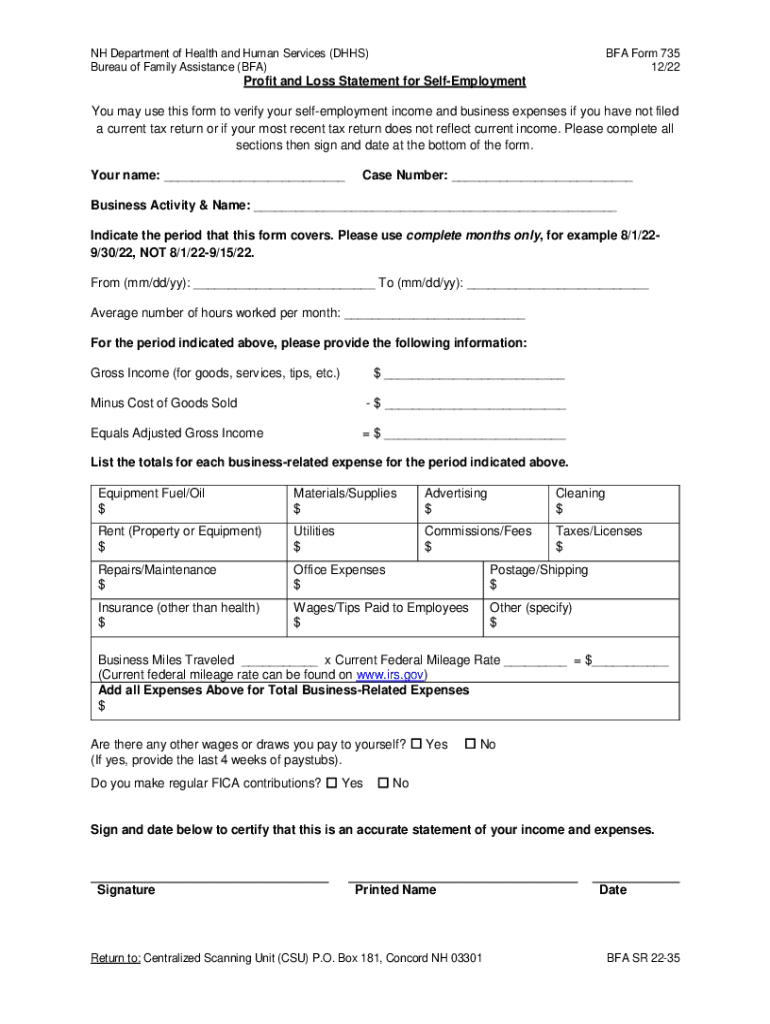
How to modify BFA Form 735 Profit and Loss Statement for Self-Employment in PDF format online

Adjusting paperwork with our comprehensive and user-friendly PDF editor is straightforward. Adhere to the instructions below to fill out BFA Form 735 Profit and Loss Statement for Self-Employment online quickly and easily:
- Log in to your account. Sign up with your credentials or create a free account to try the service prior to upgrading the subscription.
- Upload a document. Drag and drop the file from your device or import it from other services, like Google Drive, OneDrive, Dropbox, or an external link.
- Edit BFA Form 735 Profit and Loss Statement for Self-Employment. Easily add and highlight text, insert images, checkmarks, and icons, drop new fillable areas, and rearrange or remove pages from your paperwork.
- Get the BFA Form 735 Profit and Loss Statement for Self-Employment completed. Download your updated document, export it to the cloud, print it from the editor, or share it with other participants via a Shareable link or as an email attachment.
Make the most of DocHub, one of the most easy-to-use editors to rapidly manage your paperwork online!
Fill out BFA Form 735 Profit and Loss Statement for Self-Employment online
It's free
It's free
Security and compliance
At DocHub, your data security is our priority. We follow HIPAA, SOC2, GDPR, and other standards, so you can work on your documents with confidence.
Learn more


Related forms

ENG FORM 4264-R APPLICATION FOR SHORELINE USE PERMIT
The document is an application form for a Shoreline Use Permit, required by the U.S. Army Corps of Engineers. It collect ...

Restraint assessment include holistic assessment processes
The document is a Restraint Assessment form used to evaluate the need for physical restraints for a resident. It include ...

Contractor punch list
The document is a Project Punch List outlining defects and incompletions identified during a walk-through inspection of ...

Commercial lease agreement - MyFlorida
This Lease Agreement outlines the terms between the Landlord and the University of Florida Board of Trustees as Tenant f ...