




Here's how it works



How to use or fill out Wayne County Human Relations First Tier Form

- Click ‘Get Form’ to open it in the editor.
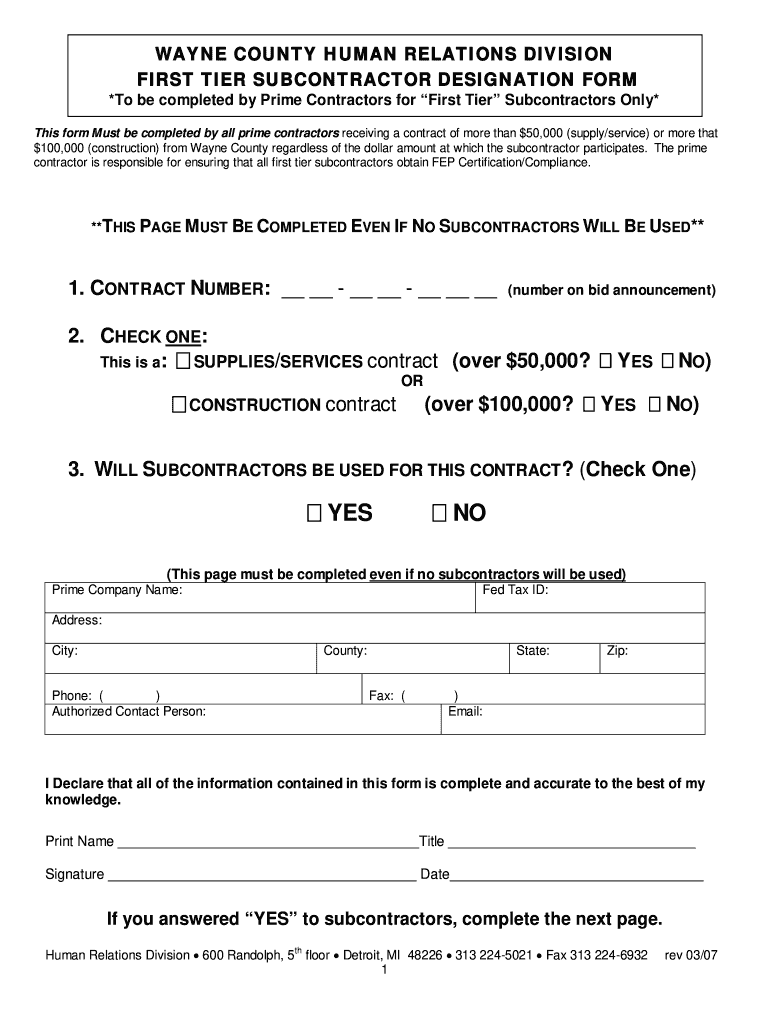
- Begin by entering the CONTRACT NUMBER at the top of the form. This is essential for identification and tracking.
- Next, check the appropriate box to indicate whether this is a SUPPLIES/SERVICES contract (over $50,000) or a CONSTRUCTION contract (over $100,000).
- Indicate if subcontractors will be used for this contract by checking 'YES' or 'NO'. Remember, this page must be completed even if no subcontractors are involved.
- Fill in your Prime Company Name, Fed Tax ID, Address, City, County, Phone number, Authorized Contact Person's details including State and Zip code.
- Finally, declare the accuracy of your information by printing your name, title, signing the form, and adding the date.
- If you answered 'YES' to using subcontractors, proceed to complete the SUBCONTRACTOR LIST section on the next page.
Start filling out your Wayne County Human Relations First Tier Form today using our platform for free!
It's free
See more wayne county human relations first tier form versions
Got questions?
How do I sign my wayne county human relations first tier form online?
Log in to your DocHub account and import your wayne county human relations first tier form to our editor using one of its upload options - from your device, cloud storage, secure URL, or your DocHub folders if you have already managed your form before. Open our editor, click the Sign button in the upper toolbar, and choose your signing method. You can upload a picture of your handwritten signature, draw it, type in your name, or utilize a QR code as an alternative.
How do you complete wayne county human relations first tier form online?
You may complete and eSign your wayne county human relations first tier form online, even on a tight deadline. All you need to access high quality editing instruments on any device is a DocHub account, which you can register in just a couple of moments. Once you register, add your file or find what you are searching for in our catalog, complete it utilizing the editing instruments you want, and put your electronic signature on it at the end.
Security and compliance
At DocHub, your data security is our priority. We follow HIPAA, SOC2, GDPR, and other standards, so you can work on your documents with confidence.
Learn more


