






Definition and Purpose of Shepherdbase
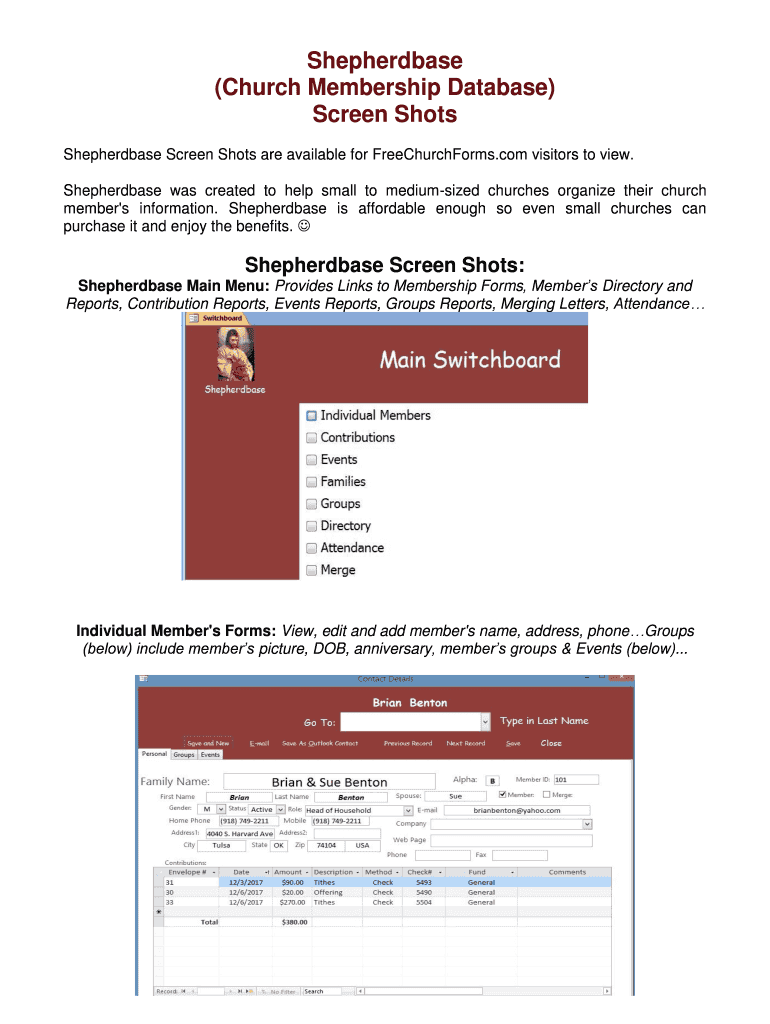
Shepherdbase is a specialized church membership database tailored for small to medium-sized churches. Its primary function is to enable these churches to organize member information, manage contributions, track events, and monitor attendance efficiently. As an affordable solution, it serves as a comprehensive tool for pastors, administrators, and church staff to streamline administrative tasks, ensuring that church operations run smoothly. The platform’s compatibility with Microsoft Office Access 2007 or later enhances its accessibility and ease of use, making it suitable for users with access to standard office software.
How to Use Shepherdbase Effectively
To maximize the benefits of Shepherdbase, users should start by importing existing data into the system. This includes setting up individual member profiles, which can contain personal information, attendance records, and historical contributions. Utilizing the event management feature allows churches to schedule and manage events seamlessly, sending out invitations and tracking RSVPs effectively. Additionally, users can generate contribution reports that provide insights into donation patterns, helping in financial planning and transparency.
Obtaining Shepherdbase
Shepherdbase is available for purchase and download through select distributors specializing in church management software. Churches interested in implementing this tool should verify that their systems meet the minimum requirements for running Microsoft Office Access 2007 or higher. Obtaining the software also involves acquiring the accompanying user guide, which provides step-by-step instructions for installation and setup. It's advisable to consult with IT professionals or the service provider's support team to ensure a smooth installation process.
Steps to Set Up and Complete Shepherdbase
- Install Microsoft Office Access: Ensure that your computer is equipped with Office Access 2007 or later.
- Download and Install Shepherdbase: Follow the installation wizard's instructions, entering necessary details to register the software.
- Create Member Profiles: Start by inputting essential member information into the database.
- Set Up Contribution Tracking: Define parameters for tracking financial contributions, ensuring records are accurate and up-to-date.
- Schedule Events: Use the event management feature to plan and coordinate upcoming church activities.
- Generate Reports: Regularly create contribution and attendance reports to evaluate church engagement and donations.
Key Elements of the Shepherdbase System
Shepherdbase includes several core components that facilitate efficient church management:
- Member Information Forms: These capture detailed personal data and the congregation's engagement history.
- Contribution Reports: Automated generation of financial reports offers clear insights into donation trends.
- Event Management: Tools for scheduling, tracking, and managing church events, ensuring high engagement.
- Communication Tools: Merging letters and automated messages facilitate ongoing community outreach and information dissemination.
Software Compatibility
Shepherdbase is designed to work seamlessly with Microsoft Office Access 2007 and newer versions. This compatibility ensures that users can leverage the full suite of features available in Access for managing databases efficiently. While the software is primarily built for Windows environments, churches running Mac OS or other operating systems may need to utilize virtual machines or compatibility layers to operate Microsoft Office applications.
Legal Use and Compliance
All information managed within Shepherdbase should comply with local and federal regulations regarding data privacy and electronic records. Churches must ensure that sensitive member information is protected and handled in accordance with legal standards. This includes safeguarding personal data from unauthorized access and using secure communication channels when sharing correspondence.
Real-World Examples and Use Cases
Many small to medium-sized churches across the United States have successfully integrated Shepherdbase into their operations, experiencing significant improvements in administrative efficiency. For example, a medium-sized church in Texas transitioned from manual record-keeping to Shepherdbase, resulting in a 40% reduction in administrative hours spent managing member data. This improved efficiency allowed church staff to focus more on community-building activities and personalized member engagement.
Digital vs. Paper Version
While Shepherdbase is primarily a digital solution, some churches may choose to maintain parallel paper records for redundancy, particularly in cases where digital storage options are limited. However, the digital version offers superior benefits, such as instant data retrieval, automated backups, and seamless integration with other office applications. Users are encouraged to take advantage of the digital format to reduce manual errors and enhance data accuracy.