




Here's how it works



How to use or fill out TEMPORARY NON-RESIDENT APPLICATION - ACLB - oregonaclb with our platform

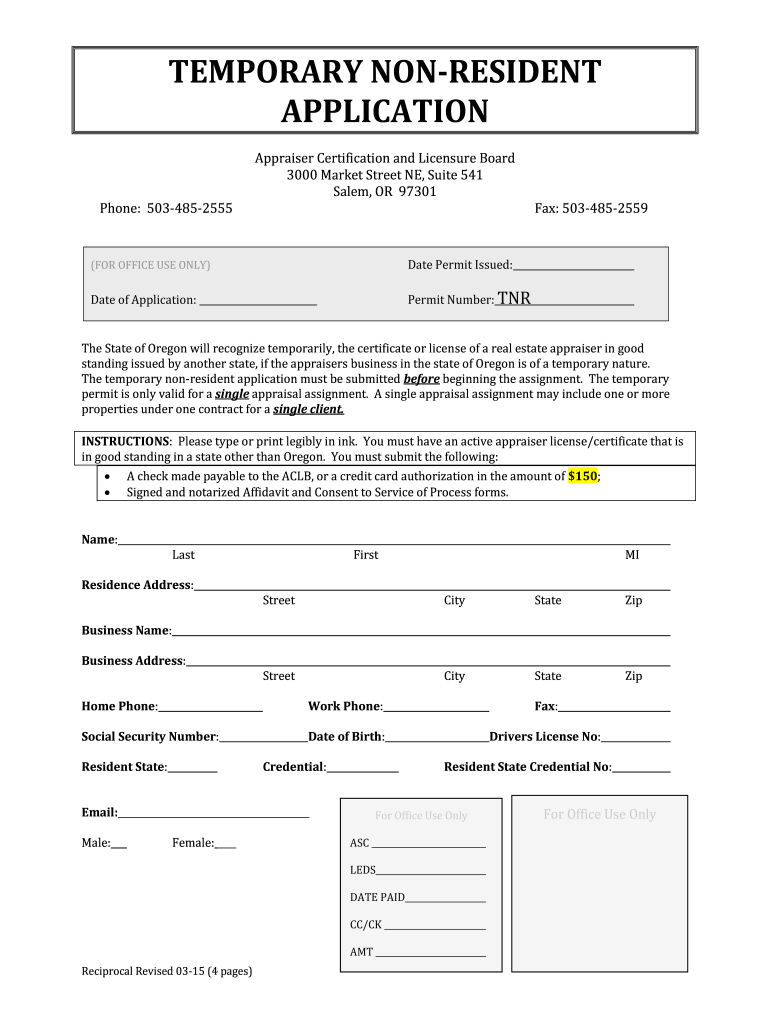
- Click ‘Get Form’ to open the TEMPORARY NON-RESIDENT APPLICATION in the editor.
- Begin by entering your personal information in the designated fields, including your name, residence address, and contact details. Ensure all entries are clear and legible.
- Fill out the business name and address sections accurately. This is crucial for processing your application effectively.
- Complete the questions regarding any criminal history or disciplinary actions. If you answer 'yes' to any question, prepare a written explanation and attach it as instructed.
- Provide detailed information about the appraisal assignment, including client name and property details. Use multiple lines if necessary to ensure clarity.
- Review the Affidavit of Application section carefully. Sign it in front of a notary public as required before submitting your application.
- Finally, ensure that all required attachments, such as payment authorization and notarized forms, are included before submission.
Start using our platform today to fill out your TEMPORARY NON-RESIDENT APPLICATION easily and for free!
It's free
See more TEMPORARY NON-RESIDENT APPLICATION - ACLB - oregonaclb versions
| Versions | Form popularity | Fillable & printable |
|---|---|---|
| 2015 | 4 Satisfied (53 Votes) |
Got questions?
Can I use DocHub to create legal eSignatures on my aclb oregon?
Yes, you can utilize DocHub for signing any business and private paperwork, including your aclb oregon. All eSignatures you create with our tool are legally binding and court-admissible, as DocHub complies with criteria required by ESIGN and UETA. Save your accomplished paperwork with a detailed Audit Trail if needed.
Do I need to install software to modify my certification of non residency?
When you edit your certification of non residency with DocHub, you only require a stable web connection and virtually any browser installed on your device. No need to install any third-party applications or research guides. Simply open a tab with DocHub, drag and drop your file, and edit it immediately.
Security and compliance
At DocHub, your data security is our priority. We follow HIPAA, SOC2, GDPR, and other standards, so you can work on your documents with confidence.
Learn more


