







Definition & Meaning
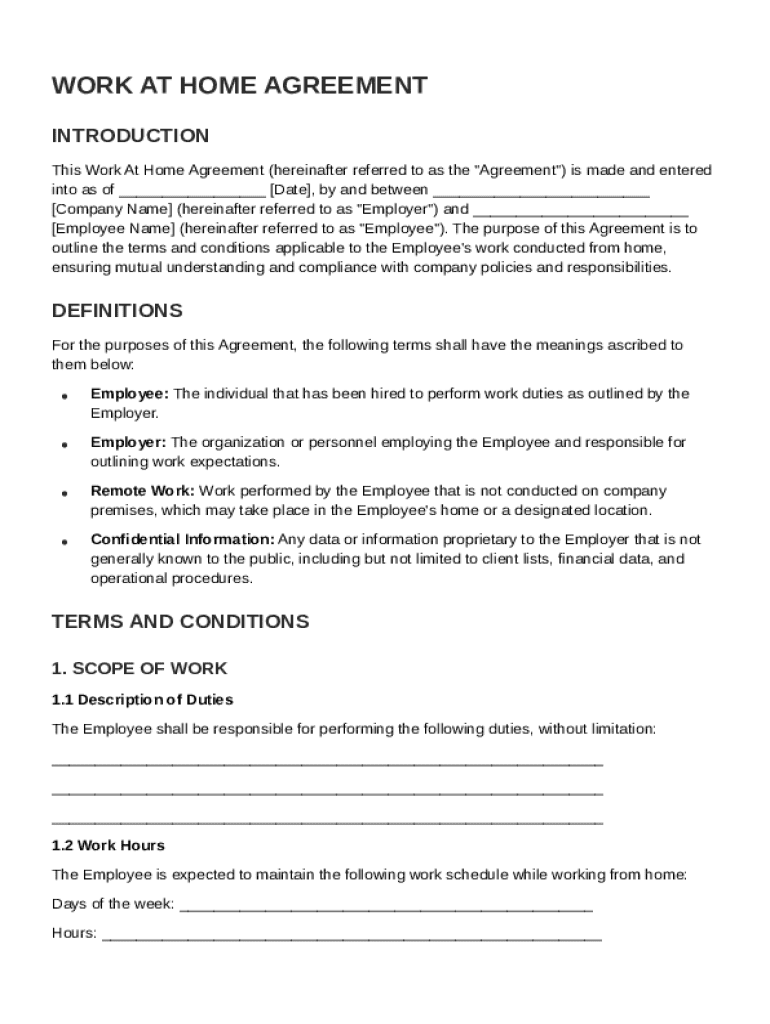
A Work At Home Agreement Template is a formal document that delineates the terms and conditions for remote work arrangements between employers and employees. This template serves a critical role in establishing mutual understanding regarding roles, responsibilities, work expectations, and performance standards. It is designed to ensure that both parties are aligned on key aspects such as communication methods, equipment use, confidentiality, and overall workplace conduct when an employee transitions to or engages in remote work.
This agreement typically includes clear definitions of the roles involved, detailing what the employee's tasks entail while working from home. It also outlines the expectations regarding work hours, productivity metrics, and the quality of output. By clearly delineating these elements, the agreement aims to minimize misunderstandings and foster a productive remote working environment.
Key Elements of the Work At Home Agreement Template
A comprehensive Work At Home Agreement Template addresses several key elements to ensure clarity and compliance.
-
Roles and Responsibilities: This section specifies the duties of both the employer and the employee, ensuring each party knows what is expected. For instance, the employer might be responsible for providing necessary equipment, while the employee is expected to maintain a certain level of productivity.
-
Work Expectations: Clearly outlines the working hours, deliverables, and performance metrics. It may specify core hours when the employee must be reachable or when meetings might occur.
-
Communication Protocols: Details preferred communication methods and frequency, such as daily check-ins via video calls or weekly progress reports via email.
-
Equipment and Expenses: Outlines responsibilities for providing and maintaining work equipment. It also covers expense reimbursement for internet or phone use directly related to work.
-
Confidentiality and Data Security: Specifies measures to protect sensitive company information when working outside the office, potentially including VPN use or secure data storage procedures.
-
Health and Safety: Addresses workplace safety standards in the home office, often requiring the employee to ensure their home working environment is physically safe and ergonomically sound.
Steps to Complete the Work At Home Agreement Template
Completing a Work At Home Agreement Template involves several detailed steps to ensure all necessary information is accurately captured.
-
Review Template Structure: Begin by familiarizing yourself with the template's layout and sections. Understanding the structure helps streamline the completion process.
-
Input Employee Information: Enter the employee's full name, position, and contact details. Ensure accuracy as this information forms the foundation of the agreement.
-
Define Work Scope and Expectations: Specify the role's tasks, expected working hours, and deliverables. Include specifics about the frequency and form of performance evaluations.
-
Outline Communication and Equipment Needs: Clearly write out the agreed-upon communication methods, the equipment provided, and any conditions for maintaining them.
-
Establish Confidentiality Terms: Incorporate clauses related to data protection and confidentiality. This might include signing a separate non-disclosure agreement if needed.
-
Final Review and Signatures: Carefully review the entire document for errors or omissions. Once confirmed, both the employer and employee should sign the document for it to be legally binding.
Important Terms Related to the Work At Home Agreement Template
Understanding the terminology within a Work At Home Agreement is crucial for both employers and employees.
-
Remote Work: Working from a location outside the traditional office setting, often from home.
-
Telecommuting: A similar term to remote work, emphasizing communication via telecommunication tools.
-
Performance Metrics: Measuring work performance based on predefined criteria, such as output quality or meeting deadlines.
-
Confidentiality: The obligation to protect sensitive information from unauthorized access or disclosure.
-
VPN (Virtual Private Network): A tool often used by remote workers to securely access company networks over the internet.
Legal Use of the Work At Home Agreement Template
The Work At Home Agreement Template is legally binding once signed by both parties, provided it is prepared according to legal standards.
-
Jurisdictional Compliance: Ensure the agreement complies with local and federal labor laws. This may involve adjusting terms to account for state-specific regulations or industry standards.
-
Amendment Clause: The agreement should include a clause outlining how amendments to the agreement can be made, highlighting the need for mutual consent.
-
Dispute Resolution: Include a section detailing how disputes will be resolved, often preferring mediation or arbitration over litigation.
-
Termination Conditions: Clearly define conditions under which the agreement can be terminated, whether due to performance issues, breach of terms, or operational requirements.
State-Specific Rules for the Work At Home Agreement Template
Each state may have specific rules governing telecommuting agreements. Some variations include:
-
Minimum Wage Laws: Ensure that compensation aligns with state-specific minimum wage laws, even when work is performed remotely.
-
Health and Safety Codes: Some states have defined guidelines for home office safety standards that must be adhered to.
-
Tax Implications: State tax codes may affect how remote work is taxed, especially if the employee works from a different state than the employer's office location.
-
Employment At-Will Variations: Understand how state laws impact at-will employment status and what protections employees have when working remotely.
Examples of Using the Work At Home Agreement Template
Practical application of the Work At Home Agreement Template can be diverse. For instance:
-
Tech Industry: A software developer in California might work from home three days a week, using the agreement to clarify expectations around deliverables and communication channels.
-
Customer Service Roles: Remote customer service representatives might use this agreement to establish their work shifts and maintain access to company resources while protecting client data.
-
Creative Professions: Graphic designers or content writers may rely on such an agreement to outline project deadlines and review cycles, ensuring remote collaboration remains effective and efficient.
Who Typically Uses the Work At Home Agreement Template
The Work At Home Agreement Template is utilized across various sectors where remote work is viable.
-
Small to Medium Enterprises (SMEs): Often use these agreements to maintain operational flexibility while ensuring productivity in remote settings.
-
Corporate Entities: Large organizations, particularly in technology or finance, use such templates to standardize remote work terms for a broad employee base.
-
Freelancers and Contractors: Individuals working remotely for multiple clients may employ personalized agreements to set clear expectations and protect their interests.

Software Compatibility
For those managing Work At Home Agreement Templates digitally, software compatibility is crucial.
-
DocHub: A popular choice for creating, editing, and signing digital documents with seamless integration with Google Drive and other cloud services.
-
Microsoft Word or Google Docs: Useful for drafting and formatting documents but may require conversion for digital signing.
-
PDF Editors: Essential for ensuring documents retain formatting and security if shared externally.
These tools collectively enable smooth creation, management, and distribution of Work At Home Agreements, maintaining compliance and efficiency throughout the process.




