




01. Edit your form online
Type text, add images, blackout confidential details, add comments, highlights and more.

Type text, add images, blackout confidential details, add comments, highlights and more.

Draw your signature, type it, upload its image, or use your mobile device as a signature pad.

Send it via email, link, or fax. You can also download it, export it or print it out.
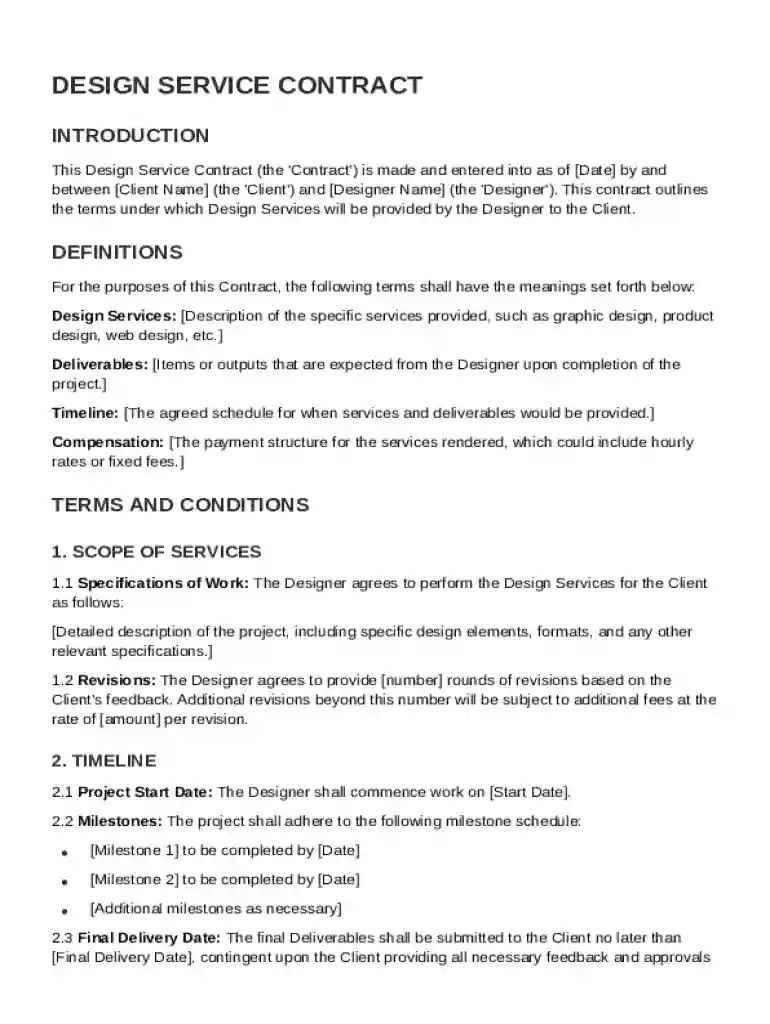
A Design Service Contract Template establishes the agreement between a client and a designer for providing design services. This contract template is a pre-structured document intended to facilitate the creation of these agreements quickly and accurately. It captures essential details of the arrangement, including definitions of key terms, which help both parties clearly understand their roles and the expectations involved. While using the template, it's crucial to tailor specific sections to match the unique needs of the project and parties involved.
The robustness of a Design Service Contract Template is defined by its components. Key elements typically include:
Scope of Services: Clearly outlines what design services will be provided. This prevents scope creep by defining limits and deliverables for the project.
Timelines: Sets forth the schedule for delivering services and achieving milestones. This ensures that both parties are aligned and can plan accordingly.
Compensation: Details the payment terms, including how and when payments are made, as well as any expenses that need to be reimbursed.
Responsibilities: Specifies both the designer's and client's obligations, offering a clear understanding of expectations.
Confidentiality: Protects sensitive information shared during the project. This is particularly critical when dealing with proprietary designs or unique concepts.
Intellectual Property Rights: Clarifies ownership of design work, allowing designers to retain or transfer rights depending on the agreement.
Termination Conditions: Defines under what circumstances the contract can be terminated, protecting both parties from unexpected changes.
Dispute Resolution Processes: Establishes methods for mediating and resolving conflicts that may arise during the project lifecycle.
Miscellaneous Provisions: Covers other contractual terms that might not fall into the primary categories but are necessary for a complete contract.
Using the template effectively involves a systematic approach:
Download the Template: Secure the design service contract template from a reliable provider such as DocHub, ensuring it aligns with legal standards and personal or business needs.
Custom Tailor the Document: Modify sections to accurately represent the particulars of the project. Change wording to reflect specific terms agreed upon by both parties.
Input Critical Details: Add the names, addresses, and contact information of both parties. Specify the scope of services, payment details, and timelines.
Review and Revise: Double-check the document for accuracy and completeness. Conduct a review with legal counsel if possible, to ensure legal compliance.
Discuss with Stakeholders: Present the customized contract to the client or designer, discussing any further modifications if needed, to reach mutual agreement.
Finalize and Sign: Once both parties agree on the terms, sign the contract electronically through platforms like DocHub for legally binding documentation.
The Design Service Contract Template is utilized by a range of individuals and organizations involved in design projects:
Freelance Designers: Independent graphic, fashion, or interior designers who need to formalize agreements with clients regarding various projects.
Design Agencies: Companies offering comprehensive design services employ these contracts to structure deals with clients.
Clients/Businesses: Entities hiring designers for their projects, ensuring expectations are clearly defined and managed.
Product Developers: Individuals involved in the development of new products requiring design input benefit from these clear terms.


The legal framework surrounding the use of a Design Service Contract Template assures compliance with applicable laws:
Adhering to the ESIGN Act: Electronic signatures used in the contract are legally enforceable under the U.S. ESIGN Act, making digital agreements as valid as paper contracts.
State-by-State Variations: While the basic structure remains constant, certain states may have specific legal requirements such as disclosure clauses, which should be incorporated.
Protection of Rights: Clearly defined intellectual property terms safeguard the ownership of design work, reinforcing protection against unauthorized use.
Following a step-by-step approach ensures thorough completion:
Collect Details: Gather all necessary information from the client and designer about the project, including objectives and deliverables.
Edit Template: Enter the collected information into the template, tailoring each section to meet the project's specifics.
Configure Terms: Set detailed terms for services, payments, timelines, and provisions related to confidentiality and intellectual property.
Validation: Engage legal expertise to verify the contract’s terms are legally sound and protect all parties involved.
Finalize Draft: Make necessary adjustments based on feedback and finalize the draft for approval by both parties.
Execute Agreement: Both parties should sign electronically or in person, formalizing the agreement and making it executable.
Here are common scenarios where this contract template is applied:
Graphic Design Projects: A freelancer creates brand design elements for a startup, detailing deliverables, payment milestones, and timeline.
Interior Design Services: An interior designer works on a residential project, using the contract to specify scope, materials procurement, and client obligations.
Web Design Contracts: A developer collaborates with a company looking to redesign their website, with the contract outlining content ownership and delivery schedules.
Product Design and Prototyping: An industrial designer contracts to develop a prototype for a new consumer product, detailing cost breakdowns and timelines.
State rules may influence certain elements of the contract:
California: May require additional clauses related to independent contractor relationships and intellectual property rights.
New York: Could enforce specific disclosure requirements for contracts over certain monetary thresholds.
Texas: Might necessitate inclusions regarding dispute resolution in line with state arbitration preferences.
Florida: May have specific stipulations regarding payment timelines to ensure compliance with state business and contract laws.
Understanding these requirements ensures the contract is tailored for compliance within the applicable jurisdiction.
At DocHub, your data security is our priority. We follow HIPAA, SOC2, GDPR, and other standards, so you can work on your documents with confidence.




Mar 24, 2022 Discover the essential components of a robust consulting agreement. Learn how to create a solid contract with these 12 key elements.
Design Professional represents to the Owner that the amount of Site Visits are adequate to perform all the obligations required of him by this Contract,


