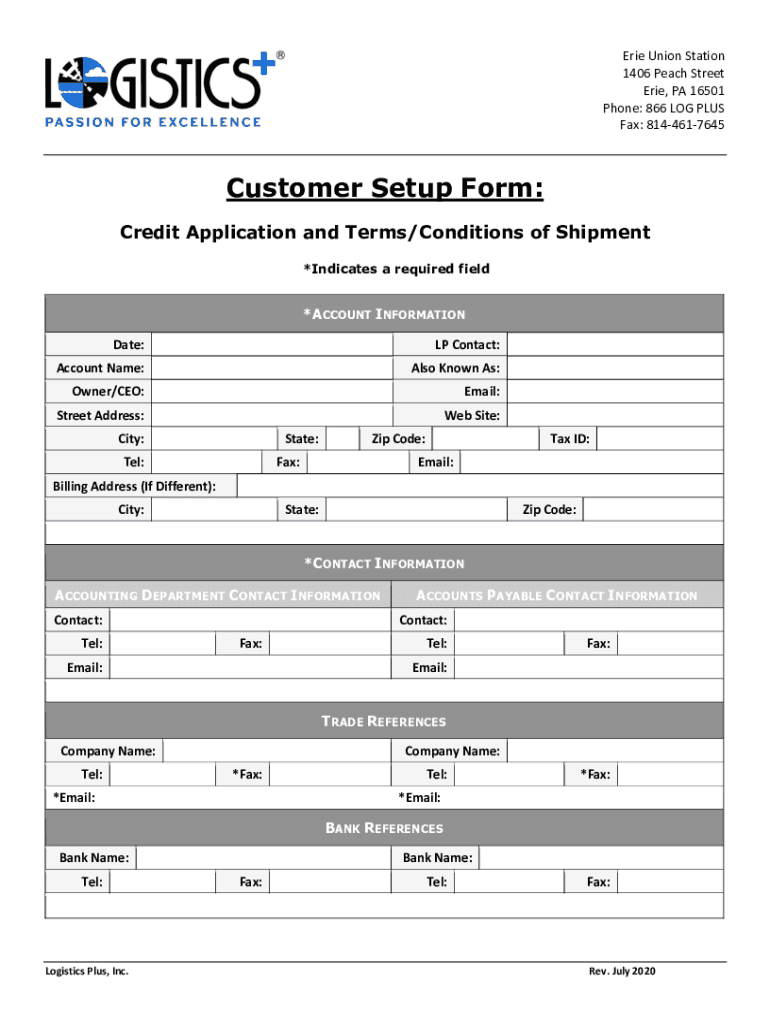
Fillable Online Customer Credit Application - Logistics Plus 2026

Get Form
Fillable Online Customer Credit Application - Logistics Plus Preview on Page 1

Here's how it works

01. Edit your form online
Type text, add images, blackout confidential details, add comments, highlights and more.
02. Sign it in a few clicks
Draw your signature, type it, upload its image, or use your mobile device as a signature pad.
03. Share your form with others
Send it via email, link, or fax. You can also download it, export it or print it out.

How to use or fill out Fillable Online Customer Credit Application - Logistics Plus

Form edit decoration
9.5
Ease of Setup
DocHub User Ratings on G2
9.0
Ease of Use
DocHub User Ratings on G2
  1. Click ‘Get Form’ to open it in the editor.
  2. Begin by filling out the *ACCOUNT INFORMATION* section. Enter the date, LP contact, account name, and any other required fields marked with an asterisk.
  3. If your billing address differs from your main address, complete the *Billing Address* section with the necessary details.
  4. Proceed to the *CONTACT INFORMATION* section. Here, provide details for both the accounting department and accounts payable contacts, ensuring all required fields are filled.
  5. In the *TRADE REFERENCES* section, list at least two companies along with their contact information. Make sure to include fax and email addresses where indicated.
  6. Next, fill in the *BANK REFERENCES* section with your bank's name and contact details.
  7. Review the *AGREEMENT TERMS*, ensuring you understand them before signing. Complete the signature section with your name, title, and date.
  8. Once completed, submit your form via email or fax as instructed at the bottom of the document.

Start using our platform today to streamline your credit application process for free!

See more Fillable Online Customer Credit Application - Logistics Plus versions

We've got more versions of the Fillable Online Customer Credit Application - Logistics Plus form. Select the right Fillable Online Customer Credit Application - Logistics Plus version from the list and start editing it straight away!
Versions Form popularity Fillable & printable
2020 4.4 Satisfied (52 Votes)
2013 4 Satisfied (43 Votes)
be ready to get more

Complete this form in 5 minutes or less

Get form

Got questions?

We have answers to the most popular questions from our customers. If you can't find an answer to your question, please contact us.
Contact us

Upload your Fillable Online Customer Credit Application - Logistics Plus to DocHub (after you’ve created an account for this). If you need to fill out fields in it, use appropriate tools from the upper pane. For example, add Signature Fields, assign each to a particular person, and click on Sign → Request signatures from others. Personalize your message for your recipients and click Send Request. You can also send your paperwork by fax or as a Signing link instead of using email (you’ll find these options by navigating to the Menu → Send)

Document editing with DocHub is equally convenient on desktop and mobile devices. You just need an internet browser to modify your Fillable Online Customer Credit Application - Logistics Plus on Android. Open our site and sign in to access the tools you require. Add your file and introduce your intended modifications. After that, you can keep your form in your file storage or send it out right away.

As the name indicates, a credit application form is a form that is filled out and completed by a business or a person who wants to apply for a line of credit with a lending institution.
A customer credit application form is a document that businesses and organizations use to apply for credit. It gathers important information about the applicants financial history, creditworthiness, and ability to repay the borrowed funds.
Applying for a credit card online is generally secure because of the security features issuers use to protect your personal information. Here are a few: Encryption: Trustworthy sites use Secure Sockets Layer encryption, indicated by a padlock icon and https at the beginning of the URL.

Security and compliance

At DocHub, your data security is our priority. We follow HIPAA, SOC2, GDPR, and other standards, so you can work on your documents with confidence.

Learn more
ccpa2
pci-dss
gdpr-compliance
hipaa
soc-compliance
be ready to get more

Complete this form in 5 minutes or less

Get form

People also ask

To streamline and safeguard your credit application process, follow these essential steps: Develop a credit policy: Gather Comprehensive Information: Check Customers Credit History: Set clear payment terms: Obtain Personal Guarantees: Verify References: Review Credit Limits Regularly: Communicate with Customers:

Related links