






Key Elements of the Standard Service Agreement Template
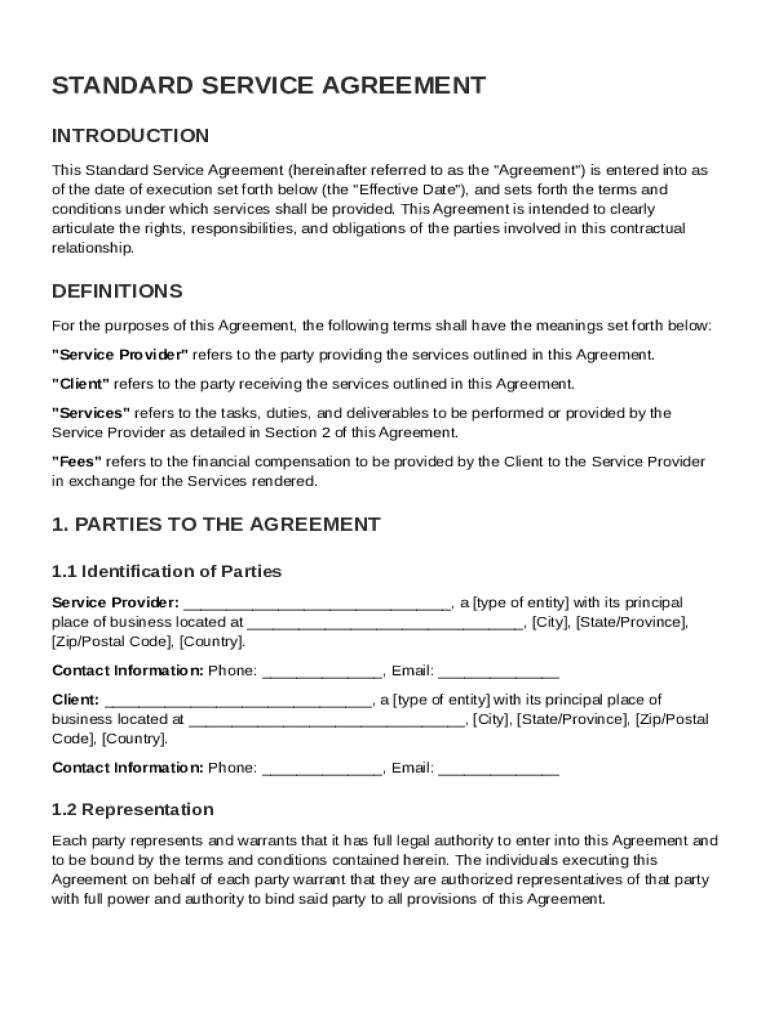
The Standard Service Agreement Template serves as a crucial document for defining the parameters of services provided between a Service Provider and a Client. Key elements include:
-
Roles and Responsibilities: Clearly outline what each party is expected to do. The Service Provider's obligations might include the scope of work, whereas the Client's responsibilities could involve providing necessary resources or approvals.
-
Payment Terms: Specify the payment schedule, amounts, and methods. Issues such as late payment penalties and conditions under which payment may be withheld need to be addressed.
-
Confidentiality: Define the confidential information and how it should be protected. This section often includes the duration for which confidentiality must be maintained after the agreement concludes.
-
Termination Conditions: Describe conditions under which the agreement can be prematurely terminated by either party, such as breach of contract or mutual agreement. This helps prevent disputes and provides a clear escape route if necessary.
-
Dispute Resolution: Lay out how disputes will be handled, whether through mediation, arbitration, or litigation. It's a crucial section that ensures issues are resolved smoothly without lengthy court proceedings.
-
Intellectual Property Rights: Establish rights concerning the ownership of intellectual property created during the agreement. This is particularly important in creative or technology-based industries.
-
Miscellaneous Provisions: Capture any additional terms such as amendments, waiver provisions, and governing laws. This ensures a comprehensive agreement that aligns with legal standards.
Steps to Complete the Standard Service Agreement Template
Completing the Standard Service Agreement Template involves several key steps:
-
Review the Requirements: Before filling out the template, understand the specific requirements of both parties involved. This involves a preliminary discussion to ensure all expectations are captured.
-
Draft the Agreement: Using the template, fill in the placeholders with specific details such as the names of the parties, services to be performed, and key deadlines.
-
Legal Review: It's wise to have the draft reviewed by legal counsel to ensure compliance with applicable laws and to identify any potential issues that might need clarification.
-
Negotiate Terms: Both parties should discuss and agree upon the specific terms of the contract. This negotiation includes aspects like payment schedules and service milestones.
-
Finalization: Once all parties agree on the terms, final adjustments are made to the template for accuracy.
-
Signing: The final step is the signing of the agreement. Electronic signatures can be used for convenience and should be legally binding under the ESIGN Act.
Legal Use of the Standard Service Agreement Template
The legal use of the Standard Service Agreement Template involves ensuring compliance with federal and state laws. This includes:
-
Adherence to the ESIGN Act: Ensure that electronic signatures are used in compliance with the federal ESIGN Act, which grants them the same legal standing as handwritten signatures.
-
State Laws: Verify that the template satisfies specific state laws that might impose additional requirements on service agreements.
-
Compliance with Industry Standards: Some industries have particular standards or certifications that need to be incorporated into the agreement to ensure legal compliance and operational credibility.
Business Types that Benefit Most from Standard Service Agreement Template
Several business types find the Standard Service Agreement Template immensely beneficial:
-
Freelancers and Consultants: Individuals offering specialized services often rely on this template to clearly outline the scope and payment for their work.
-
Technology and Software Companies: These organizations utilize service agreements to manage engagements involving software development, maintenance, and support.
-
Marketing Agencies: Clear agreements help define deliverables and timelines for marketing services, aligning client expectations with agency capabilities.
-
Professional Services Firms: Legal, financial, and accounting firms use standard service agreements to delineate the range of services rendered to clients.
Who Typically Uses the Standard Service Agreement Template
The Standard Service Agreement Template is widely used by:
-
Service Providers: Businesses or individuals providing services use this to formalize the terms of deliverables and payments with clients.
-
Clients: Clients utilize the template to ensure that the services they procure are well-defined and protected under agreed terms.
-
Legal Departments: They may apply such templates to ensure consistency and compliance in contracts across the organization.
-
Project Managers: PMs find these agreements useful in clarifying the scope and responsibilities of all parties involved in a project.


Software Compatibility for Standard Service Agreement Template
The Standard Service Agreement Template is usually compatible with various software tools:
-
DocHub: The template is easily editable in DocHub, which supports a variety of file formats like DOC, PDF, and more.
-
Microsoft Word: Ideal for creating and editing service agreements, due to its proven comprehensive document handling capabilities.
-
Google Drive: With integration in platforms like DocHub, Google Drive provides seamless storage and sharing.
-
Electronic Signature Software: Tools like DocuSign that comply with the ESIGN Act can be used for signing agreements electronically.
State-Specific Rules for the Standard Service Agreement Template
Different states in the U.S. may impose distinct rules affecting service agreements:
-
Non-Compete Clauses: Some states like California restrict the use of non-compete clauses in service agreements. Understanding these laws helps ensure compliance.
-
Employee Classification: States such as Massachusetts have specific definitions of an independent contractor which must align with how the agreement is structured.
-
Liability Clauses: States can differ on the enforceability of certain liability and indemnity clauses. The template should be adjusted accordingly to adhere to state-specific laws.
Examples of Using the Standard Service Agreement Template
Several scenarios illustrate the practical application of the template:
-
Software Development: A tech company outlines the scope of software development work with clear milestones and deadlines.
-
Consulting Services: A consultant and a firm agree on the terms of engagement, including onboarding processes and the duration of services.
-
Event Planning: An event planner and a client use the template to agree upon the logistics, payment, and deliverables for an upcoming event.
These examples highlight the flexibility and utility of the Standard Service Agreement Template in various professional settings.