






Definition and Meaning of Security Contract Template
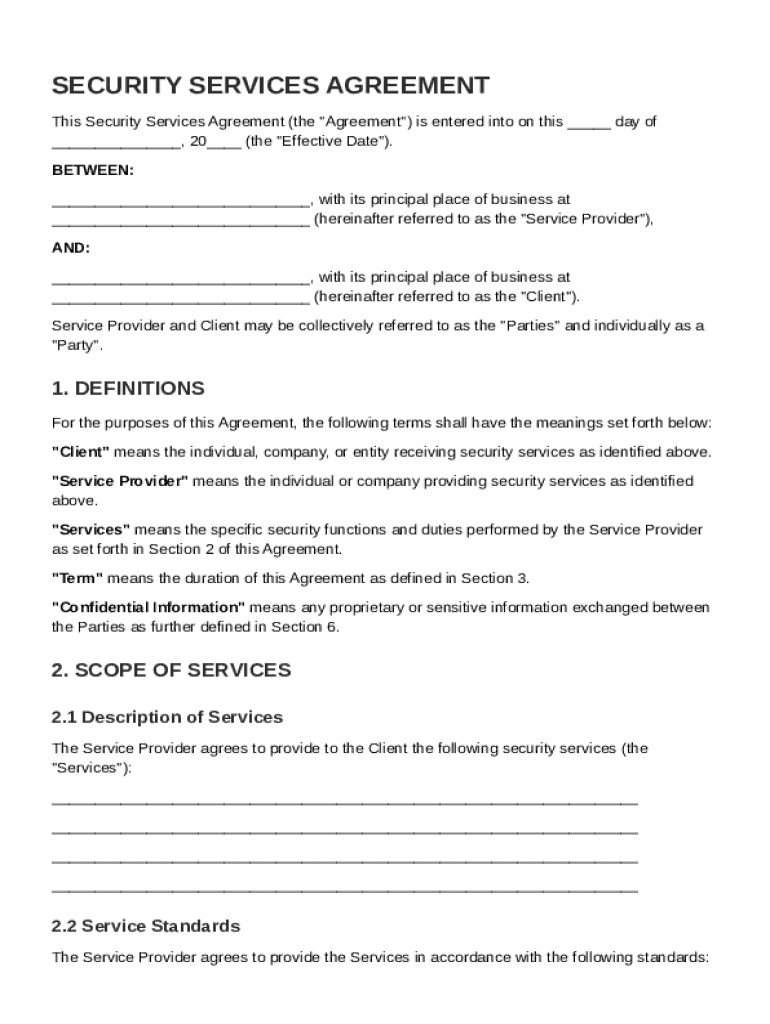
A Security Contract Template is designed to outline the terms under which security services are provided. It establishes an agreement between a security service provider and their client. This document specifies key elements such as the scope of services, payment terms, responsibilities, and other critical legal aspects. By clearly defining these components, both parties hold a mutual understanding of expectations and obligations, promoting a professional relationship that minimizes risks and disputes.
Essential Components
- Scope of Services: Clearly delineates what services the security provider will offer, such as patrol management, access control, and incident reporting.
- Payment Terms: Details the compensation structure, including frequency, method, and any clauses regarding late payments or adjustments.
- Responsibilities: Outlines the obligations of both parties, ensuring that roles are clearly understood and unambiguous.
Example Scenario
Consider a commercial property manager hiring a security firm to protect a mall. The Security Contract Template would specify patrol schedules, emergency response protocols, and interactions with law enforcement. This clarity helps both the mall and security firm manage expectations and achieve strategic goals.
Key Elements of the Security Contract Template
The structure of a Security Contract Template includes several pivotal sections. Each section holds specific content that aims to protect both parties legally and operationally.
Main Sections
- Definitions: Clarifies terminology used throughout the contract, such as "Client," "Provider," or "Services."
- Liability Limitations: Identifies the extent to which each party is liable for damages or breaches.
- Confidentiality Obligations: Ensures that sensitive information accessed by the security service provider is protected and not disclosed without authorization.
Practical Implications
By including robust confidentiality provisions, for instance, a company can feel more secure knowing that trade secrets or proprietary processes remain protected against any unintended disclosure.
Steps to Complete the Security Contract Template
Filling out a Security Contract Template involves attention to detail to protect both parties' interests. The process is designed to be thorough, ensuring that every aspect of service delivery is covered.
Step-by-Step Process
- Gather Necessary Information: Include both parties' details, service specifications, and objectives.
- Review Standard Clauses: Ensure that sections such as liabilities, disclosures, and indemnifications fit your context.
- Customize Service Sections: Modify service descriptions in the template to match specific needs and capabilities.
Edge Cases
In scenarios requiring high security, such as guarding an IT facility, additional clauses could cover digital data protection, reflecting specialized needs.
Legal Use of the Security Contract Template
Ensuring compliance with legal standards is critical for Security Contract Templates. These templates must adhere to local, state, and federal regulations to be enforceable.
Legality Considerations
- Compliance with Laws: Such as adherence to state-specific licensing requirements for security personnel.
- Governing Law: Specifies which jurisdiction’s laws will apply in the event of a dispute.
Case Study
In a recent negotiation between a museum and a security firm, the parties included clauses to comply with federal data protection standards, enhancing operational integrity.
Who Typically Uses the Security Contract Template
The Security Contract Template is a crucial tool for various business types and sectors. Different entities rely on these templates to formalize their security operations.


Typical Users
- Commercial Property Managers: To manage physical security across multiple sites.
- Events Coordinators: Ensures safety for attendees during large public gatherings.
- Corporate Entities: Establishes protocols for head office security.
Sector-Specific Use
Retail chains might use these contracts to enforce loss prevention measures, showcasing the template’s adaptability to specialized needs.
How to Use the Security Contract Template
Utilizing the Security Contract Template efficiently can streamline agreement processes and enhance protections.
Implementation Strategies
- Incorporate Collaboratively: Involve legal advisers and stakeholders when finalizing the contract to address all necessary aspects.
- Regular Updates: Periodically review and update the contract to reflect service changes or legal amendments.
Example in Practice
When new technology, like drones for perimeter security, is introduced, contracts might need amendments—demonstrating the template’s dynamic nature in operational contexts.
Examples of Using the Security Contract Template
Several scenarios demonstrate how businesses apply this template to secure their assets effectively.
Real-World Applications
- Corporate Offices: Contracting security teams to enforce access control systems.
- Public Infrastructure: Hiring patrol services for transit systems.
- Private Residences: Engaging security personnel to monitor private estates, ensuring personal safety, and protecting valuables.
Practical Outcomes
A utility company partnered with a security firm to monitor remote substations, using the contract to ensure compliance with energy sector security standards.
State-Specific Rules for the Security Contract Template
Different states in the United States can have varying requirements affecting the execution of security contracts.
Navigating State Differences
- Licensing Requirements: Variations exist regarding the credentials required for security personnel.
- Employment Laws: Include specific local provisions around labor practices and wage standards.
Impact of Local Regulations
For example, California might have more stringent regulations regarding the use of armed guards, necessitating tailored clauses within the security contract template.
Important Terms Related to Security Contract Template
Understanding key terminologies within the Security Contract Template is vital for accurate application and compliance.
Essential Definitions
- Indemnification: Protects one party from liability due to the other party's actions.
- Force Majeure: Refers to unforeseeable circumstances that prevent fulfilling a contract.
Practical Clarifications
The term “Indemnification” often surfaces when discussing liability coverage, ensuring both parties understand their protections and responsibilities accurately.
Versions or Alternatives to the Security Contract Template
Security contracts come in various versions, each suited for different scenarios and organizational requirements.
Variations and Alternatives
- Standard Contracts: Fit for general security services with no special requirements.
- Customized Agreements: Tailored for specialized services, like cybersecurity measures for IT firms.
Fit for Purpose
A small business might opt for a standard contract, while larger enterprises with complex security needs would prefer a customized template, addressing specific challenges and requirements.