







Definition & Meaning
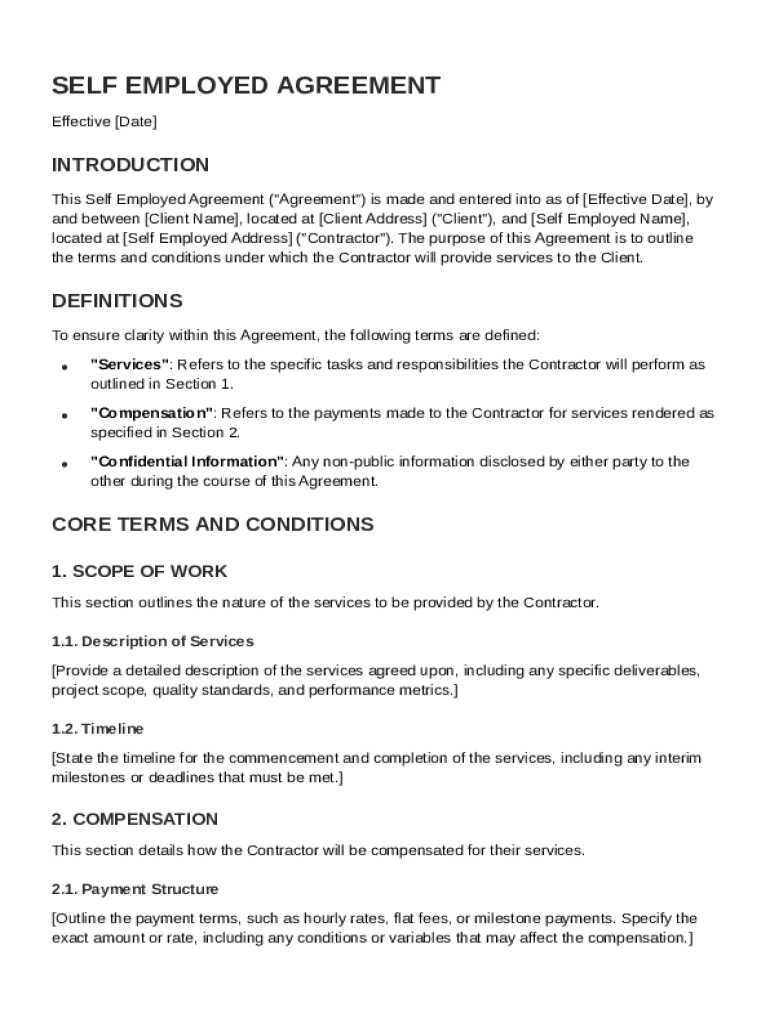
The Self Employed Agreement Template is a legal document that outlines the relationship between a client and a contractor who is self-employed. The agreement establishes clear terms and conditions under which services are provided, ensuring a mutual understanding between both parties. It includes provisions related to the scope of work, compensation structure, and confidentiality obligations. This form acts as a safeguard to clarify the roles and responsibilities and ensures that both client and contractor have a documented reference of their agreement.
Key Elements of the Self Employed Agreement Template
The template contains several critical components that are essential for defining the relationship and obligations between the client and contractor.
- Definitions: Clearly identifies the terminology used within the agreement to avoid misunderstandings.
- Scope of Work: Specifies the services the contractor is expected to perform, detailing the tasks, deliverables, and expectations.
- Compensation Details: Outlines the payment structure, including rates, payment schedule, and any additional expenses that may be reimbursed.
- Independent Contractor Status: Affirms the status of the contractor as an independent entity, not an employee, including a waiver of employment rights.
- Confidentiality Obligations: Stipulates the conditions under which information shared during the engagement must be kept confidential.
Steps to Complete the Self Employed Agreement Template
- Identification of Parties: Begin by filling in the names and contact details of both the client and the contractor.
- Define the Scope of Work: Provide a detailed description of the services to be delivered, including timeframes and project milestones.
- Outline Compensation Terms: Specify the amount and method of payment, any retainers or deposits, and the schedule for disbursement.
- Include Confidentiality Clauses: Ensure privacy terms are clearly articulated to protect sensitive information.
- Review and Execute: Both parties should review the completed document thoroughly before signing to acknowledge acceptance of all terms.
Legal Use of the Self Employed Agreement Template
This document serves as a contract that is legally binding under the jurisdiction specified within the template. It adheres to legal standards pertinent to independent contractor agreements, thereby providing a framework for reinforcing business relationships. Understanding the legal implications, including governing law and dispute resolution processes, ensures both parties are aware of their rights and remedies under the agreement.
Important Terms Related to Self Employed Agreement Template
Several terms are integral to understanding this template fully:
- Intellectual Property Rights: Stipulates ownership and usage rights regarding creations or services delivered under the contract.
- Termination Conditions: Enumerates the conditions under which the agreement can be annulled by either party.
- Indemnification: Specifies scenarios where parties agree to protect each other from liability or legal action.
- Notice Procedures: Details how communications regarding modifications or termination are to be made.
Who Typically Uses the Self Employed Agreement Template
This agreement is primarily utilized by independent contractors and clients who engage their services on a contract basis. It is commonly used by freelancers in various industries, such as graphic design, consulting, IT services, and writing. Clients range from individuals to large corporations seeking specialized skills without the need for permanent employment positions.

State-specific Rules for the Self Employed Agreement Template
In the United States, the legal enforceability of a Self Employed Agreement may vary by state, influenced by local labor laws and regulations. It’s essential for users to ensure that their agreement complies with specific state requirements regarding worker classification, such as those outlined in California’s AB5 law or the Fair Labor Standards Act. Legal counsel is often recommended to navigate state-specific intricacies effectively.
Examples of Using the Self Employed Agreement Template
A marketing agency might use this agreement to hire a freelance graphic designer for a rebranding project. The template provides a structured approach to define project timelines and payment terms while protecting proprietary brand information shared during the project. Another example could be an IT consultant providing cybersecurity audits for a corporation, necessitating a clear agreement on deliverables and confidentiality clauses.
Software Compatibility
DocHub supports the use of the Self Employed Agreement Template across various formats, including PDF, DOC, and TXT, ensuring compatibility with popular software like Microsoft Word or Adobe Acrobat. This flexibility facilitates hassle-free editing of the contract as needed, directly within the DocHub editor or other compatible software applications.




