






Definition & Meaning
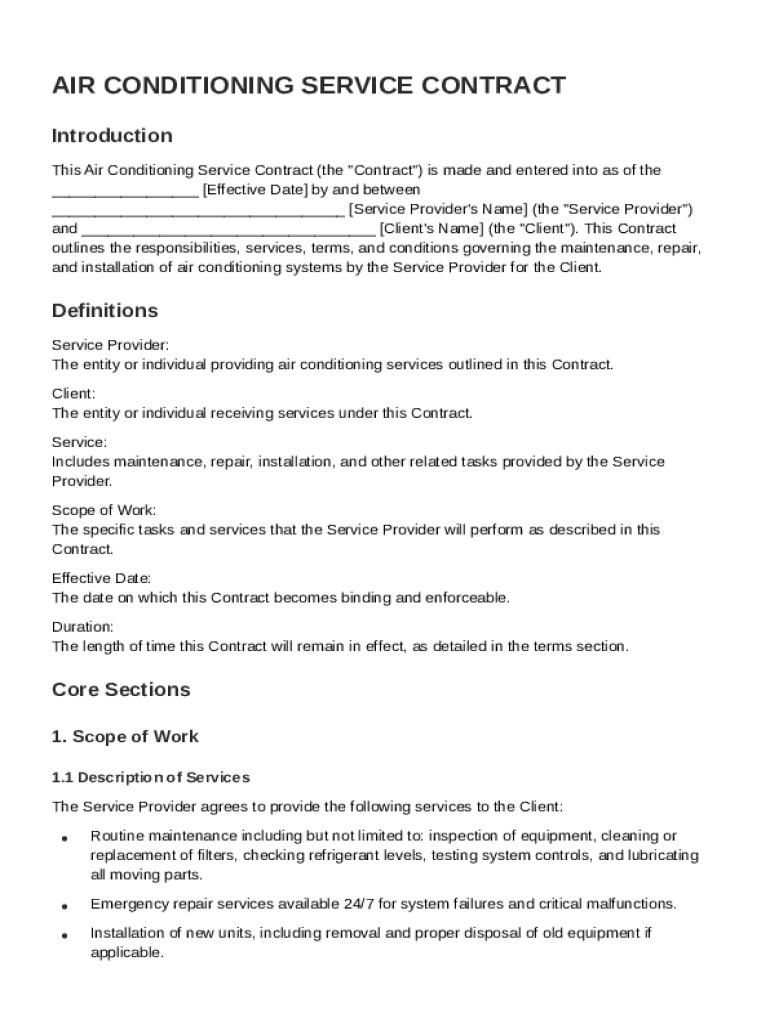
The "Air Condition Service Contract Template" is a legal document that establishes an agreement between a service provider and a client for maintaining, repairing, and installing air conditioning systems. This template serves as a blueprint for outlining the rights and responsibilities of each party to ensure smooth operations and clear communication. By defining the scope of work, payment terms, and other essential conditions, this agreement helps prevent misunderstandings and disputes. It is particularly beneficial for businesses in the HVAC industry and clients seeking regular maintenance and service for their air conditioning units.
Key Elements of the Air Condition Service Contract Template
Scope of Work
The scope of work is a critical component of the contract template, detailing specific tasks the service provider agrees to perform. This may include routine maintenance, emergency repairs, and system installations. By clearly outlining these tasks, both parties can ensure their expectations are aligned, reducing the potential for disputes.
Payment Terms
Payment terms are crucial in defining the financial aspects of the agreement. These can include the cost of services, payment schedule, and acceptable payment methods. Some contracts might require a deposit, while others may outline terms for installment payments. Understanding these terms helps the client prepare financially and ensures the service provider receives timely compensation.
Responsibilities of Each Party
Both the client and service provider have responsibilities that must be fulfilled for the contract to run smoothly. The service provider is typically responsible for delivering services as described, while the client must ensure timely payments and provide access to the premises. Clearly stating these responsibilities in the contract template helps maintain accountability.
Steps to Complete the Air Condition Service Contract Template
-
Review the Template: Begin by thoroughly reviewing the contract template to understand its structure and requirements.
-
Fill Out Client and Provider Information: Enter the names, addresses, and contact details of both the client and the service provider.
-
Specify the Scope of Work: Clearly outline the services to be provided, including any specific maintenance tasks or repair work.
-
Detail Payment Terms: Specify the agreed-upon payment schedule and methods, including any upfront payments or penalties for late payments.
-
Define Responsibilities: Document the responsibilities of both parties, including access requirements for the service provider and obligations of the client.
-
Include Legal Provisions: Add any necessary legal clauses, such as confidentiality agreements and dispute resolution procedures, to protect both parties.
-
Review and Sign: Once the template is filled out, both parties should carefully review it for accuracy and completeness before signing.
Who Typically Uses the Air Condition Service Contract Template
This template is commonly used by HVAC companies, independent technicians, and businesses or individuals requiring regular air conditioning services. It is especially useful for:
- HVAC Contractors: For establishing clear terms with clients for ongoing or one-time services.
- Property Managers: Who manage buildings and require regular maintenance contracts with service providers.
- Residential Clients: Seeking regular service agreements to maintain home air conditioning systems.


Legal Use of the Air Condition Service Contract Template
Compliance with U.S. Laws
In the United States, service contracts like the Air Condition Service Contract Template must comply with federal and state regulations to be legally binding. These contracts generally fall under the jurisdiction of the Uniform Commercial Code (UCC), which governs commercial transactions.
Confidentiality and Governing Law
Confidentiality provisions might be included to protect proprietary information shared during the service. The contract should also specify the governing law, which is typically the state law where the client or service provider is located.
State-Specific Rules for the Air Condition Service Contract Template
Variation in Terms by State
Certain states may have specific requirements for service contracts. For instance, terms concerning consumer protection or warranty obligations can differ.
- California: In California, service contracts must comply with the state's consumer protection laws, requiring clear disclosure of service terms and conditions.
- Texas: Texas may have particular licensing requirements for HVAC contractors affecting how contracts are drafted.
Understanding these state-specific rules ensures the contract remains compliant and enforceable.
Software Compatibility
The Air Condition Service Contract Template is designed to be versatile and compatible with various document editing software. Users can conveniently edit the template using platforms like Microsoft Word, Google Docs, and DocHub, easing the process of customization and allowing for electronic signing and storage.
DocHub Features
DocHub offers features that enhance the usability of the contract template, such as:
- Fillable Fields: Streamline data input with easy-to-use fillable text boxes and signature fields.
- Secure Sharing: With tools for password protection and document encryption, it provides secure document sharing options with clients.
- Integration with Google Workspace: Seamlessly import and export contract documents to and from Google Drive, enhancing workflow efficiency.
With this compatibility, users benefit from flexibility and ease of use when managing their service contracts digitally.