
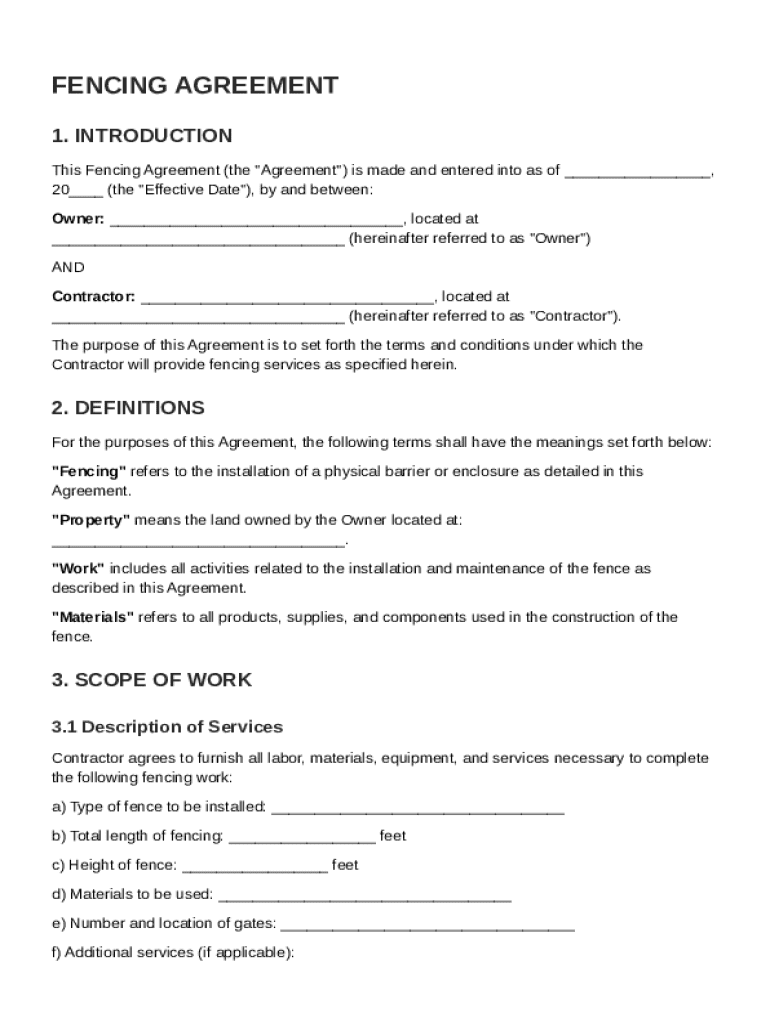







Definition & Meaning
The Fencing Agreement Template is a structured document that outlines the terms and conditions between an Owner and a Contractor for the installation of fencing services. This agreement ensures transparency by clearly defining essential elements such as the scope of work, responsibilities, payment terms, warranties, and dispute resolution procedures. With this template, both parties involved can have a mutual understanding, reducing the likelihood of disputes and misunderstandings during the project.
Scope of Work
- Detailed Description: The template includes a section that explicitly describes the nature of the fencing project, including materials, dimensions, and installation techniques.
- Timelines and Milestones: Clearly defined timelines ensure that the project progresses on schedule. Milestones may be used to track specific phases of the installation.
- Exclusions and Clarifications: Outlining what is not included in the project prevents misconceptions. For instance, landscaping around the new fence may not be covered.
Key Elements of the Fencing Agreement Template
The template includes critical components that safeguard the interests of both parties and provide clear guidelines for project execution.
Payment Terms
- Payment Schedule: The agreement details when payments are due, whether as a lump sum or in installments, and delineates what portion of the payment is to be made upfront.
- Payment Methods: Accepted forms of payment, such as checks, wire transfers, or credit card payments, are specified to avoid ambiguity.
Responsibilities and Obligations
- Owner's Duties: The owner might need to prepare the site or ensure that necessary permits are obtained before the project commences.
- Contractor's Duties: Includes providing all materials and personnel necessary to complete the project as described in the agreement.
Legal Use of the Fencing Agreement Template
The Fencing Agreement Template adheres to legal standards, offering security to both parties through enforceable clauses.
Warranties and Guarantees
- Material and Workmanship Warranties: The contractor may offer a warranty covering materials and workmanship, typically lasting between one and five years.
- Exclusions: Items not covered under the warranty, such as damage due to natural disasters or owner modification, are also clarified.
Indemnification Clauses
- Protection Against Liability: One party agrees to compensate the other for certain costs and damages, protecting against legal claims from third parties during or after the project.
Steps to Complete the Fencing Agreement Template
Completing the Fencing Agreement Template involves several steps to ensure that it accurately reflects the agreement between the Owner and the Contractor.
- Review Template Sections: Familiarize yourself with all sections of the template to understand what information is required.
- Provide Detailed Information: Accurately fill out sections pertaining to the scope of work, payment terms, and responsibilities.
- Include Legal Provisions: Ensure all necessary legal language is present to address warranties, indemnification, and dispute resolution.
- Final Review: Double-check the completed form for accuracy and completeness before signing.
Examples of Using the Fencing Agreement Template
The template serves various scenarios and can be adapted to fit specific fencing projects.
Residential Fencing Projects
- Example: A homeowner contracts a local company to install a wooden privacy fence, specifying treated wood and a height of six feet. The template ensures all details are captured, minimizing risk of project overruns.
Commercial Fencing Projects
- Example: A business needs a security fence around its property, requiring specific materials and installation standards. The template ensures precise requirements are communicated and met.
Important Terms Related to Fencing Agreement Template
Understanding the terminology within the Fencing Agreement Template is crucial for clear communication and comprehension.
Common Terms
- "Contractor": The entity responsible for completing the work as described in the agreement.
- "Owner": The individual or business commissioning the fencing project.
- "Retention": A sum withheld from the final payment pending completion of the work to the required standard.
State-Specific Rules for the Fencing Agreement Template
Different states in the U.S. may have varying regulations and requirements related to fencing contracts.
State Variations
- Permit Requirements: Some states require specific permits prior to the installation of fencing, which should be obtained in advance.
- Zoning Laws: Local zoning laws might dictate the types of materials allowed or maximum fence heights.
Why Use a Fencing Agreement Template
Utilizing a Fencing Agreement Template protects all parties by establishing clear expectations and legal assurances.
Benefits
- Clarity and Protection: Detailed clauses protect both parties if disputes arise.
- Professionalism: A formal agreement demonstrates professionalism, potentially enhancing business relationships.
Real-World Scenarios
- Conflict Avoidance: By defining responsibilities and project specifics in advance, the agreement helps prevent disputes over unexpected costs or project scope changes.
Versions or Alternatives to the Fencing Agreement Template
There are different templates and versions available that may cater to specific needs or project types.
Variations
- Customizable Templates: Some templates allow customization to accommodate unique project requirements or state-specific regulations.
- Industry-Specific Versions: Templates for specific industries, like agriculture or pool installation, include tailored clauses.




