Definition and Purpose of the Outsource Contract Template
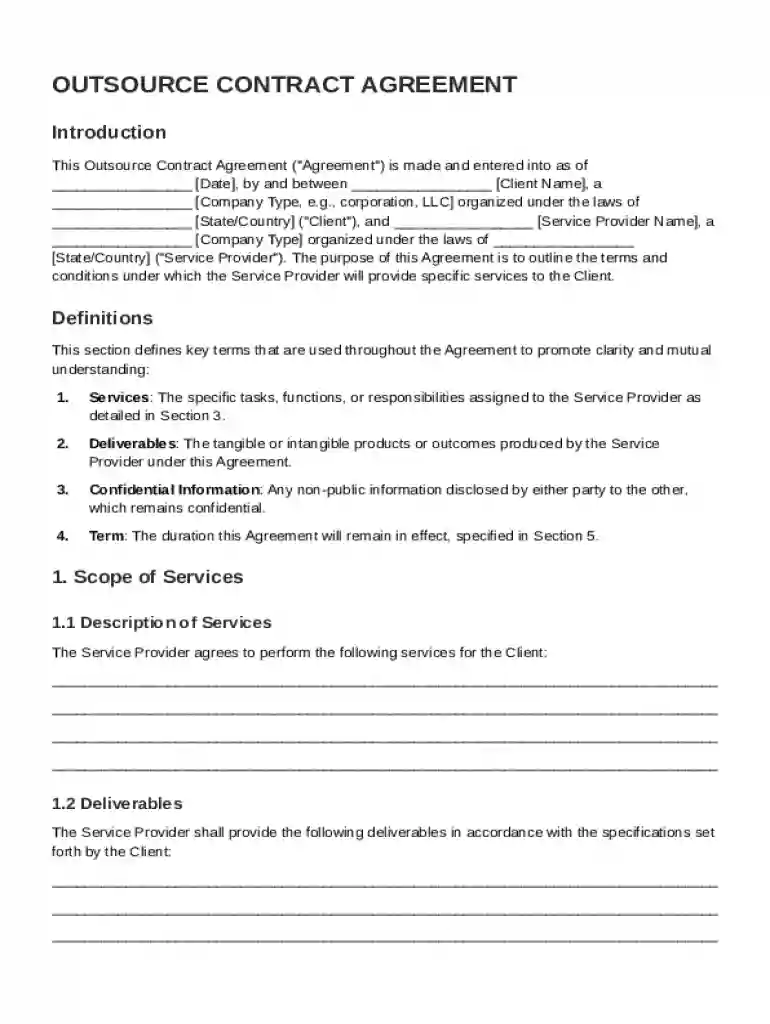
An Outsource Contract Template serves as a standardized document to outline the terms and obligations between a client and a service provider. This template covers vital components such as service definitions, scope of work, compensation, and confidentiality obligations. The contract is designed to facilitate clear communication and mutual understanding, ensuring each party knows their roles and responsibilities. It acts as a legally binding agreement, lending confidence and clarity to the outsourcing relationship.
Key Elements within the Template
The template includes multiple elements that structure the outsourcing agreement:
- Service Definitions: Clarifies the services being outsourced, ensuring both parties have a mutual understanding of the project's scope.
- Compensation Details: Details the payment structure, including rates, billing cycles, and payment methods.
- Confidentiality Obligations: Sets protocols for protecting proprietary information, ensuring data security during and after the partnership.
- Termination Conditions: Outlines scenarios that might result in early termination, along with penalties or procedures for such actions.
- Indemnification Clauses: Protects parties from legal responsibility for third-party claims.
How to Use the Outsource Contract Template
Utilizing the Outsource Contract Template involves a systematic process aligned with both parties' expectations and legal standards. The document should be downloaded or accessed from a reputable source, like a document management platform, where it can be easily customized to fit the specific needs of the parties involved.
- Review the Template: Familiarize yourself with the structure and content of the template.
- Customize to Fit Needs: Modify sections such as names, contact information, payment amounts, and service descriptions.
- Include Specific Clauses: Add any industry-specific or project-specific clauses as necessary for clarity or compliance.
- Review Legal Compliance: Collaborate with legal counsel to ensure all terms comply with prevailing laws and regulations.
- Final Review and Signatures: Conduct a final review to make sure all details are accurate before both parties sign to formalize the agreement.
Important Terms Related to the Outsource Contract Template
Understanding specific terminology within the template ensures effective communication and minimizes disputes.
- Scope of Work (SOW): A detailed description of the tasks and deliverables required from the service provider.
- Deliverables: Tangible or intangible outputs that the provider is expected to deliver by project completion.
- Force Majeure: A clause that frees both parties from liability or obligation when events beyond their control prevent fulfilling the contract.
- Arbitration: A method for resolving disputes outside of the judicial system.
- Intellectual Property Rights: Defines ownership and usage rights concerning creations or inventions that result from the service provided.
Steps to Complete the Outsource Contract Template
The process to complete the Outsource Contract Template involves precise customization followed by a review to ensure all terms are accurate and binding.
- Gather Necessary Information: Collect essential data, such as party names, services to be offered, and project timelines.
- Input Data into the Template: Use a digital platform for easy editing, inserting the collected information into appropriate sections.
- Customize the Terms: Tailor the contract's terms to reflect specific project requirements, such as payment methods and delivery timelines.
- Review with Legal Counsel: Ensure the template meets all legal standards and conditions specific to the industry or jurisdiction.
- Finalize the Document: Once satisfied, both parties should review the entire document to ensure clarity and accuracy before signing.
Legal Use of the Outsource Contract Template
The Outsource Contract Template must comply with legal requirements to ensure enforceability:
- Governing Law: Specifies which state or federal law will govern the agreement, crucial for cross-jurisdiction partnerships.
- Dispute Resolution: Establishes procedures for handling disagreements, often detailing mediation or arbitration steps.
- Compliance with Privacy Laws: Particularly important for contracts involving data handling, to ensure adherence to privacy laws such as GDPR or CCPA.
- Electronic Signature Validity: When using online platforms, ensure electronic signatures comply with acts such as the ESIGN Act to be deemed legally binding.
Practical Examples of Using the Template
Real-world scenarios illustrate how the Outsource Contract Template can be effectively employed:
- IT Services Agreement: A tech company may use the template to outline software development services, capturing specifics like source code ownership and bug resolution timelines.
- Marketing Services Agreement: A business might engage a marketing agency using the template to detail deliverables such as campaign designs and performance metrics reporting.
- Manufacturing Agreement: A manufacturing firm could outsource production processes, using the template to specify quantities, quality assurance standards, and delivery schedules.
Software Compatibility with Document Platforms
Employing a digital platform to manage the Outsource Contract Template enhances efficiency in document handling:
- Integration with Cloud Services: Easily edit or store the template using cloud services like Google Drive or Dropbox for collective access and collaboration.
- Compatibility with Document Software: Ensure that the template can be opened and edited with common software, such as Microsoft Word or Adobe Acrobat, for ease of use.
- Document Security Features: Use platforms offering encryption and secure sharing options to protect sensitive contract information.
State-by-State Differences in Contract Requirements
Although the template provides a solid foundation, state laws may necessitate additional customizations:
- Varying Legal Clauses: States may have differing regulations on non-compete clauses or liability limitations that require adjustments on a per-state basis.
- Licensing Requirements: Some industries may require specific licenses dependent on state jurisdiction, impacting which parties can legally enter into the contract.
- Contract Filing Laws: States might have distinct filing requirements or processes for registration, particularly for contracts involving large sums or lengthy durations.