
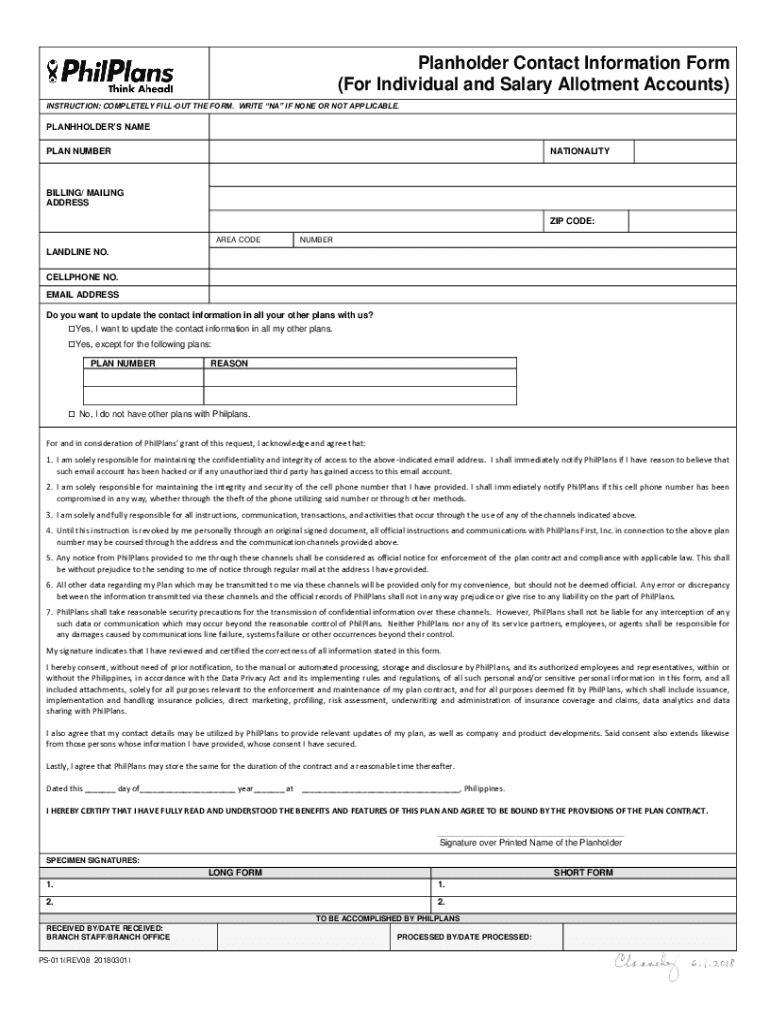







Definition and Purpose of the Plan Holder Contact Information Form
The Plan Holder Contact Information Form is a critical document designed for individuals with Salary Allotment Accounts, enabling them to update personal contact details. This form requires the planholder's consent for data sharing and processing, adhering to the Data Privacy Act. By filling out this form, individuals ensure that their contact information is current, facilitating efficient communication regarding their account status and any changes related to their salary allotment.
Essential Components
- Personal Information: Includes fields for the planholder's name, address, phone numbers, and email addresses.
- Consent Statement: A section where the planholder provides explicit consent for the processing and sharing of their data.
- Signature Field: Required for certifying understanding of the included terms and confirming the accuracy of the information provided.
How to Use the Plan Holder Contact Information Form
Filling out the Plan Holder Contact Information Form is straightforward, but attention to detail is crucial to ensure accuracy. Here's a step-by-step guide on using the form:
- Access the Form: Obtain the form online through a secure platform like DocHub.
- Provide Personal Details: Enter your full name, address, and contact information in the designated fields.
- Read Consent and Certification Sections Carefully: Ensure you understand and agree to the terms related to data use and permissions.
- Sign the Form: Use DocHub’s electronic signature feature to legally sign the online form.
- Review and Submit: Double-check all entered information for accuracy before submitting or sharing the form as required.
Practical Tips
- Ensure your internet connection is secure when accessing the form online.
- Take your time to read the consent section thoroughly to avoid misunderstandings.
Obtaining the Plan Holder Contact Information Form
Accessing the Plan Holder Contact Information Form is convenient via multiple channels:
- Online Platforms: Secure sites like DocHub provide an easy-to-use interface for retrieving and filling the form.
- Direct from Employers or Financial Institutions: Some planholders might receive the form directly from their employers or associated financial institutions.
- Download from Specific Websites: Check relevant company or financial service websites for downloadable versions of the form.
Online Convenience
- Electronic Versions: Fill and sign the form digitally for quicker processing.
- Cloud Access: Use cloud storage services for easy access and sharing.
Steps to Complete the Plan Holder Contact Information Form
Completing the form involves a meticulous approach to ensure all necessary details are correctly captured:
- Open the Form: Access the form through a digital platform like DocHub.
- Fill in Personal Details: Enter your up-to-date contact information.
- Complete Required Sections: Fill out all mandatory fields, ensuring no details are omitted.
- Consent to Terms: Acknowledge the consent terms by checking the relevant section.
- Apply Electronic Signature: Use DocHub’s signature tools to affix your digital signature.
- Review for Accuracy: Verify all provided information before submission.
Common Mistakes
- Omitting essential details such as a phone number or email.
- Misunderstanding the consent terms, leading to incorrect declarations.
Importance of Filing the Plan Holder Contact Information Form
Regularly updating contact information through this form ensures:
- Timely Updates: Stay informed about changes in your Salary Allotment Account.
- Data Privacy Compliance: Protect your personal data while adhering to privacy laws.
- Enhance Communication: Maintain clear communication channels with account administrators.
Benefits
- Avoids missed notifications or updates.
- Ensures compliance with institutional and legal requirements.
Common Users of the Plan Holder Contact Information Form
This form primarily serves:
- Salary Allotment Account Holders: Individuals managing accounts linked to employment-related salary disbursements.
- Financial Advisors: Professionals assisting clients with salary management and related document submissions.
- Organizational Human Resources Departments: HR teams responsible for managing employee benefits and payroll information.


Use Cases
- Employees in firms offering salary allotment benefits.
- Advisors in charge of managing multiple client accounts requiring regular updates.
Legal Considerations and Data Privacy
Legal aspects surrounding this form involve:
- Data Protection Laws: Compliance with statutes like the Data Privacy Act ensures planholder information is handled lawfully.
- Consent Necessities: Explicit consent for the data's processing and use is mandatory.
- Signature Requirements: Legally binding signatures certify the planholder's acknowledgment of terms and details provided.
Key Legal Terms
- Confidentiality: Safeguarding personal data sharing and storage.
- Legitimate Use: The necessity of using collected data only for intended purposes.
Key Elements of the Plan Holder Contact Information Form
Understanding the form's components enhances accurate completion:
- Contact Fields: Sections for entering names, numbers, and email addresses.
- Consent Clauses: Statements necessitating planholder agreement for data processing.
- Certification Statement: Final acknowledgment section confirming understanding of form terms.
Best Practices
- Keep personal information updated to prevent lapses in communication.
- Regularly review consent clauses for any updates or changes.
By following these structured guidelines, planholders can efficiently use, complete, and understand the Plan Holder Contact Information Form for their Salary Allotment Accounts.




