






Definition & Meaning of the Support Contract Template
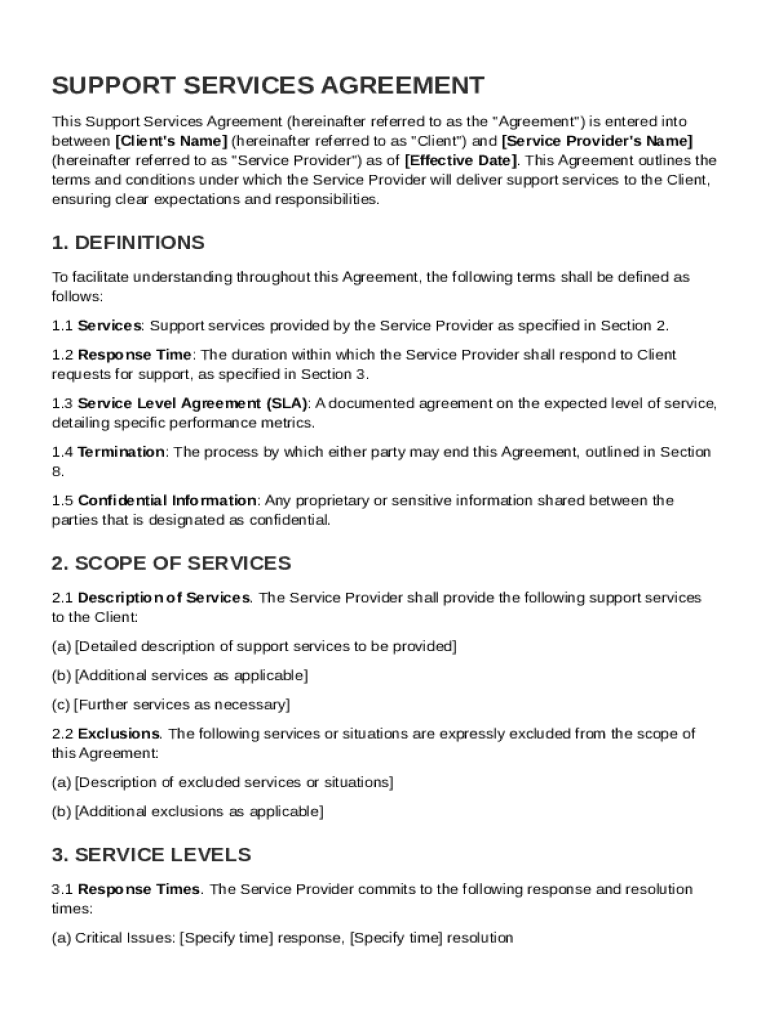
The Support Contract Template, often referred to as a Support Services Agreement, is a legal document that outlines the terms and responsibilities between a Client and a Service Provider. This contract is crucial for defining the scope of services to be provided, service levels, and response times. It establishes the obligations of both parties, specifically detailing client responsibilities, fees, and payment terms. Typically, it encompasses confidentiality obligations and termination clauses, ensuring both parties understand the limitations of liability. Furthermore, this agreement often includes miscellaneous provisions such as governing law and dispute resolution procedures, making it vital for maintaining structured and transparent business relations.
Key Elements of the Support Contract Template
A well-crafted Support Contract Template contains several critical components:
- Scope of Services: This defines what services will be provided, including any exclusions or limitations.
- Service Levels and Response Times: Specifies the expected timeframes for service delivery and issue resolution.
- Fees and Payment Terms: Details the cost of services, payment schedules, and any penalties for late payments.
- Confidentiality Obligations: Ensures any sensitive information exchanged remains secure and private.
- Termination Clauses: Outlines the conditions under which the contract can be ended by either party.
Each of these elements is fundamental in ensuring that the Client and Service Provider have a mutual understanding of their roles and obligations.
Importance and Utility of the Support Contract Template
Utilizing a Support Contract Template holds several advantages for businesses:
- Clarification of Responsibilities: Clearly delineates duties of the Client and Service Provider, minimizing potential disputes.
- Risk Management: Provides a framework for managing liabilities and risks associated with the service provided.
- Enhances Trust: Establishes a professional standard of service, fostering trust between the parties involved.
- Legal Protection: Offers legal safeguards in the event of a disagreement or service-related issues.
These benefits underscore the necessity of having a formalized contract in place for support services.
Steps to Complete the Support Contract Template
Completing a Support Contract Template involves several steps to ensure accuracy and comprehensiveness:
- Identify the Parties Involved: Clearly state the legal names and information of the Client and Service Provider.
- Define the Services and Scope: Detail the services to be provided, ensuring there is no ambiguity.
- Establish Service Levels: Set clear expectations regarding response times, availability, and performance metrics.
- Outline Payment Details: Specify the fee structure, payment schedules, and any applicable penalties.
- Incorporate Confidentiality Clauses: Add terms that protect sensitive information exchanged during the contract term.
- Include Termination Terms: Define conditions for terminating the contract by either party.
- Review and Sign: After drafting, both parties should review the contract and sign it to validate its terms.
By following these steps, businesses can ensure that the contract is precise, legally binding, and comprehensive.
Who Typically Uses the Support Contract Template
Support Contract Templates are commonly used by a variety of entities:
- IT Service Providers: Engaged to offer technical support and maintenance for client software and hardware.
- Consulting Firms: Provide strategic advice and solutions requiring ongoing support.
- Maintenance Companies: Offer regular upkeep and repair services to clients’
- Small to Mid-Sized Businesses: Often lack in-house support teams and need external providers for various services.
These entities leverage the template to formalize their service agreements with clients, ensuring clarity and legal protection.


Legal Use of the Support Contract Template
The Support Contract Template serves as a legally binding document when properly executed. Key considerations for legal compliance include:
- Legally Competent Parties: Both parties must have the legal capacity to enter into a contract.
- Mutual Agreement: Both parties should consent to the terms without coercion or misrepresentation.
- Consideration: The contract must involve something of value being exchanged, typically services for payment.
- Legal Purpose: The services contracted must not involve illegal activities.
Ensuring these legal elements are addressed can safeguard the contract against potential disputes.
Important Terms Related to the Support Contract Template
Familiarity with certain terms enhances comprehension and execution of the contract:
- Service Level Agreement (SLA): A subset of the contract specifying detailed services and performance metrics.
- Confidential Information: Any data disclosed under the agreement that is not considered public domain.
- Force Majeure: A clause excusing liability for failure to perform due to unforeseen extraordinary events.
- Indemnification: Protection against loss or damage as outlined in the agreement.
Understanding these terms is essential for interpreting and applying the contract effectively.
State-Specific Rules for the Support Contract Template
While the Support Contract Template is versatile, state-specific laws may affect its application:
- Governing Law: The template should specify which state’s law governs the agreement.
- Consumer Protection Laws: Certain states have stricter regulations that might impact service terms.
- Business Licensing Requirements: Some states require specific licensing for comprehensive support services.
Adapting the template to accommodate these regional differences ensures compliance and validity in various jurisdictions.
Examples of Using the Support Contract Template
Real-world scenarios illustrate the template's utility:
- Tech Company: A software developer employs the template to offer ongoing customer support and updates.
- Consulting Business: A firm uses it to provide continuous strategy and planning services for corporate clients.
- Facilities Management Company: Uses the template for routine maintenance and emergency repair services.
These examples demonstrate how diverse businesses effectively utilize support contracts to establish service frameworks.