




Here's how it works



How to use or fill out bankers life annuity withdrawal form with our platform

- Click ‘Get Form’ to open the bankers life annuity withdrawal form in the editor.
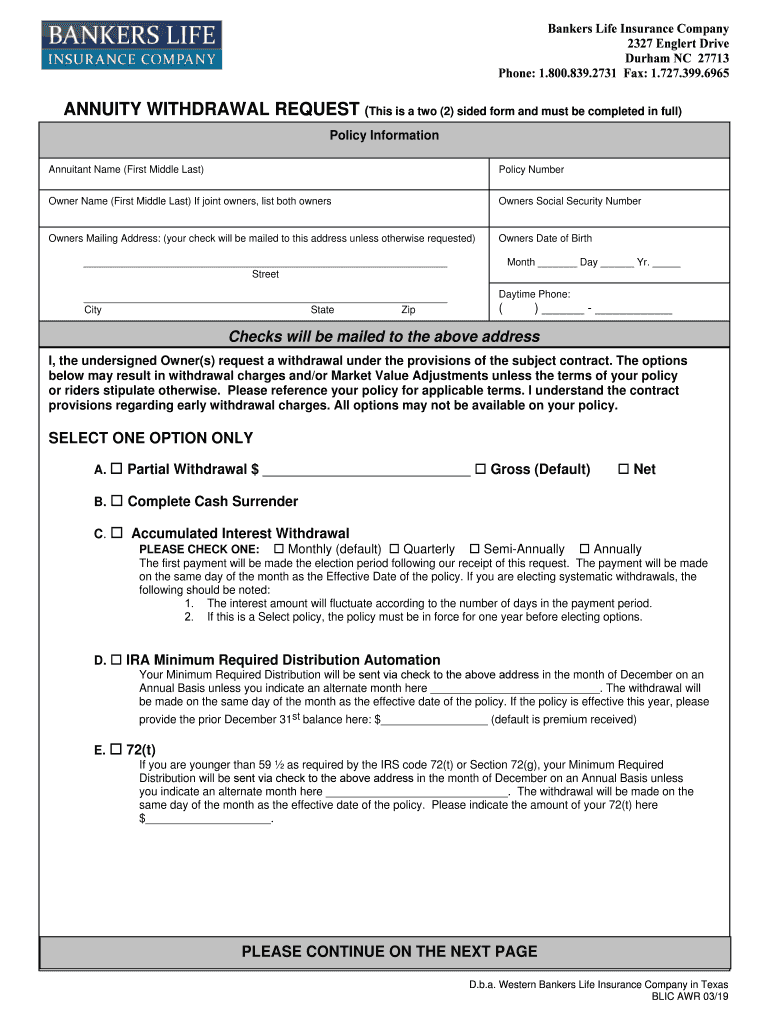
- Begin by entering the Annuitant Name and Policy Number in the designated fields. Ensure accuracy as this information is crucial for processing your request.
- Fill in the Owner's Name, Social Security Number, and Mailing Address. This address will be used for sending any checks unless specified otherwise.
- Select one option for your withdrawal: Partial Withdrawal, Complete Cash Surrender, Accumulated Interest Withdrawal, IRA Minimum Required Distribution Automation, or 72(t). Make sure to indicate your choice clearly.
- If applicable, complete the Withholding section by selecting whether you want federal income tax withheld. Remember that failing to provide a tax ID may result in higher withholding rates.
- Sign and date the form at the bottom. If you are in a community property state, ensure your spouse also signs where required.
Start using our platform today to easily fill out your bankers life annuity withdrawal form for free!
It's free
See more bankers life annuity withdrawal form versions
Got questions?
Can I use DocHub to create legal eSignatures on my bankers life annuity withdrawal form?
Yes, you can utilize DocHub for signing any business and private paperwork, including your bankers life annuity withdrawal form. All electronic signatures you create with our service are legally binding and court-admissible, as DocHub complies with standards required by ESIGN and UETA. Save your accomplished document with a detailed Audit Trail if necessary.
How do you fill out bankers life annuity withdrawal form on Android?
It is a no-brainer on a computer or via a mobile device to complete a bankers life annuity withdrawal form with DocHub. All you need to do is open any installed web browser on your smartphone and proceed to the DocHub site. Once authenticated, add your document and open it in editing mode. Use our toolbar to make your edits and save changes. Optionally, keep your document in your files or send it to a recipient on the spot.
Security and compliance
At DocHub, your data security is our priority. We follow HIPAA, SOC2, GDPR, and other standards, so you can work on your documents with confidence.
Learn more




