






Definition and Meaning
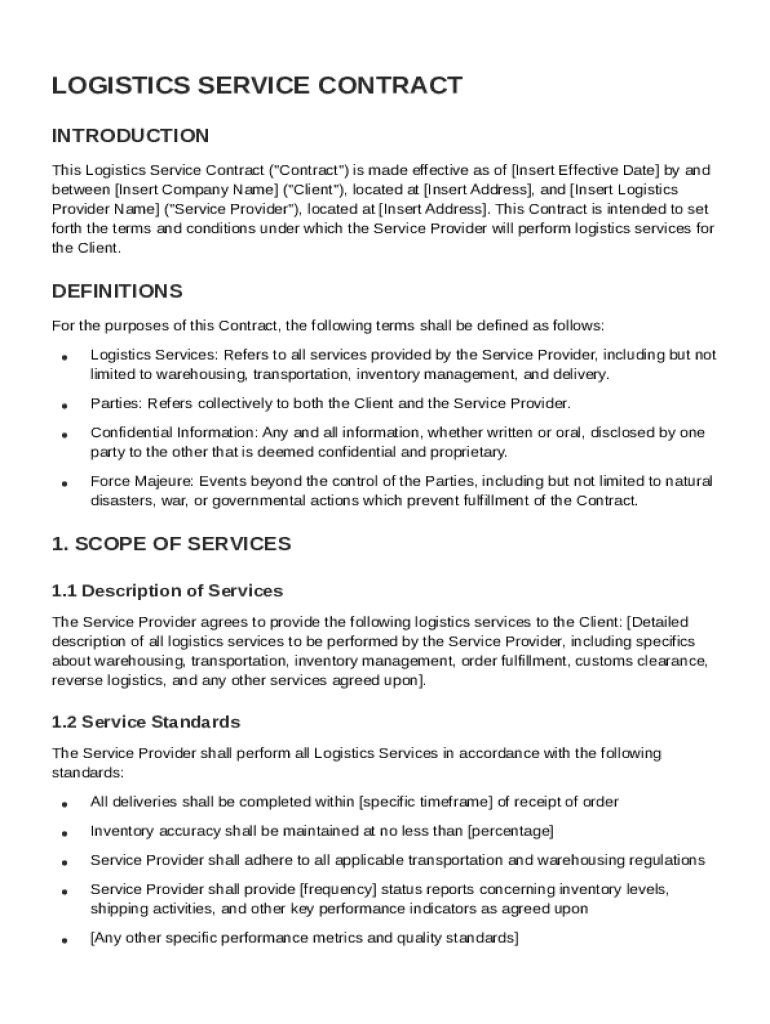
A "Logistics Service Contract Template" is a preformatted document designed to establish a contractual relationship between a client and a service provider offering logistics services. This template facilitates the drafting of legally binding agreements by clearly defining the responsibilities and obligations of both parties involved. The logistics services that are typically covered include warehousing, transportation, and inventory management. By using this template, both parties can ensure that they have mutually agreed upon the terms of the service, avoiding misunderstandings and potential disputes in the future.
Key Elements of the Logistics Service Contract Template
The Logistics Service Contract Template includes several critical components that are essential for protecting both parties' interests:
- Scope of Services: Defines the specific logistics services to be provided, such as transportation routes, warehousing locations, and inventory management practices.
- Payment Terms: Details how and when payment is made, including the agreed-upon payment schedule and methods.
- Liability Limitations: Outlines any limits on the service provider's liability in case of damages or losses experienced during logistics operations.
- Confidentiality Obligations: Mandates the protection of any confidential information exchanged during the service.
- Governing Law: Specifies the jurisdiction whose laws will govern the contract.
Understanding these elements ensures that all parties have a clear comprehension of their rights and duties.
How to Use the Logistics Service Contract Template
Using the Logistics Service Contract Template involves several straightforward steps:
- Download the Template: Obtain a copy of the template that fits your needs.
- Customize the Content: Modify the template to reflect the specific terms that have been agreed upon, including company names, service details, and payment arrangements.
- Review the Terms: All parties should carefully review the contract to ensure that all provisions are clear and satisfactory.
- Legal Review: Consider having a legal professional review the contract to ensure compliance with applicable laws.
- Sign the Agreement: Once satisfied, both parties should sign the document to formalize the agreement.
This structured approach helps ensure that the contract is thorough and legally sound.
Legal Use of the Logistics Service Contract Template
The Logistics Service Contract Template serves as a legally binding agreement and must be approached with care to maintain legal integrity. Each party should conduct due diligence to confirm that the contract complies with applicable laws in their jurisdiction. Features like signatures and authentication methods embedded in platforms like DocHub can contribute to the enforceability of the contract, as they ensure that all parties have genuinely agreed to the stipulated terms.
Steps to Complete the Logistics Service Contract Template
Completing a Logistics Service Contract Template can be broken down into clear, manageable steps:
- Outline Required Information: Gather details about the services and parties involved.
- Fill in Service Details: Include specific information about the logistics operations, such as locations, timelines, and particular services.
- Set Payment and Delivery Terms: Clearly state how payments will be made and any delivery schedules that apply.
- Insert Legal Clauses: Add clauses concerning liability, confidentiality, and dispute resolution.
- Review and Edit: Ensure the document meets all initial objectives and contains no errors or omissions.
- Execute the Contract: Finalize by obtaining signatures from all parties involved.
Following these steps will help ensure the contract is comprehensive and meets both parties' expectations.
Important Terms Related to Logistics Service Contract Template
Understanding critical terms within the Logistics Service Contract Template is vital for clarity:
- Force Majeure: Refers to circumstances beyond control, such as natural disasters, that may impact service delivery.
- Amendments: Details modifications to the contract that may occur post-signing and how they must be formalized.
- Termination Clauses: Define conditions under which either party can terminate the agreement early.
- Notices: Procedures for formally communicating important information between parties as required by the terms of the contract.
Clarity on these terms ensures smooth operations and minimizes potential for conflict.
Who Typically Uses the Logistics Service Contract Template
This template is commonly employed by various entities engaging in logistics services:
- Logistics Companies: Seeking formal agreements with clients for services offered.
- Manufacturers: Contracting logistics providers for transporting their goods.
- Retailers: Establishing delivery and inventory management frameworks with service providers.
- Warehousing Businesses: Setting terms with customers needing storage solutions.
The usage by diverse businesses highlights the template's role in facilitating structured and legally sound logistics operations.


Software Compatibility
The Logistics Service Contract Template is compatible with various software platforms, enhancing its accessibility and utility:
- DocHub: Allows comprehensive editing and signing of the contract online, ensuring real-time collaboration.
- Microsoft Word: Supports detailed document creation and modification, providing flexibility for customization.
- Google Docs: Offers cloud-based editing, ensuring that all changes are saved and shared efficiently.
These software options allow for a seamless document management process, accommodating each party's preferred tools for contract completion and review.
Software Integration for Signing and Storage
DocHub facilitates easy integration with various storage and signing solutions to streamline contract management. You can import your logistics service contract directly from platforms such as Google Drive, ensuring a smooth workflow without having to download and re-upload files multiple times. Once the contract is complete, DocHub's robust electronic signature feature ensures that all parties can easily sign the document, maintaining its legal validity under US law. After signing, the contract can be safely stored in the cloud for easy access and reference, contributing to a more efficient document workflow.
This setup provides a clear solution for managing logistics contracts, reducing the administrative burden while enhancing security and accessibility.