
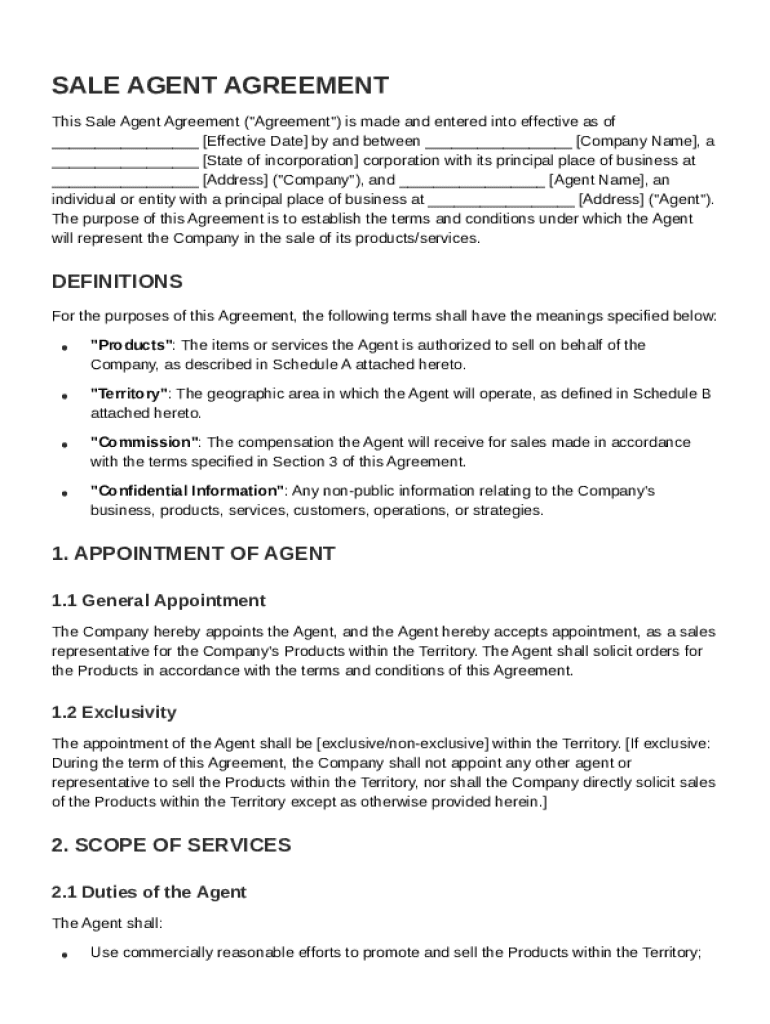







Definition and Meaning of the Sales Agent Agreement Template
A Sales Agent Agreement Template serves as a foundational document that outlines the operational framework between a company and its sales agent. This template delineates the roles, responsibilities, and expectations of the agent as they represent the company in selling its products or services. Key components generally included are the description of services, commission structures, and the duration of the agreement. By establishing these terms, both parties have a mutual understanding of the business relationship, minimizing the potential for disputes.
Core Elements of the Sales Agent Agreement
- Appointment and Scope: Details about the specific duties and geographic scope of the agent's responsibilities.
- Compensation: Outlines the commission rates, payment schedules, and any bonuses or incentives.
- Confidentiality Obligations: Instructions to safeguard sensitive company information.
- Indemnification Clauses: Specifies conditions under which the agent or the company would be held accountable for breaches or disputes.
How to Use the Sales Agent Agreement Template
The Sales Agent Agreement Template is designed to be a flexible and comprehensive tool that assists companies in setting up formal relationships with sales representatives. It can be adapted to meet the specific needs of any industry or business model.
Adapting the Template
To customize the template:
- Identify Key Variables: Determine the roles and responsibilities specific to the sales agent's role.
- Adjust Financial Details: Modify the commission structures to reflect fair compensation proportional to sales volume.
- Incorporate Legal Specifics: Ensure that the template aligns with applicable laws and industry standards.
Users should consult with a legal professional to ensure accuracy and compliance.
Steps to Complete the Sales Agent Agreement Template
Filling out a Sales Agent Agreement Template requires attention to detail and an understanding of the respective roles of each party.
Step-by-Step Guide
- Enter Party Details: Fill in the names and contact information for both the company and the agent.
- Define Roles and Responsibilities: Clearly outline the agent's role and sales territories.
- Specify Financial Terms: Include detailed commission structures and payment schedules.
- Set Confidentiality Terms: Outline what constitutes confidential information and the repercussions of breaches.
- Review and Approve Terms: Both parties should review the agreement thoroughly before signing.
By following this methodical approach, both parties can be confident that they understand and agree to all terms.
Key Elements of the Sale Agent Agreement Template
A well-drafted Sales Agent Agreement Template contains various crucial elements that define and govern the relationship between a sales agent and their principal company.
Critical Components
- Commission and Payment Terms: Specifies how and when the agent will receive compensation.
- Termination Clauses: Conditions under which the agreement can be concluded prematurely.
- Dispute Resolution: Mechanisms for resolving any potential disagreements that might arise.
- Legal Compliance: Ensures the agreement abides by state and federal laws.
By incorporating these elements, the template ensures a robust and legally sound agreement.
Legal Use and Compliance of the Sales Agent Agreement Template
Ensuring that your Sales Agent Agreement is legally compliant is crucial to its effectiveness and enforceability.
Legal Alignments
- Independent Contractor Status: Clarifies that the agent is not an employee of the company to minimize liability for employment-related benefits and taxes.
- Governing Law Clause: Specifies which state's laws will apply to the agreement.
- ESIGN Act Compliance: If using electronic signatures, ensure the agreement meets the standards set by the Electronic Signatures in Global and National Commerce Act.
Adhering to these legal standards protects both parties and reinforces the enforceability of the agreement in a court of law.
Important Terms Related to the Sales Agent Agreement Template
Understanding the terminology used in a Sales Agent Agreement is crucial for comprehending the document.
Key Terms
- Exclusive vs. Non-Exclusive: Determines whether the agent has sole rights to sell within a territory or if others will also be granted that privilege.
- Compensation: Refers to the commission or monetary rewards earned based on sales achievements.
- Indemnity: Protects one party from bearing the full burden of legal responsibility for damages.
Clear definitions of these terms help both parties understand their rights and obligations.
Who Typically Uses the Sales Agent Agreement Template?
The Sales Agent Agreement Template is versatile and widely used across a variety of industries and business sectors.


Common Users
- Manufacturers: Employ sales agents to expand market reach.
- Service Providers: Use agents to attract new clients.
- Real Estate Firms: Require agents for property sales.
- Tech Companies: Utilize agents to distribute software solutions.
Such companies benefit by formalizing relationships to enhance sales effectiveness and accountability.

State-Specific Rules for the Sales Agent Agreement Template
While the template offers a standard structure, state-specific rules might necessitate modifications to ensure compliance.
Regional Variations
- California: Requires clear employee versus contractor designation.
- New York: Specific clauses about commissions and payments upon termination.
- Texas: Demands compliance with state agency commission guidelines.
Understanding these state-specific nuances is crucial for businesses operating in multiple jurisdictions.




