






Definition & Meaning
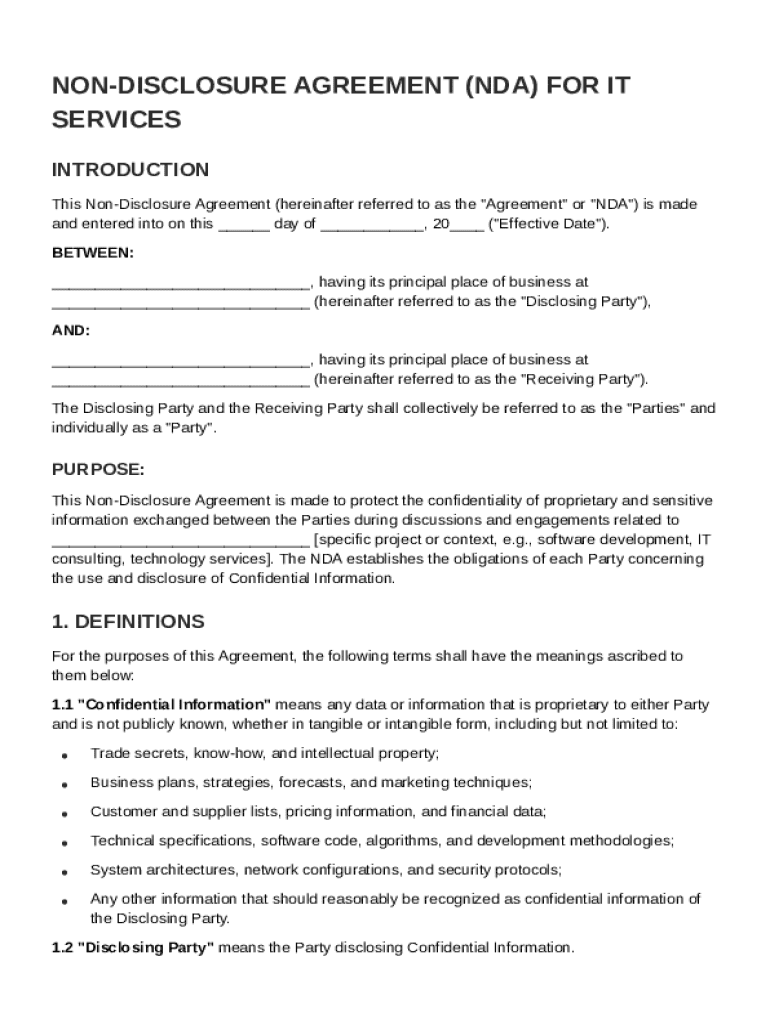
An IT Non-Disclosure Agreement (NDA) Template is a legal document designed to protect sensitive and confidential information shared between two parties engaged in IT services or projects. This agreement outlines the responsibilities and obligations of each party to maintain confidentiality and safeguard proprietary data. It ensures that information related to software development, technical processes, digital assets, and other intellectual properties remains secure during mutual collaborations.
- Confidentiality Obligations: Both parties agree not to disclose any confidential information to unauthorized parties.
- Scope of Coverage: Defines what constitutes confidential information and the limitations on its usage.
- Duration of Agreement: Specifies the period during which the confidentiality obligations are effective.
- Exemptions: Identifies any scenarios where information can be shared without breaching the NDA.
How to Use the IT Non-Disclosure Agreement Template
The IT Non-Disclosure Agreement Template serves as a foundational document for securing sensitive information during collaborative projects. Here's how to effectively use the template:
- Customization: Tailor the template to reflect the specific details and terms of your collaboration. Include the names of the involved parties, specific details about the project, and the type of information being protected.
- Review Terms: Ensure a comprehensive understanding of all terms and conditions. Pay special attention to the clauses regarding disclosures and responsibilities.
- Legal Consultation: It might be beneficial to consult with a legal professional to ensure the agreement adheres to state laws and covers all necessary aspects.
- Execution: Both parties should review, sign, and obtain copies of the final agreement to formalize their understanding and commitment to confidentiality.
Steps to Complete the IT Non-Disclosure Agreement Template
Completing the IT Non-Disclosure Agreement Template involves several key steps to ensure all parties are protected legally:
- Identify Parties: Clearly define the parties involved in the agreement, including full legal names and roles (e.g., Disclosing Party and Receiving Party).
- Detail Confidential Information: Specify the type of information deemed confidential. This includes proprietary processes, business strategies, and technological innovations.
- Define Term of Agreement: Establish the time period during which the confidentiality obligations are active. This can extend beyond the duration of the project for ongoing protection.
- Signatures: Obtain signatures from authorized representatives of each party. Date the document to establish a legal binding timeframe.
- File and Store: Securely store both digital and physical copies of the signed agreement for future reference.
Key Elements of the IT Non-Disclosure Agreement Template
Understanding the essential components of the IT Non-Disclosure Agreement Template is crucial for effective utilization:
- Definitions Section: Clarifies key terms used throughout the agreement, such as “Confidential Information” and “Permitted Disclosure.”
- Non-disclosure Obligations: Details the binding duty of parties not to disclose confidential information without permission.
- Exclusions: Lists any types of information not considered confidential, like data already in the public domain.
- Legal Recourse: Outlines the actions parties can take in the event of a breach, including seeking injunctions or damages.
- Termination Conditions: Specifies how and when the agreement can be terminated by either party.
Legal Use of the IT Non-Disclosure Agreement Template
The IT Non-Disclosure Agreement Template is designed to be legally enforceable, adhering to pertinent laws to protect intellectual property and sensitive information. Here's how it maintains legal integrity:
- Compliance with Laws: The template aligns with U.S. laws governing trade secrets and confidential data to ensure binding agreements.
- E-Signature Legitimacy: Electronic signatures collected through platforms like DocHub comply with the ESIGN Act, making them legally recognized.
- Dispute Resolution Clause: Includes a clause for resolving disputes through arbitration or mediation to avoid court litigation.
Important Terms Related to IT Non-Disclosure Agreement Template
Familiarity with key terms will help in understanding and applying the IT Non-Disclosure Agreement Template effectively:
- Disclosing Party: The individual or organization that provides confidential information.
- Receiving Party: The individual or group that receives the sensitive information and is bound by confidentiality terms.
- Permitted Disclosure: Situations where information may be legally shared, such as with written consent from the disclosing party.
- Residuals Clause: Allows use of general knowledge or skills retained after the agreement, as long as no confidential information is disclosed.
Examples of Using the IT Non-Disclosure Agreement Template
Real-world scenarios where the IT Non-Disclosure Agreement Template proves essential include:
- Technology Startups: Protecting new software codes and algorithms shared between developers and investors during funding discussions.
- Collaborative Projects: Preserving the confidentiality of joint research and development efforts between two tech companies.
- Employee Agreements: Ensuring that employees with access to proprietary systems maintain confidentiality post-employment.
Who Typically Uses the IT Non-Disclosure Agreement Template
The IT Non-Disclosure Agreement Template is commonly utilized across various sectors involved in technological services, including:
- Software Development Firms: To safeguard algorithms and code innovations during project dissemination.
- IT Contractors: When engaged in projects requiring access to proprietary systems and databases.
- Freelancers in IT: To ensure client’s business strategies and technical details remain confidential during and after service delivery.
- Consulting Agencies: To protect business insights and recommendations provided to clients from being disclosed to competitors.