






Definition & Meaning
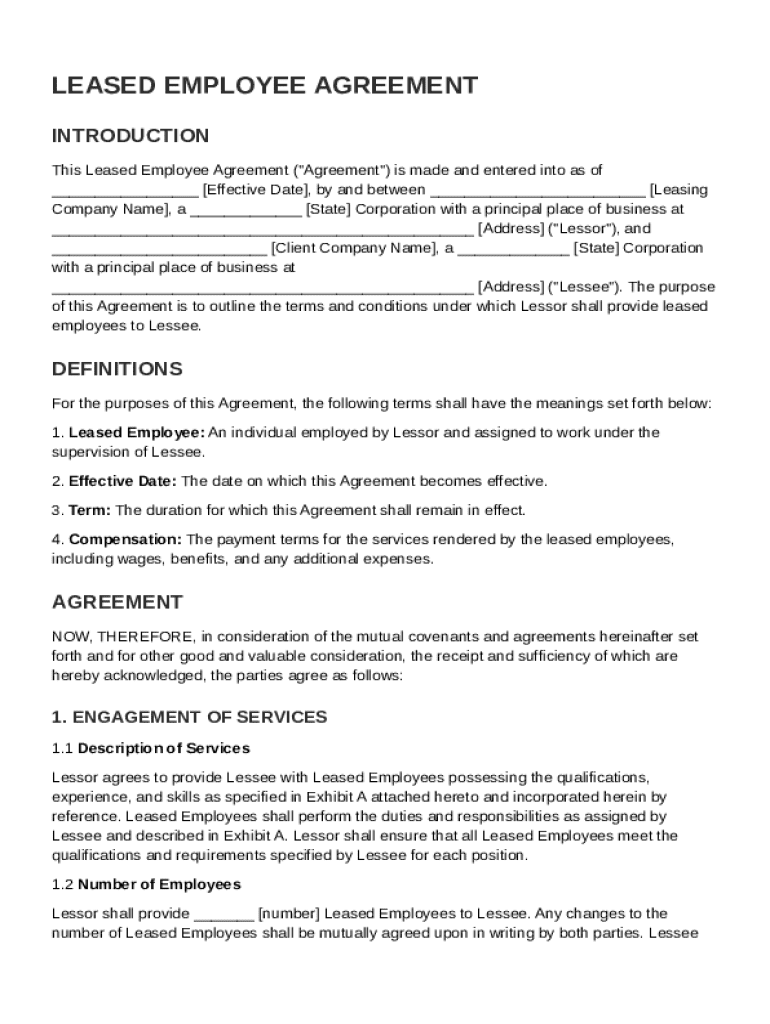
A Leased Employee Agreement Template is a legal instrument used to define the arrangement under which a leasing company (the Lessor) provides employees to another organization (the Lessee). This document outlines the specific terms and conditions governing the leasing relationship. Its core purpose is to differentiate the leased employee relationship from a traditional employer-employee arrangement, clarifying that the leased workers remain under the management and control of the leasing company. The agreement delineates key responsibilities and rights, addressing aspects like service engagement, payment structures, and confidentiality obligations. Ultimately, it serves to formalize the leasing arrangement ensuring both parties are aware of their roles and responsibilities.
How to Use the Leased Employee Agreement Template
The Leased Employee Agreement Template is an essential tool for businesses engaging in employee leasing. To efficiently use the template:
- Review the Structure: Familiarize yourself with the sections of the template, including roles, payment terms, duties, and compliance.
- Identify Key Stakeholders: Determine which parties will be involved, such as the leasing company representative and authorized signatories from the client company.
- Customize the Content: Adjust the template to reflect specifics like employee roles, compensation details, and confidentiality clauses. Ensure customization aligns with both parties' expectations.
- Review Legal Requirements: Validate that all legal requirements, as per state and federal guidelines, are incorporated.
- Finalize and Sign: After thorough review and mutual agreement, proceed with signatures from both parties to formalize the arrangement.
By systematically tailoring the template, businesses can ensure a clear and legally sound agreement.
Key Elements of the Leased Employee Agreement Template
Key elements of the Leased Employee Agreement Template help define and enforce crucial aspects of the leased employee relationship:
- Roles and Responsibilities: Clearly demarcates the roles between the leasing company, client company, and leased employees.
- Compensation and Payment Structure: Details how leased employees will be compensated, including any parties responsible for specific costs.
- Compliance and Regulatory Adherence: Ensures the arrangement meets all applicable labor laws and industry-specific regulations.
- Confidentiality and Non-Disclosure: Establishes the necessity to maintain information privacy, protecting proprietary data of both companies.
- Indemnification Provisions: Clarifies responsibilities concerning liabilities and protection against potential legal claims.
- Termination and Amendment Terms: Specifies conditions under which the agreement may be terminated or modified.
Each element is crucial to maintaining a transparent, equitable relationship between leasing and client organizations.
Steps to Complete the Leased Employee Agreement Template
To effectively complete the Leased Employee Agreement Template:
- Information Gathering: Collect all relevant details about the leased employees, including their job descriptions and employment terms.
- Fill Out Template Sections: Start by filling in identifying details of the lessor and lessee, followed by employee-specific components.
- Clarify Legal Terms: Input necessary legal clauses addressing confidentiality, compliance, and indemnity.
- Review Compensation Details: Ensure all financial elements are correctly identified, such as salary, benefits, and responsible payment party.
- Obtain Necessary Approvals: Share the draft with legal counsel or pertinent stakeholders for feedback and approval.
- Finalize the Document: Incorporate feedback, ensure clarity in language, and prepare for signatures.
- Secure Signatures from All Parties: Once signed, each party should retain a copy for future reference.
Careful attention to each of these steps ensures the agreement is comprehensive and enforceable.
Legal Use of the Leased Employee Agreement Template
The Leased Employee Agreement Template is a legally binding document integral to establishing leasing relationships. Its legal use enables companies to:
- Outline Legal Obligations: Clearly specify legal duties of both lessor and lessee, ensuring compliance with employment laws.
- Define Contractual Relationships: Establish and legally clarify the non-traditional relationship, avoiding employer-employee misclassification.
- Ensure Confidentiality: Legally enforce confidentiality agreements to protect sensitive company information.
- Mitigate Legal Risk: Address liabilities comprehensively, providing indemnification assurances for both parties.
- Facilitate Dispute Resolution: Include clauses for resolving disagreements, preferably through mediation or arbitration methods.
Using the agreement appropriately prevents legal ambiguities, safeguarding both entities involved.
Important Terms Related to the Leased Employee Agreement Template
Several critical terms frequently appear in a Leased Employee Agreement Template, such as:
- Lessor/Lessee: Denotes the leasing company and the client company involved in the contract, respectively.
- Engagement of Services: Refers to the employment duties and expectations for the leased employee.
- Compensation and Benefits: Outlines how payment is structured and any additional benefits provided.
- Confidentiality: The commitment to maintaining the privacy of exchanged information within the contractual relationship.
- Termination Conditions: Description of scenarios where the contract may be concluded and the processes involved.
Understanding these terms ensures all parties clearly comprehend their roles and obligations under the agreement.
State-Specific Rules for the Leased Employee Agreement Template
Variations in employment laws necessitate state-specific considerations within the Leased Employee Agreement Template. Common nuances include:
- Employment Classification Regulations: Certain states may have stricter guidelines distinguishing independent contractors from employees.
- Wage and Hour Laws: State-specific minimum wage laws impact compensation provisions within the agreement.
- Confidentiality and Data Protection: Specific states impose varied data protection standards affecting confidentiality clauses.
- Workers’ Compensation Requirements: Some states require leased employee agreements to address specific workers’ compensation protocols.
Consulting local employment lawyers to adapt the template ensures compliance with regional laws and ordinances.
Who Typically Uses the Leased Employee Agreement Template
The Leased Employee Agreement Template is primarily utilized by:
- Staffing Agencies: Agencies providing temporary or leased workers often rely on these agreements to formalize client relationships.
- Corporate HR Departments: HR teams in corporations looking to temporarily scale their workforce without permanent hires.
- Legal Counsel: Legal professionals who shape and review such agreements to ensure their robustness and alignment with legal requirements.
- Client Companies: Organizations requiring short-term employee services, typically for projects or seasonal work.
This template speaks to users who interact frequently with labor leasing arrangements, ensuring smooth, legal, and efficient transactions.